> ## Documentation Index
> Fetch the complete documentation index at: https://trainings.air.athelas.com/llms.txt
> Use this file to discover all available pages before exploring further.
# Appointment Types
### **Definitions: Chart Note Templates**
Templates are the **building blocks** of your clinical notes. Each template is a \*\*section \*\*within your Chart Note (e.g., Plan of Care, Goals, Measurements, Treatments, Medications).
You can also create **custom sections** for your own questions under Subjective, Objective, Assessment, or Plan. Templates are designed to be **general** so they can be reused across many appointment types.
### **Definitions: Appointment Types**
Appointment types are the **frameworks for your visits**. You can **mix and match templates** and their order to create the exact chart note you want for each type of appointment.
We recommend creating general Appointment Types that can be used across use-cases. E.g. A general Initial Eval note can be customized for a Hip Injury case by creating custom groups for Hip injuries within Measurements, Treatments, Interventions or Text Snippets.
### **Appointment Type Management**
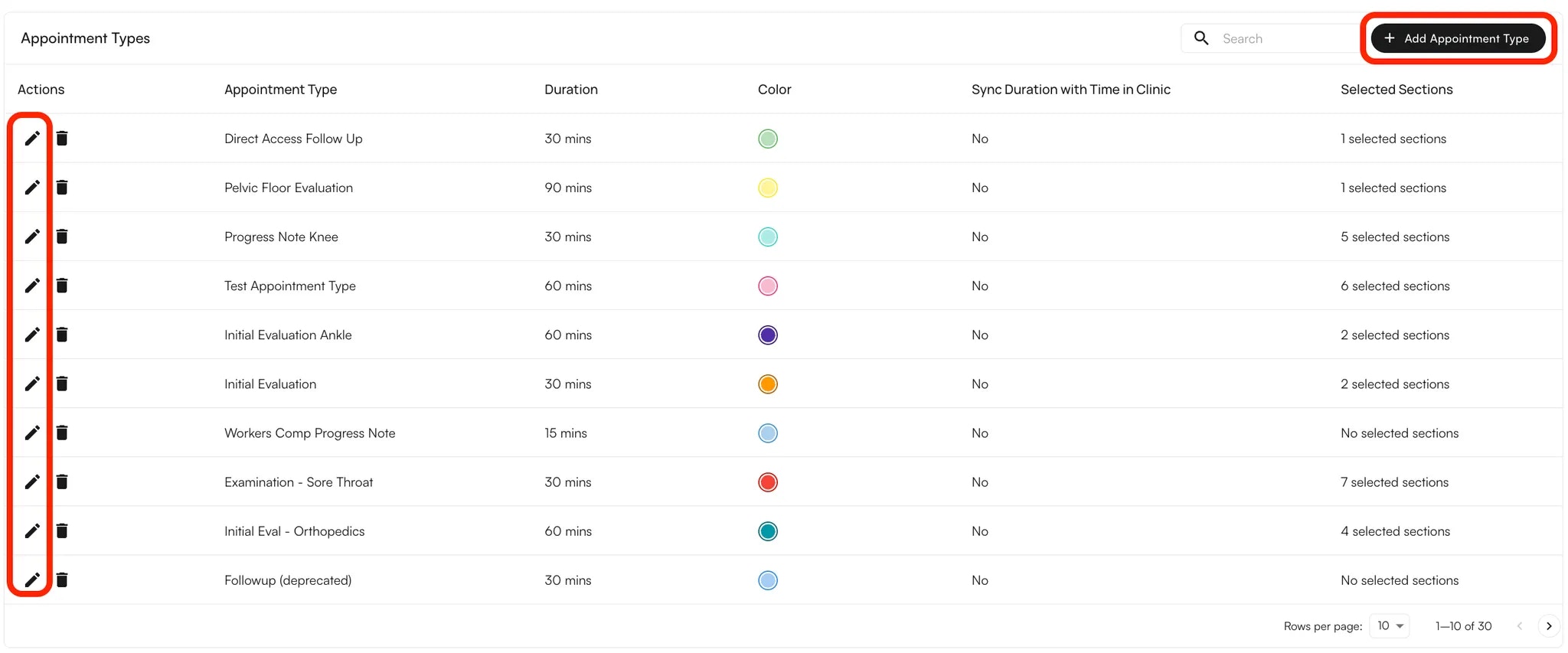
You can create and manage custom appointment types, each with its own settings, clinical note structure, and optional CPT codes.
 We have 16 consistent colors, making it easier for users to differentiate appointment type colors:
### **Custom Appointment Types**
* Navigate to the **Preferences** tab in the left navigation pane and open **Appointment Types**.
* Click **+ Appointment Type** in the top-right corner or click on the pencil icon to edit an existing appointment
* Enter the **Name**, **Duration**, and **Color** for the appointment type.
* Select the **sections** to include (and their order).
* You can choose to make them available for the Scribe to write into.
* If you include **Measurements**, you can set default measurements to auto-populate whenever this Appointment Type is scheduled.
* (Optional) Sync duration with in-clinic time (the time spent with the patient in-clinic will be reflected on the Calendar)
* (Optional) Assign **CPT codes** that will auto-populate for this appointment type.
* Select a **default clinical note type**, then click **Create**.
* You can edit or delete appointment types from the same tab at any time.
**Note:** Sections can be either **Default** (pre-built by Athelas) or **Custom** (templates created by your practice).
**Note:** For **Clinical Note Types** beyond the Initial Evaluation, you can configure which Sections should carry over. For example, Measurements may be excluded in follow-up visits if not needed.
### **External & Internal Appointment Types**
External appointment types are what **patients** see when booking through the Patient Portal. Internal appointment types are what your **team** sees in Air. Mapping internal types to an external type lets you simplify online booking without losing the internal detail your staff relies on.
**To create or edit mappings:**
* Navigate to **Calendar Preferences**.
* Open the **Appointment Types** tab.
* Create an **External Appointment Type**, then select the **Internal Appointment Types** that map to it.
* (Optional) Choose a **default internal mapping**. This determines which internal appointment type is selected when automatic scheduling is on.
**Note:** Each internal appointment type can map to only one external appointment type.
**Example:** Map `IE Knee`, `IE Lumbar`, and `IE Lower Extremity` to a single external appointment type called `Initial Evaluation`.
See [Reserve Blocks](/air_front_desk/portal_and_online_scheduling/reserve_blocks) for how external appointment types interact with reserve-block scheduling rules.
### FAQ
**External** appointment types are shown to patients in the Patient Portal. **Internal** appointment types are shown to your staff in Air. You can map multiple internal types to one external type to simplify what patients need to choose.
No. Each internal appointment type can map to only one external appointment type.
Patients see external appointment types when booking through the Patient Portal online scheduling flow.
We have 16 consistent colors, making it easier for users to differentiate appointment type colors:
### **Custom Appointment Types**
* Navigate to the **Preferences** tab in the left navigation pane and open **Appointment Types**.
* Click **+ Appointment Type** in the top-right corner or click on the pencil icon to edit an existing appointment
* Enter the **Name**, **Duration**, and **Color** for the appointment type.
* Select the **sections** to include (and their order).
* You can choose to make them available for the Scribe to write into.
* If you include **Measurements**, you can set default measurements to auto-populate whenever this Appointment Type is scheduled.
* (Optional) Sync duration with in-clinic time (the time spent with the patient in-clinic will be reflected on the Calendar)
* (Optional) Assign **CPT codes** that will auto-populate for this appointment type.
* Select a **default clinical note type**, then click **Create**.
* You can edit or delete appointment types from the same tab at any time.
**Note:** Sections can be either **Default** (pre-built by Athelas) or **Custom** (templates created by your practice).
**Note:** For **Clinical Note Types** beyond the Initial Evaluation, you can configure which Sections should carry over. For example, Measurements may be excluded in follow-up visits if not needed.
### **External & Internal Appointment Types**
External appointment types are what **patients** see when booking through the Patient Portal. Internal appointment types are what your **team** sees in Air. Mapping internal types to an external type lets you simplify online booking without losing the internal detail your staff relies on.
**To create or edit mappings:**
* Navigate to **Calendar Preferences**.
* Open the **Appointment Types** tab.
* Create an **External Appointment Type**, then select the **Internal Appointment Types** that map to it.
* (Optional) Choose a **default internal mapping**. This determines which internal appointment type is selected when automatic scheduling is on.
**Note:** Each internal appointment type can map to only one external appointment type.
**Example:** Map `IE Knee`, `IE Lumbar`, and `IE Lower Extremity` to a single external appointment type called `Initial Evaluation`.
See [Reserve Blocks](/air_front_desk/portal_and_online_scheduling/reserve_blocks) for how external appointment types interact with reserve-block scheduling rules.
### FAQ
**External** appointment types are shown to patients in the Patient Portal. **Internal** appointment types are shown to your staff in Air. You can map multiple internal types to one external type to simplify what patients need to choose.
No. Each internal appointment type can map to only one external appointment type.
Patients see external appointment types when booking through the Patient Portal online scheduling flow.