> ## Documentation Index
> Fetch the complete documentation index at: https://trainings.air.athelas.com/llms.txt
> Use this file to discover all available pages before exploring further.
# Set your Calendar Settings
Configure appointment types, calendar preferences, and provider settings to customize how your schedule is displayed and managed.
### Calendar Timings
**Calendar Timings:** Set Calendar start and end times in **Preferences → Calendar → Start & End Times.**
By default, Calendars display **6:00 AM – 8:00 PM**. This applies at the site level, meaning all Facilities follow the same schedule unless otherwise configured.
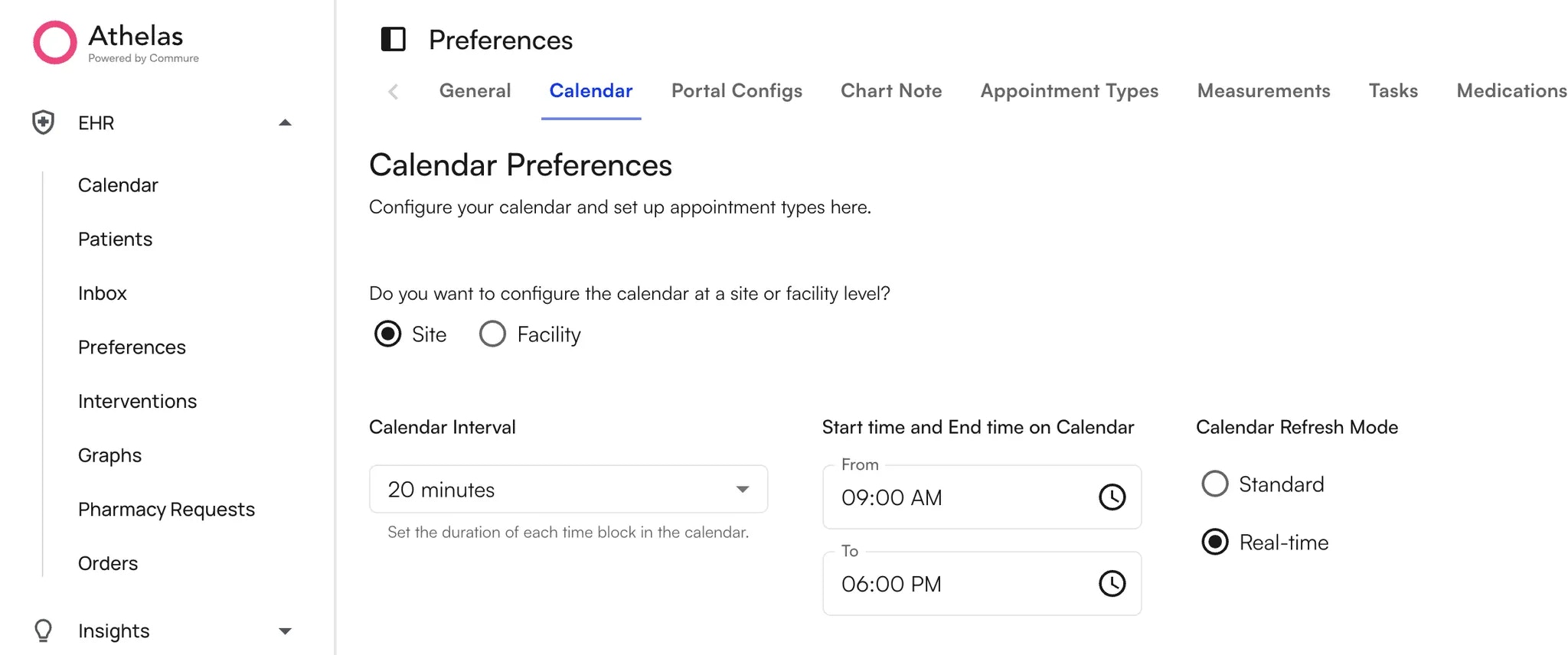 **Unique timings for specific facilities:** To set different timings for select Facilities, select the "Facility" option.
On the table below, selecting a Facility displays its start & end time settings on the right. Multiple Facilities can be selected and updated at once. Changes are applied immediately to the Calendar.
### Calendar Intervals
\*\*Calendar Interval: \*\*Set the duration of each time block in the calendar(ranges from 5min - 30min)
### Calendar Refresh Mode
**Calendar Refresh Mode:** Choose how frequently your Calendar updates:
* **Standard Refresh Mode:** Updates only when the browser is refreshed.
* **Real-Time Refresh Mode:** Updates instantly. For example, if front desk staff create, cancel, edit, or check in appointments, the Calendar reflects the changes immediately.
### Calendar Settings
You can update the following from the **Preferences** Tab on the left navigation bar:
| **Use High Contrast Mode** | When enabled, calendar elements will use higher contrast for better accessibility and readability. |
| :--------------------------------------- | :----------------------------------------------------------------------------------------------------------------------------- |
| **Open Calendar Tooltip on Hover** | When enabled, the calendar tooltip will open on hover. |
| **Show Supervising Provider in Tooltip** | When enabled, the calendar tooltip will display the supervising provider's name if available. |
| **Show Facility Name in Calendar Block** | When enabled, the facility name will be displayed on appointment blocks in the calendar when multiple facilities are selected. |
**Unique timings for specific facilities:** To set different timings for select Facilities, select the "Facility" option.
On the table below, selecting a Facility displays its start & end time settings on the right. Multiple Facilities can be selected and updated at once. Changes are applied immediately to the Calendar.
### Calendar Intervals
\*\*Calendar Interval: \*\*Set the duration of each time block in the calendar(ranges from 5min - 30min)
### Calendar Refresh Mode
**Calendar Refresh Mode:** Choose how frequently your Calendar updates:
* **Standard Refresh Mode:** Updates only when the browser is refreshed.
* **Real-Time Refresh Mode:** Updates instantly. For example, if front desk staff create, cancel, edit, or check in appointments, the Calendar reflects the changes immediately.
### Calendar Settings
You can update the following from the **Preferences** Tab on the left navigation bar:
| **Use High Contrast Mode** | When enabled, calendar elements will use higher contrast for better accessibility and readability. |
| :--------------------------------------- | :----------------------------------------------------------------------------------------------------------------------------- |
| **Open Calendar Tooltip on Hover** | When enabled, the calendar tooltip will open on hover. |
| **Show Supervising Provider in Tooltip** | When enabled, the calendar tooltip will display the supervising provider's name if available. |
| **Show Facility Name in Calendar Block** | When enabled, the facility name will be displayed on appointment blocks in the calendar when multiple facilities are selected. |