> ## Documentation Index
> Fetch the complete documentation index at: https://trainings.air.athelas.com/llms.txt
> Use this file to discover all available pages before exploring further.
# Conditional Forms
Conditional forms let practices dynamically show questions in intake and post-visit forms based on a patient's responses to other questions. This lets a single form serve multiple purposes, gather additional detail around specific areas, or gate information based on responses.
## Accessing conditional forms
Conditional forms are created in the **Templates** section under **Utilities**.
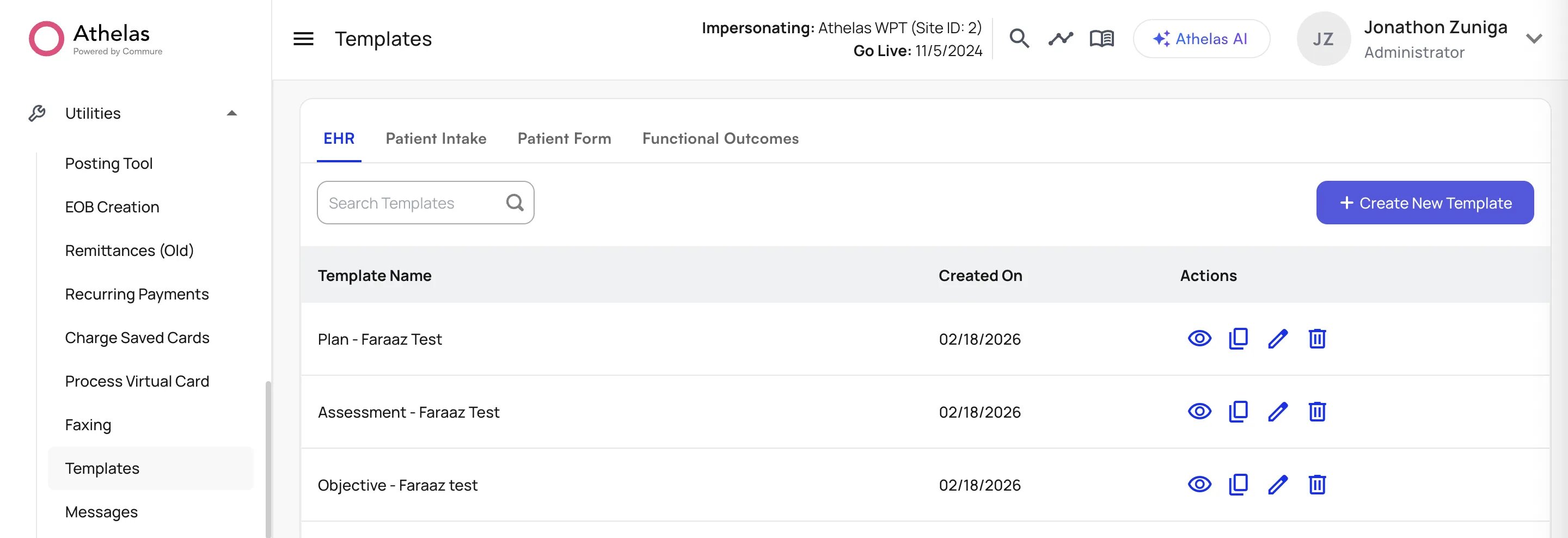 Click **+ Create New Template** to create a new form with conditional questions.
## Creating a conditional form
Conditional questions can be added after any supported trigger question. Any question that follows a supported question type shows a **Conditional Question** checkbox. Once checked, select the trigger question and the trigger response that should reveal the conditional question.
Currently, only **Single-Choice** and **Yes/No** question types are supported to trigger a conditional question.
Click **+ Create New Template** to create a new form with conditional questions.
## Creating a conditional form
Conditional questions can be added after any supported trigger question. Any question that follows a supported question type shows a **Conditional Question** checkbox. Once checked, select the trigger question and the trigger response that should reveal the conditional question.
Currently, only **Single-Choice** and **Yes/No** question types are supported to trigger a conditional question.
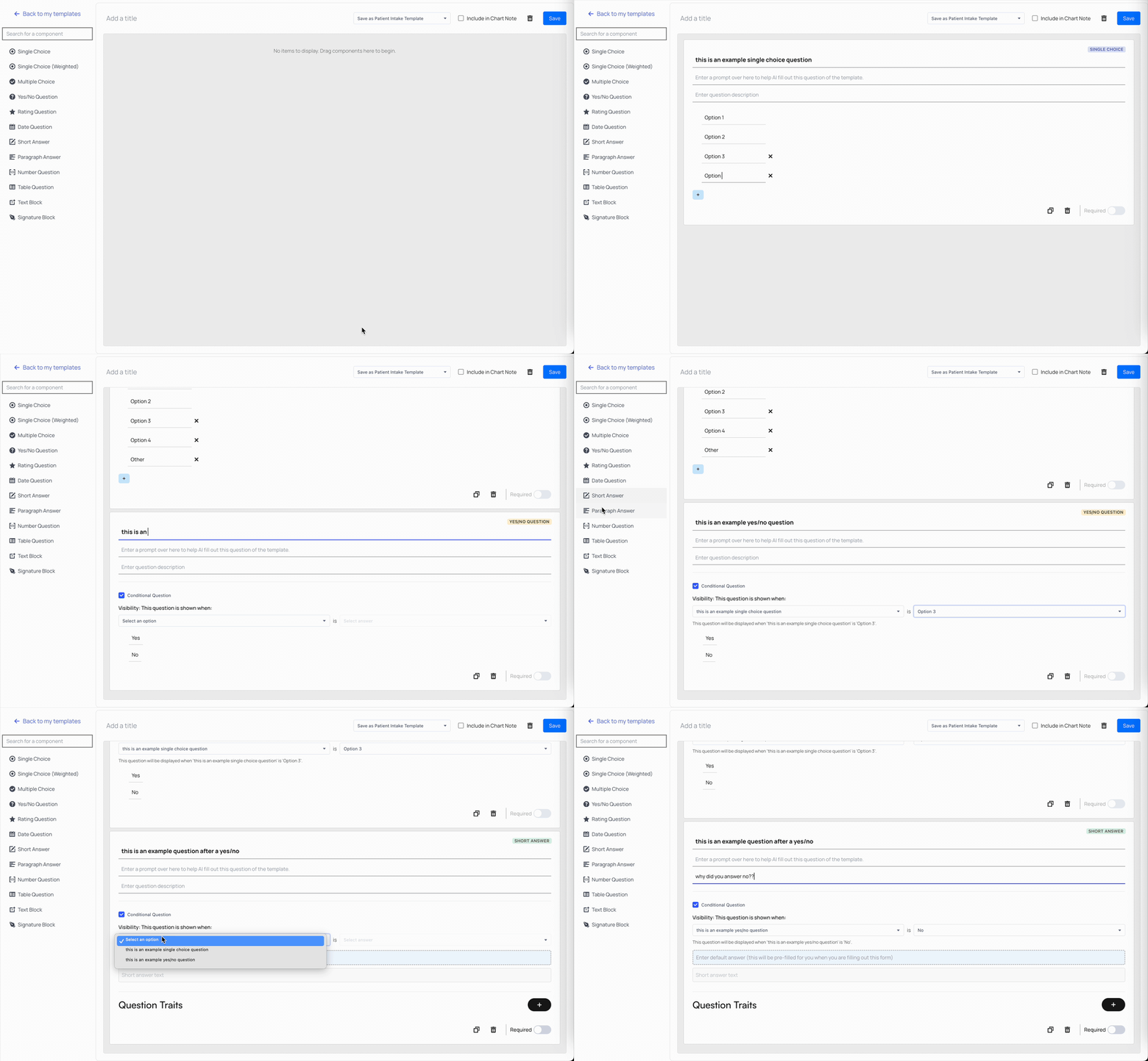 Once a question is marked as conditional, it won't appear in the patient's form until the correct response is given to the trigger question.
## Filling out conditional forms
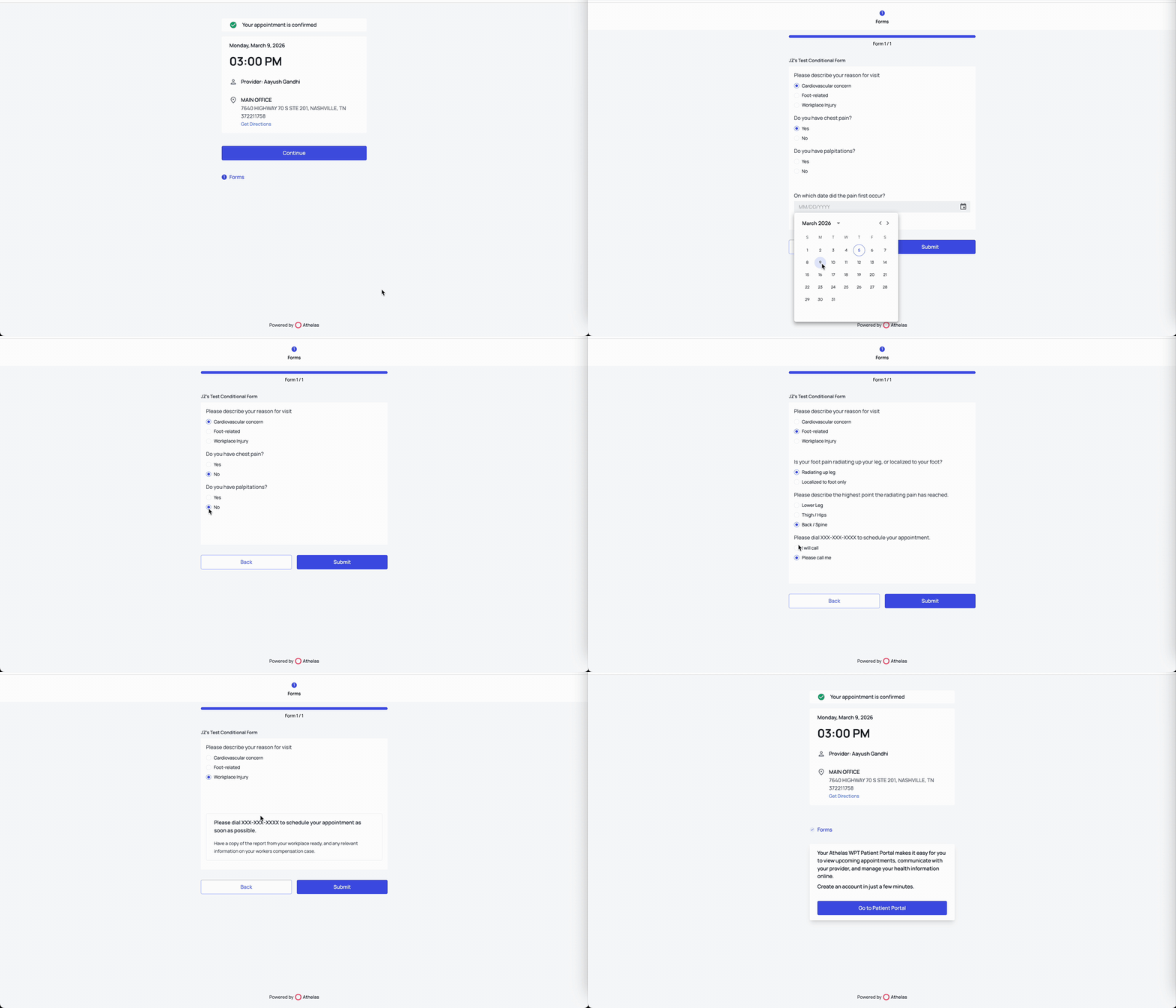
When patients receive a conditional form, they access it the same way as any other form. Conditional forms can be sent through **Outreach Flows**, **Patient Workflows**, or a specific appointment's intake forms.
After authenticating into the form, patients fill it out normally. Once they select a conditional response to a trigger question, the new conditional questions appear automatically. Changing their response to a non-conditional response — or to a different conditional branch — updates which questions appear.
Once a question is marked as conditional, it won't appear in the patient's form until the correct response is given to the trigger question.
## Filling out conditional forms
When patients receive a conditional form, they access it the same way as any other form. Conditional forms can be sent through **Outreach Flows**, **Patient Workflows**, or a specific appointment's intake forms.
After authenticating into the form, patients fill it out normally. Once they select a conditional response to a trigger question, the new conditional questions appear automatically. Changing their response to a non-conditional response — or to a different conditional branch — updates which questions appear.
 ## Reviewing conditional form responses
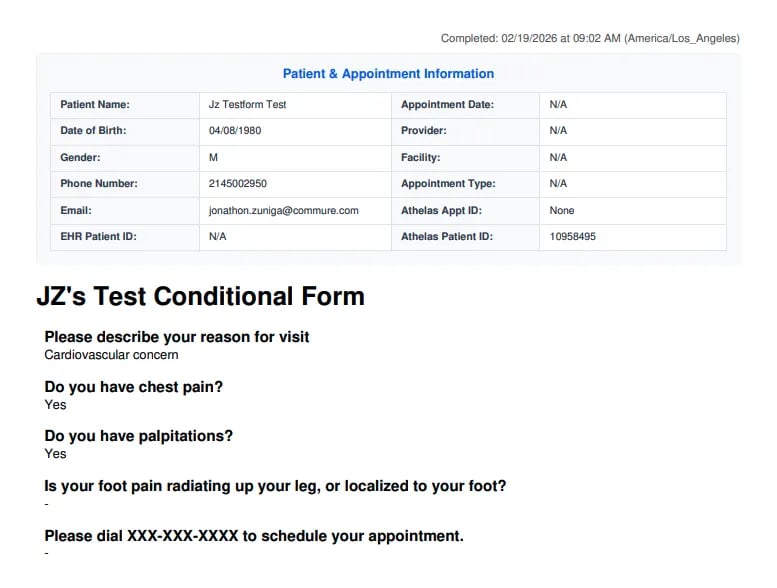
Conditional form responses appear in the patient's **Attachments** section like any other form response. The PDF of the patient's responses includes all questions, but only shows responses to the questions that were surfaced to the patient.
## Reviewing conditional form responses
Conditional form responses appear in the patient's **Attachments** section like any other form response. The PDF of the patient's responses includes all questions, but only shows responses to the questions that were surfaced to the patient.
 ### FAQ
Only **Single-Choice** and **Yes/No** questions can act as trigger questions. A conditional question can be added after any question that follows one of these supported types.
Conditional forms are sent the same way as any other form — through **Outreach Flows**, **Patient Workflows**, or a specific appointment's intake forms.
The form updates as they answer. Selecting a non-conditional response, or a different conditional branch, changes which conditional questions appear.
The PDF includes every question in the form, but only shows responses to the questions that were actually surfaced to the patient.
### FAQ
Only **Single-Choice** and **Yes/No** questions can act as trigger questions. A conditional question can be added after any question that follows one of these supported types.
Conditional forms are sent the same way as any other form — through **Outreach Flows**, **Patient Workflows**, or a specific appointment's intake forms.
The form updates as they answer. Selecting a non-conditional response, or a different conditional branch, changes which conditional questions appear.
The PDF includes every question in the form, but only shows responses to the questions that were actually surfaced to the patient.