> ## Documentation Index
> Fetch the complete documentation index at: https://trainings.air.athelas.com/llms.txt
> Use this file to discover all available pages before exploring further.
# Plan of Care Tracking
The Plan of Care Tracking feature helps your practice maintain Medicare Part B compliance by automatically tracking POC certifications and recertifications. The system ensures all Plans of Care are signed by the referring physician within required timeframes and alerts staff when action is needed.
### **Overview**
**Key benefits of POC Tracking:**
* **Automated Compliance Tracking:** Never miss a certification deadline.
* **Risk Mitigation:** Reduce claim denials due to missing or late POC signatures.
* **Real-time Visibility:** See all POC statuses at a glance from a single dashboard.
* **Audit Trail:** Complete documentation history for compliance audits.
* **Workflow Support:** Streamlined signature collection and follow-up.
### **Medicare Compliance Requirements**
**Initial Certification — 30-Day Rule**
The Plan of Care must be signed and dated by the referring or ordering physician within **30 days** of the initial evaluation appointment date (date of service).
> **Example:** If a patient's initial evaluation is on January 15th, the POC must be signed by February 14th.
**Recertification — 90-Day Rule**
POCs must be recertified every **90 days**. This timeline is calculated from the initial evaluation date of service or the date of the previous recertification.
> **Example:** If the initial evaluation was on January 15th, recertification is due on April 15th.
The 30-day clock starts from the **appointment date** of the initial evaluation (date of service), not when documentation is finalized or the claim is submitted.
### **Dashboard Overview**
The POC Tracking dashboard displays all Plans of Care grouped by status. Access it from the **Plan of Care Tracking** section in Air.
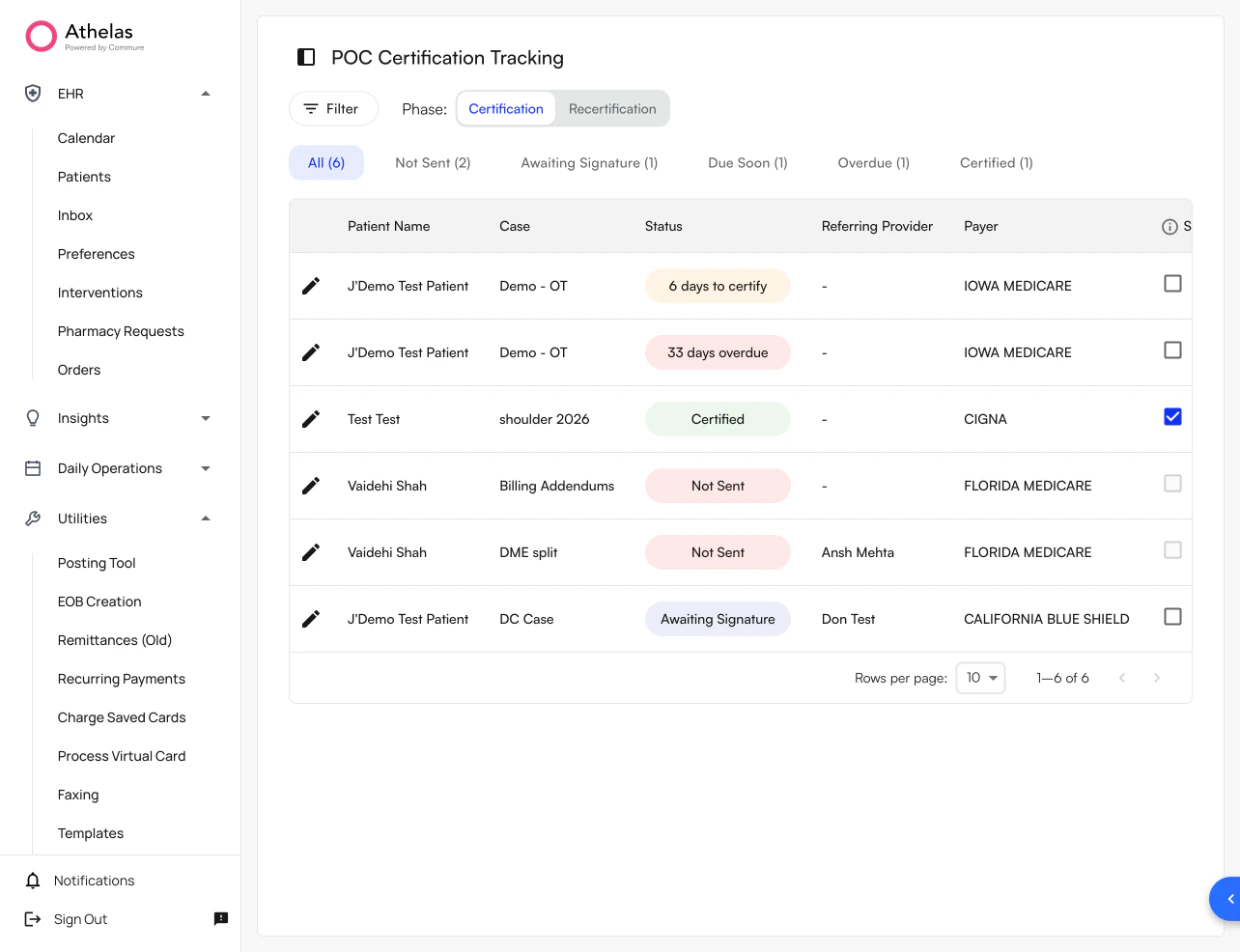 **Status Tabs**
| **Tab** | **Description** |
| :--------------------- | :-------------------------------------------------- |
| **All** | Every POC currently being tracked |
| **Not Sent** | POCs created but not yet sent to the physician |
| **Awaiting Signature** | POCs sent to the physician, waiting to be returned |
| **Due Soon** | POCs unsigned for 20–30 days (approaching deadline) |
| **Overdue** | POCs exceeding 30 days without a signature |
| **Certified** | POCs successfully signed by the physician |
**Filter Options**
* **Patient Filter:** Search for a specific patient's POC.
* **Phase Filter:** Toggle between **Initial Eval Certification** and **Recertification** phases.
* **Custom Filters:** Filter by referring provider, facility, payer, or patient.
**Table Columns**
Patient Name, Case, Status, Referring Provider, Payer, Script Exempt, Certification Start, Certification End, Frequency & Duration.
### **POC Tracking Preferences**
Configure how the system handles faxing and tracking from your practice settings.
**Auto-Faxing Eval Notes**
Determines when an evaluative note is automatically faxed to the referring physician:
* **Always** — Fax every evaluative note automatically.
* **POC Updates** — Fax only when the POC is created or updated.
* **Never** — Do not auto-fax; staff sends manually.
**POC Tracking Options**
Determines when an evaluative note will be tracked in the POC tracker:
* **Always** — Track all evaluative notes.
* **POC Updates** — Track only when the POC is created or updated.
✨**Smart Tip:** Set **Auto-Faxing** to **Always** and **POC Tracking** to **Always** to ensure no certifications fall through the cracks after an initial evaluation is signed.
### **Certification Workflow**
**Initial Certification Process**
1. **Case creation (automatic):** When an Initial Eval note is signed, POC tracking begins automatically.
2. **Auto-fax:** The system faxes the visit notes to the referring physician based on your preferences. If the fax fails, the case is flagged; if not sent, it moves to **Not Sent** status.
3. **Awaiting Signature:** The system tracks the number of days elapsed since the date of service. At **20 days**, the status changes to **Due Soon**. At **30 days**, it changes to **Overdue**.
4. **Attach signed POC:** When the signed document is received, staff attaches it and marks the case as signed. Status updates to **Certified**.
5. **Signature tracking stops:** The system stops reminders and begins tracking toward the next recertification date.
***
**Recertification Process**
1. **Automatic trigger:** The system triggers a recertification when the recertification window approaches (near 90 days from the initial eval date of service or last evaluative note), or when a new evaluative note is submitted.
2. **Follow standard signature process:** The same workflow as initial certification applies. The status changes to **Due Soon** at 75 days and **Overdue** at 90 days.
**Note:** The Initial Script Exemption does **not** apply to recertifications. A signed POC is always required.
***
**Discharge Workflow**
When a patient is discharged, the system marks the case as closed. No further recertification alerts are generated, and all documentation is retained for audit purposes.
### **Status Types**
| **Status** | **Meaning** | **Action Required** | **Risk Level** |
| :--------------------- | :-------------------------------------------- | :--------------------------------------------------------------------- | :----------------------- |
| **Not Sent** | POC created but not yet sent to the physician | Send POC via fax | Moderate |
| **Awaiting Signature** | POC sent, waiting to be signed | Monitor; follow up if approaching 20 days | Low |
| **Due Soon** | Unsigned for 20–30 days | Follow up with physician, confirm receipt, request expedited signature | Moderate |
| **Overdue** | Not signed within 30 days | Priority follow-up, document all attempts, consider escalation | High — claim denial risk |
| **Certified** | Signed by physician, compliant | None — system alerts when recertification approaches | None |
### **Initial Script Exemption**
**What is the Initial Script Exemption?**
A Medicare allowance that permits providers to demonstrate a "good faith effort" in obtaining a POC signature for the **initial certification only**. When this exemption is applied, the system stops alerting for that case and a returned signed POC is not required.
**Requirements to Use the Exemption**
* A written referral (script) from the physician that is signed, dated, and attached to the patient's medical record.
* Documented proof that the POC was sent within 30 days of the initial evaluation date (fax confirmation or delivery record).
* One send attempt is sufficient — you do not need to receive the POC back signed.
**Standard Path vs. Script Exemption Path**
| | **Standard Path** | **Script Exemption Path** |
| :----- | :---------------------------- | :-------------------------------------------- |
| Step 1 | Initial Eval completed | Initial Eval completed |
| Step 2 | Send POC | Confirm signed script is on file |
| Step 3 | Wait for returned signed POC | Send POC once |
| Step 4 | Attach signed POC → Certified | Mark as Script Exempt → No signature required |
**System Behavior When Exemption is Applied**
* The system stops alerting for that certification.
* A returned signed POC is not required for compliance.
* The system still records that the POC was sent (for audit trail).
* Recertification will still require a signed POC.
The Script Exemption applies **only** to the initial POC certification. It **cannot** be used for any recertifications. You also cannot mark a case as Script Exempt without first successfully faxing the POC to the referring provider.
**Important Limitations**
* Requires both a signed script **and** proof that the POC was sent.
* Should only be used when the physician is unresponsive after a documented good faith effort.
* Does not apply to recertifications under any circumstances.
### **Tracking and Managing POCs**
**Status Tabs**
| **Tab** | **Description** |
| :--------------------- | :-------------------------------------------------- |
| **All** | Every POC currently being tracked |
| **Not Sent** | POCs created but not yet sent to the physician |
| **Awaiting Signature** | POCs sent to the physician, waiting to be returned |
| **Due Soon** | POCs unsigned for 20–30 days (approaching deadline) |
| **Overdue** | POCs exceeding 30 days without a signature |
| **Certified** | POCs successfully signed by the physician |
**Filter Options**
* **Patient Filter:** Search for a specific patient's POC.
* **Phase Filter:** Toggle between **Initial Eval Certification** and **Recertification** phases.
* **Custom Filters:** Filter by referring provider, facility, payer, or patient.
**Table Columns**
Patient Name, Case, Status, Referring Provider, Payer, Script Exempt, Certification Start, Certification End, Frequency & Duration.
### **POC Tracking Preferences**
Configure how the system handles faxing and tracking from your practice settings.
**Auto-Faxing Eval Notes**
Determines when an evaluative note is automatically faxed to the referring physician:
* **Always** — Fax every evaluative note automatically.
* **POC Updates** — Fax only when the POC is created or updated.
* **Never** — Do not auto-fax; staff sends manually.
**POC Tracking Options**
Determines when an evaluative note will be tracked in the POC tracker:
* **Always** — Track all evaluative notes.
* **POC Updates** — Track only when the POC is created or updated.
✨**Smart Tip:** Set **Auto-Faxing** to **Always** and **POC Tracking** to **Always** to ensure no certifications fall through the cracks after an initial evaluation is signed.
### **Certification Workflow**
**Initial Certification Process**
1. **Case creation (automatic):** When an Initial Eval note is signed, POC tracking begins automatically.
2. **Auto-fax:** The system faxes the visit notes to the referring physician based on your preferences. If the fax fails, the case is flagged; if not sent, it moves to **Not Sent** status.
3. **Awaiting Signature:** The system tracks the number of days elapsed since the date of service. At **20 days**, the status changes to **Due Soon**. At **30 days**, it changes to **Overdue**.
4. **Attach signed POC:** When the signed document is received, staff attaches it and marks the case as signed. Status updates to **Certified**.
5. **Signature tracking stops:** The system stops reminders and begins tracking toward the next recertification date.
***
**Recertification Process**
1. **Automatic trigger:** The system triggers a recertification when the recertification window approaches (near 90 days from the initial eval date of service or last evaluative note), or when a new evaluative note is submitted.
2. **Follow standard signature process:** The same workflow as initial certification applies. The status changes to **Due Soon** at 75 days and **Overdue** at 90 days.
**Note:** The Initial Script Exemption does **not** apply to recertifications. A signed POC is always required.
***
**Discharge Workflow**
When a patient is discharged, the system marks the case as closed. No further recertification alerts are generated, and all documentation is retained for audit purposes.
### **Status Types**
| **Status** | **Meaning** | **Action Required** | **Risk Level** |
| :--------------------- | :-------------------------------------------- | :--------------------------------------------------------------------- | :----------------------- |
| **Not Sent** | POC created but not yet sent to the physician | Send POC via fax | Moderate |
| **Awaiting Signature** | POC sent, waiting to be signed | Monitor; follow up if approaching 20 days | Low |
| **Due Soon** | Unsigned for 20–30 days | Follow up with physician, confirm receipt, request expedited signature | Moderate |
| **Overdue** | Not signed within 30 days | Priority follow-up, document all attempts, consider escalation | High — claim denial risk |
| **Certified** | Signed by physician, compliant | None — system alerts when recertification approaches | None |
### **Initial Script Exemption**
**What is the Initial Script Exemption?**
A Medicare allowance that permits providers to demonstrate a "good faith effort" in obtaining a POC signature for the **initial certification only**. When this exemption is applied, the system stops alerting for that case and a returned signed POC is not required.
**Requirements to Use the Exemption**
* A written referral (script) from the physician that is signed, dated, and attached to the patient's medical record.
* Documented proof that the POC was sent within 30 days of the initial evaluation date (fax confirmation or delivery record).
* One send attempt is sufficient — you do not need to receive the POC back signed.
**Standard Path vs. Script Exemption Path**
| | **Standard Path** | **Script Exemption Path** |
| :----- | :---------------------------- | :-------------------------------------------- |
| Step 1 | Initial Eval completed | Initial Eval completed |
| Step 2 | Send POC | Confirm signed script is on file |
| Step 3 | Wait for returned signed POC | Send POC once |
| Step 4 | Attach signed POC → Certified | Mark as Script Exempt → No signature required |
**System Behavior When Exemption is Applied**
* The system stops alerting for that certification.
* A returned signed POC is not required for compliance.
* The system still records that the POC was sent (for audit trail).
* Recertification will still require a signed POC.
The Script Exemption applies **only** to the initial POC certification. It **cannot** be used for any recertifications. You also cannot mark a case as Script Exempt without first successfully faxing the POC to the referring provider.
**Important Limitations**
* Requires both a signed script **and** proof that the POC was sent.
* Should only be used when the physician is unresponsive after a documented good faith effort.
* Does not apply to recertifications under any circumstances.
### **Tracking and Managing POCs**
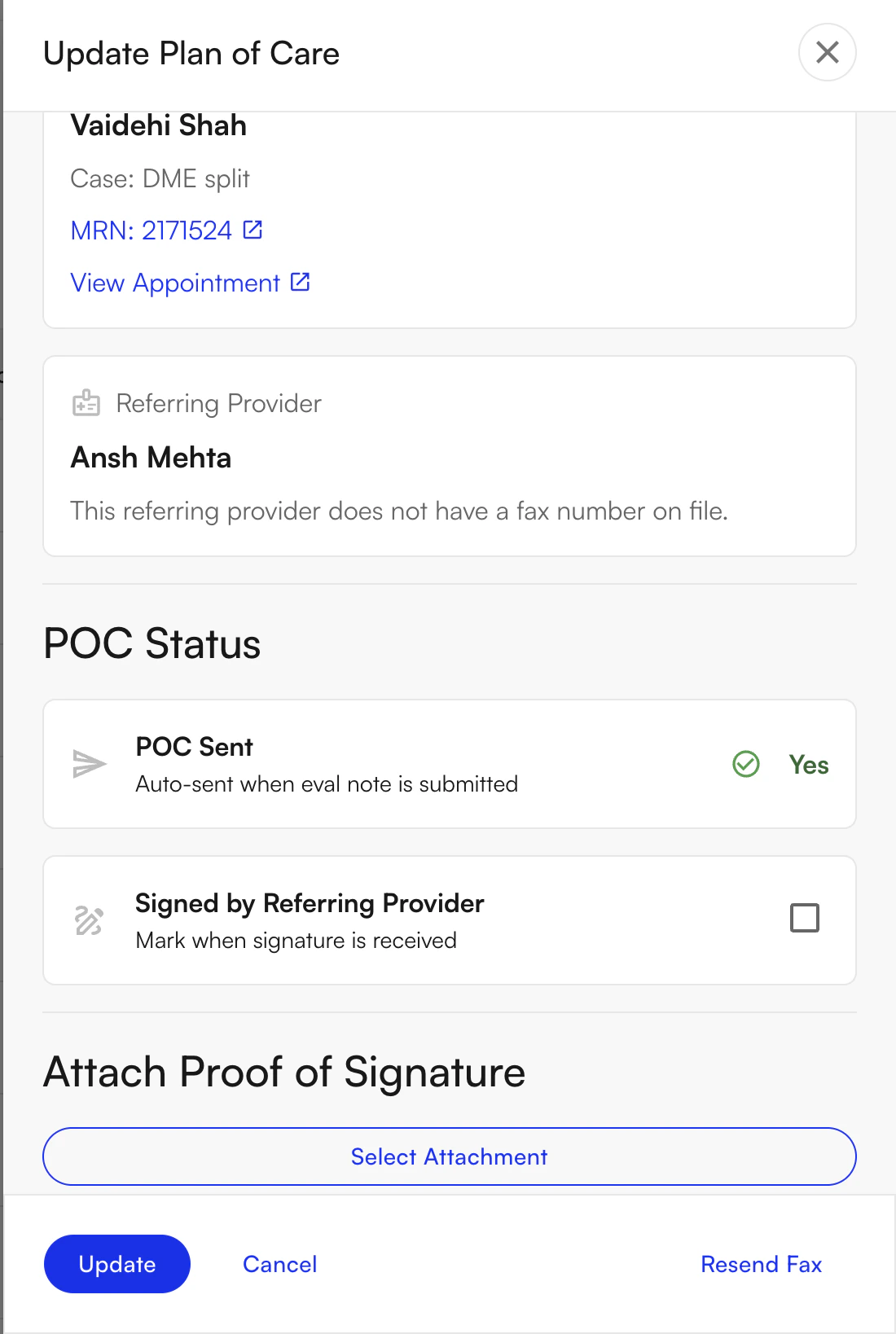 **Viewing POC Details**
Click the **edit** (pencil) icon on any row to view the full POC record, including referring provider details, case and appointment information, faxing status and history, the ability to attach proof of signature, and the option to resend the fax.
***
**Sending a POC to a Physician**
**To send or resend a POC:**
1. Navigate to the patient's case in the dashboard.
2. Click **Resend Fax** or the fax icon.
3. The system automatically sends the POC via fax, updates the status to **Awaiting Signature**, and begins tracking days elapsed.
***
**Marking a POC as Signed**
**To mark a POC as certified:**
1. Click the **edit** (pencil) icon on the patient's row.
2. Click **Attach Signed POC**.
3. Upload the signed document.
The system attaches the document, updates the status to **Certified**, stops signature tracking alerts, and begins tracking toward the next recertification date.
✨**Smart Tip:** Enter the date the **physician signed** the document (as written on the POC), not the date you received it. This ensures your compliance timeline is accurate.
***
**Using the Script Exemption**
**To apply the Initial Script Exemption:**
1. Confirm you have a signed, dated referral script on file.
2. Confirm the POC was sent to the referring physician at least once.
3. Check **Script Exempt** on the case.
4. Attach the signed referral script.
**Note:** This applies only to initial certifications. The checkbox is not available for recertification cases.
***
**POC Alerts in the Appointment Details Modal**
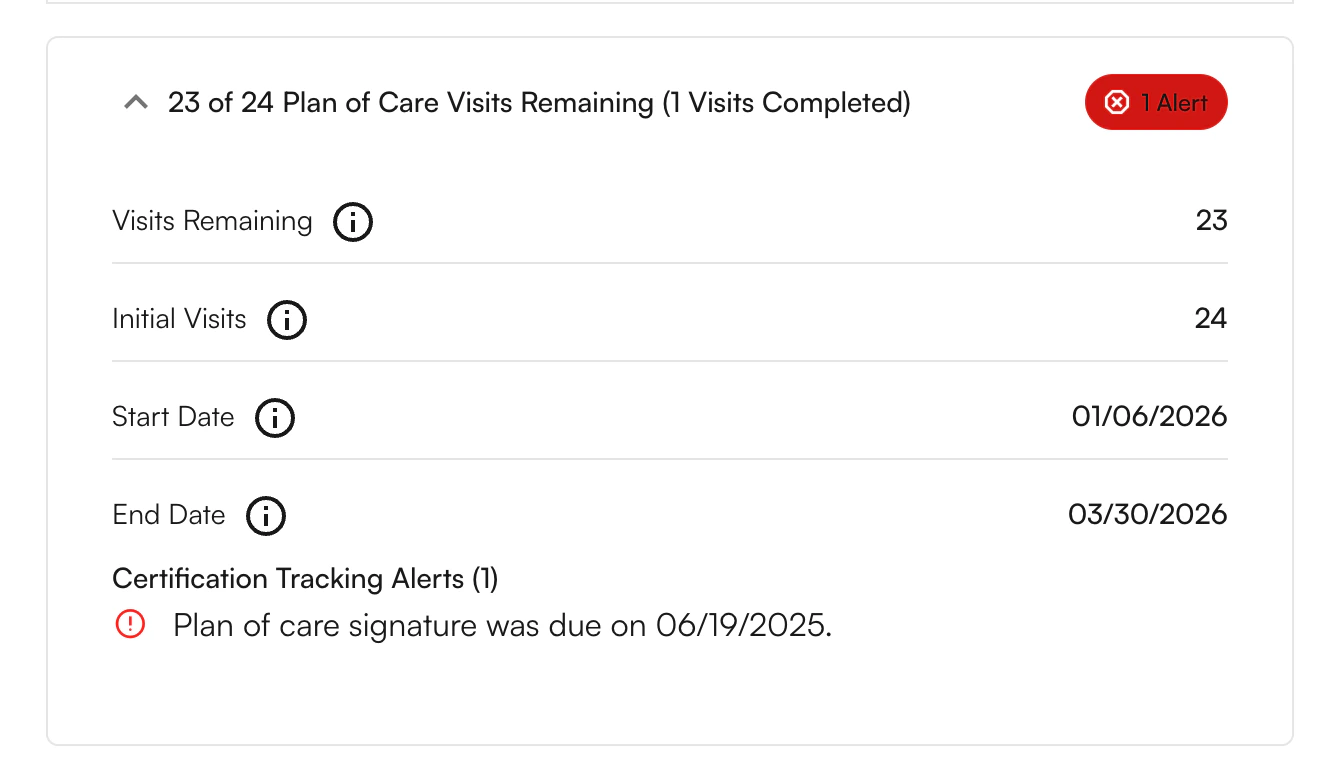
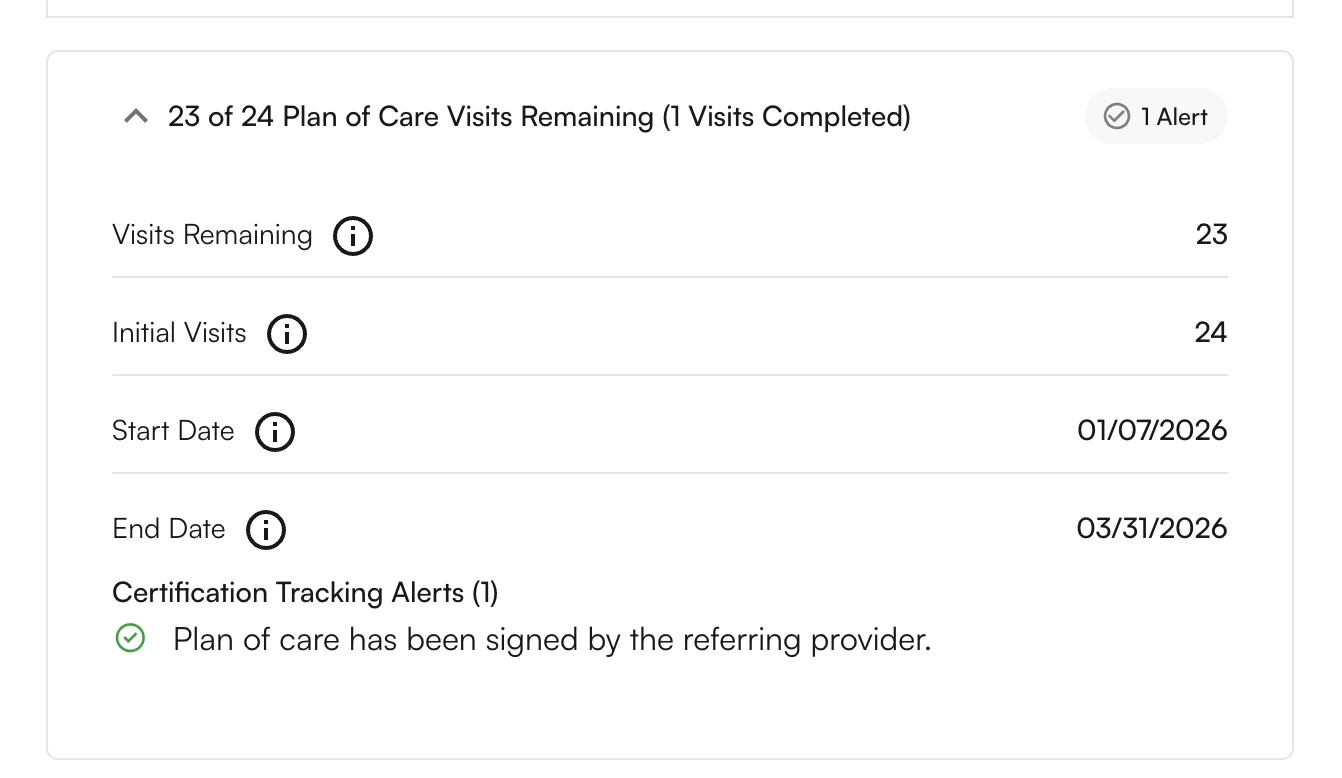
The **Plan of Care** section within the Appointment Details modal reflects the current POC alert status at the individual appointment level. The alert badge changes color based on urgency.
**Not Sent** — The POC has been created but has not yet been sent to the referring physician. Send the POC via fax to move this case forward.
**Viewing POC Details**
Click the **edit** (pencil) icon on any row to view the full POC record, including referring provider details, case and appointment information, faxing status and history, the ability to attach proof of signature, and the option to resend the fax.
***
**Sending a POC to a Physician**
**To send or resend a POC:**
1. Navigate to the patient's case in the dashboard.
2. Click **Resend Fax** or the fax icon.
3. The system automatically sends the POC via fax, updates the status to **Awaiting Signature**, and begins tracking days elapsed.
***
**Marking a POC as Signed**
**To mark a POC as certified:**
1. Click the **edit** (pencil) icon on the patient's row.
2. Click **Attach Signed POC**.
3. Upload the signed document.
The system attaches the document, updates the status to **Certified**, stops signature tracking alerts, and begins tracking toward the next recertification date.
✨**Smart Tip:** Enter the date the **physician signed** the document (as written on the POC), not the date you received it. This ensures your compliance timeline is accurate.
***
**Using the Script Exemption**
**To apply the Initial Script Exemption:**
1. Confirm you have a signed, dated referral script on file.
2. Confirm the POC was sent to the referring physician at least once.
3. Check **Script Exempt** on the case.
4. Attach the signed referral script.
**Note:** This applies only to initial certifications. The checkbox is not available for recertification cases.
***
**POC Alerts in the Appointment Details Modal**
The **Plan of Care** section within the Appointment Details modal reflects the current POC alert status at the individual appointment level. The alert badge changes color based on urgency.
**Not Sent** — The POC has been created but has not yet been sent to the referring physician. Send the POC via fax to move this case forward.
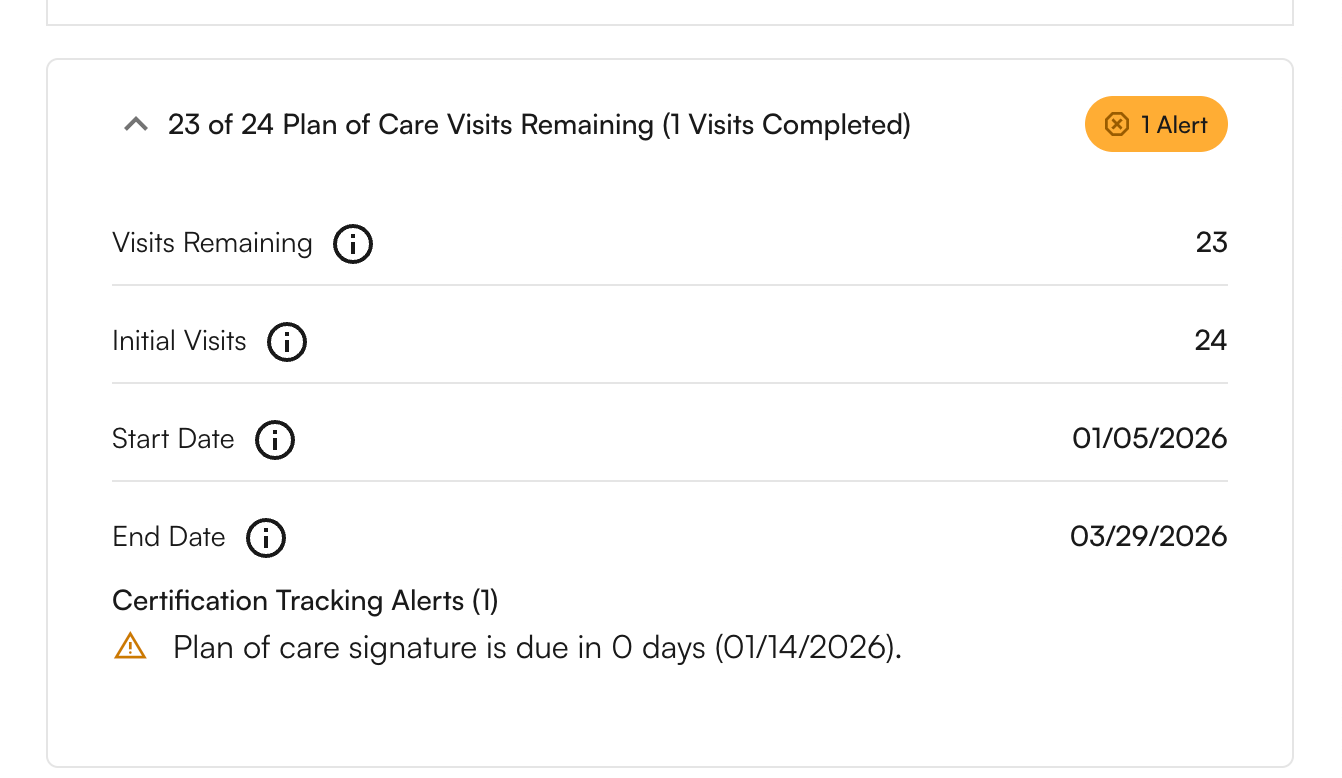 **Sent** — The POC has been sent to the referring physician and is awaiting signature. The system begins tracking days elapsed from the date of service.
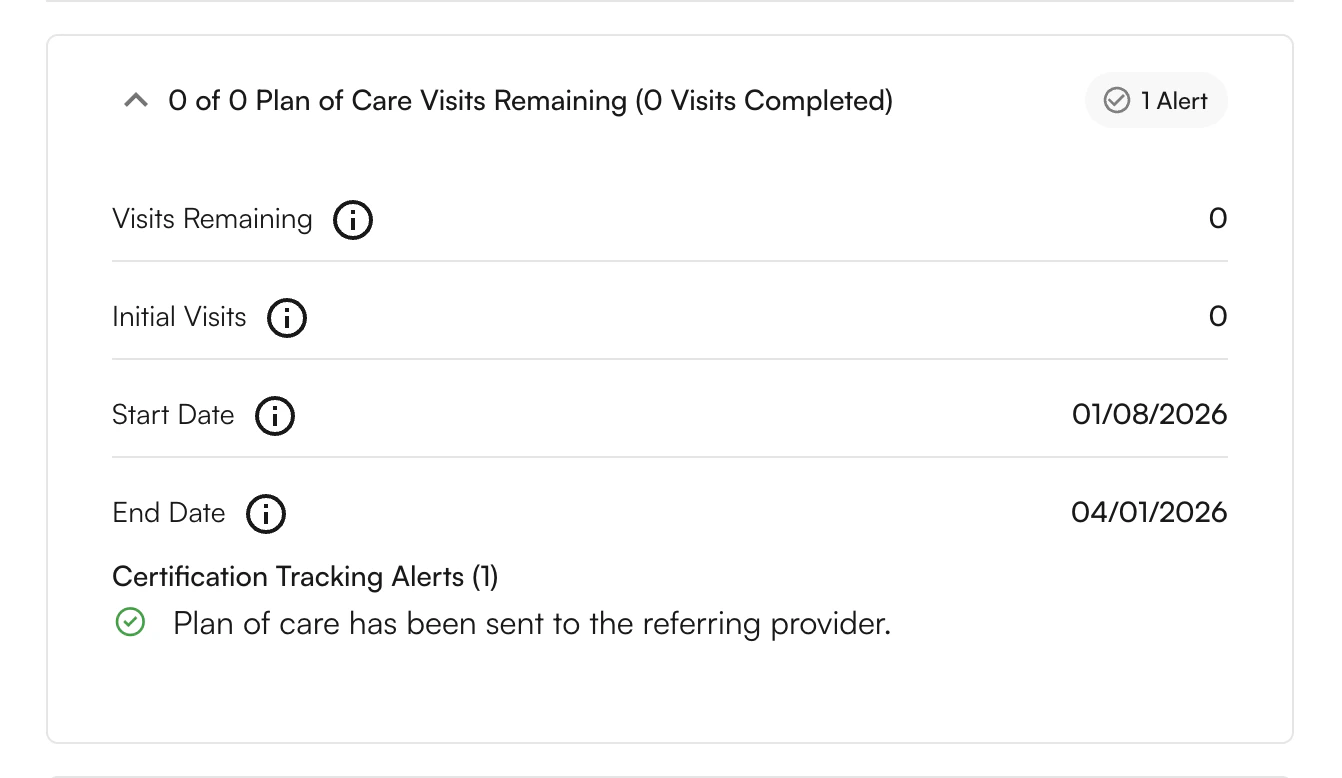 **Due Soon** — The POC has been unsigned for 20–30 days. Follow up with the physician immediately to request an expedited signature.
**Overdue** — The POC has not been signed within the 30-day window. Claims are at risk of denial. Prioritize follow-up and document all contact attempts.
**Due Soon** — The POC has been unsigned for 20–30 days. Follow up with the physician immediately to request an expedited signature.
**Overdue** — The POC has not been signed within the 30-day window. Claims are at risk of denial. Prioritize follow-up and document all contact attempts.
 **Certified** — The POC has been signed by the referring provider. No further action is needed until the next recertification window approaches.
 ### **Best Practices**
**Front Desk / Care Coordination Staff**
* Send POCs within 1–2 days of the initial evaluation and confirm fax delivery.
* Check the **Due Soon** tab every morning and follow up on cases approaching 20 days.
* Call physician offices at 20 days if no response has been received.
* Only apply the Script Exemption when a valid signed script is on file; always document that the POC was sent.
***
**Therapists / Providers**
* Finalize initial evaluation documentation within 24–48 hours so the POC is clear and ready to send.
* Review your caseload 2 weeks before a POC expires and decide whether to discharge or recertify.
* Create new POCs in advance if a patient's condition changes significantly.
* Do not document visits without a valid POC — update or recertify before continuing treatment.
***
**Admins / Operations Managers**
* Review the dashboard regularly to identify patterns and problem areas (e.g., a specific referring provider with high overdue rates).
* Streamline the POC sending process and build relationships with high-volume physician offices.
* Train staff on Medicare requirements and the correct handling of Due Soon and Overdue alerts.
### FAQ
Medicare requires physician certification to confirm that therapy services are medically necessary and appropriate for the patient's condition. Without this signature, claims may be denied.
* **Initial Certification:** The first POC signed after the initial evaluation — must be signed within 30 days of the date of service.
* **Recertification:** Renewal of the POC every 90 days to continue therapy services.
The 30-day deadline starts from the **appointment date** of the initial evaluation (the date of service), not when you finish documentation or submit the claim.
Claims for dates of service after 30 days are at risk of denial. Document all follow-up attempts, continue pursuing the signature, and consider applying the **Initial Script Exemption** if you have a valid signed referral on file.
Use the Script Exemption when:
* You have a signed, dated referral script attached to the patient's medical record.
* The POC has been sent to the physician at least once within 30 days.
* The physician is unresponsive despite a good faith effort.
**Note:** The exemption applies only to the initial certification — recertifications always require a returned signed POC.
* Signed, dated referral script attached to the patient's medical record.
* Proof the POC was sent (fax confirmation or send record).
* The **Script Exempt** checkbox checked in the tracking system.
* Documentation of the attempt to obtain a signature.
Update the referring provider in the patient's chart, then resend the POC to the correct physician using the **Resend Fax** option and attach the corrected record.
The system maintains a complete historical record of all POC activity from the release date of the feature. Click the edit icon on any patient row to view the full send and status history for that case.
### **Best Practices**
**Front Desk / Care Coordination Staff**
* Send POCs within 1–2 days of the initial evaluation and confirm fax delivery.
* Check the **Due Soon** tab every morning and follow up on cases approaching 20 days.
* Call physician offices at 20 days if no response has been received.
* Only apply the Script Exemption when a valid signed script is on file; always document that the POC was sent.
***
**Therapists / Providers**
* Finalize initial evaluation documentation within 24–48 hours so the POC is clear and ready to send.
* Review your caseload 2 weeks before a POC expires and decide whether to discharge or recertify.
* Create new POCs in advance if a patient's condition changes significantly.
* Do not document visits without a valid POC — update or recertify before continuing treatment.
***
**Admins / Operations Managers**
* Review the dashboard regularly to identify patterns and problem areas (e.g., a specific referring provider with high overdue rates).
* Streamline the POC sending process and build relationships with high-volume physician offices.
* Train staff on Medicare requirements and the correct handling of Due Soon and Overdue alerts.
### FAQ
Medicare requires physician certification to confirm that therapy services are medically necessary and appropriate for the patient's condition. Without this signature, claims may be denied.
* **Initial Certification:** The first POC signed after the initial evaluation — must be signed within 30 days of the date of service.
* **Recertification:** Renewal of the POC every 90 days to continue therapy services.
The 30-day deadline starts from the **appointment date** of the initial evaluation (the date of service), not when you finish documentation or submit the claim.
Claims for dates of service after 30 days are at risk of denial. Document all follow-up attempts, continue pursuing the signature, and consider applying the **Initial Script Exemption** if you have a valid signed referral on file.
Use the Script Exemption when:
* You have a signed, dated referral script attached to the patient's medical record.
* The POC has been sent to the physician at least once within 30 days.
* The physician is unresponsive despite a good faith effort.
**Note:** The exemption applies only to the initial certification — recertifications always require a returned signed POC.
* Signed, dated referral script attached to the patient's medical record.
* Proof the POC was sent (fax confirmation or send record).
* The **Script Exempt** checkbox checked in the tracking system.
* Documentation of the attempt to obtain a signature.
Update the referring provider in the patient's chart, then resend the POC to the correct physician using the **Resend Fax** option and attach the corrected record.
The system maintains a complete historical record of all POC activity from the release date of the feature. Click the edit icon on any patient row to view the full send and status history for that case.