> ## Documentation Index
> Fetch the complete documentation index at: https://trainings.air.athelas.com/llms.txt
> Use this file to discover all available pages before exploring further.
# Edit your Practice Settings
The My Practice page is your central hub in Insights to manage staff, facilities, providers, settings, and permissions for your practice.
Click on the My Practice tab within Settings on the left navigation bar.
### **Team Members**
View, add, edit, and remove users. **Default Role Permissions:**
* **Administrator** – Full access to all pages and features.
* **Billing Manager** – Access to all pages except team management.
* **Staff** – Limited access (Practice Overview + Advanced Insights). Best for front desk staff.
* **Single Provider** – Claim Details page only, filtered to their own claims.
You may also check or uncheck individual items for specific employees.
* The **Feature Permissions** options allow you to configure which features are available for your team member to utilize.
* The **Page Permissions** options allow you to configure which pages your team member can view.
**Note:** Unchecking “Miscellaneous Line Items” means a user cannot create or edit them, but can still view/apply them to balances.
### **Practice Details**
Enter and update your practice and corporate information.
Ensure the **corporate address** is your official billing address. This appears in Box 33 on the CMS-1500 form and is required for compliance and enrollments.
### **Main Contact**
Store contact information for the **practice owner** and **billing liaison**.
### **Facilities**
Add, edit, or deactivate your organization’s facilities.
You can also move facilities between the **Active** and **Inactive** tabs.
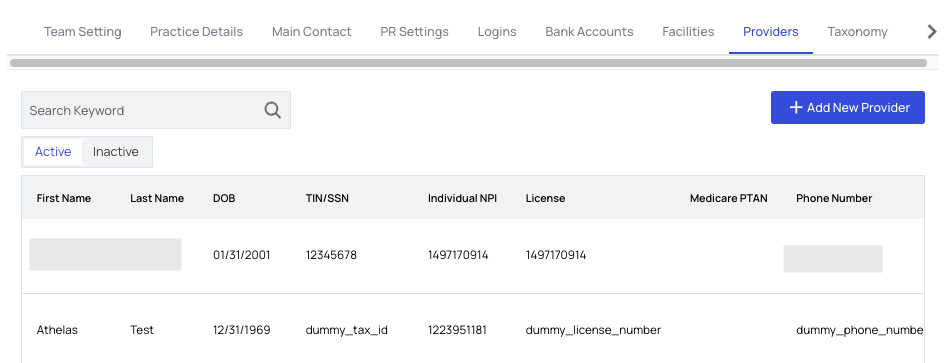
### **Providers**
Manage your practice’s healthcare providers.
* Add, edit, or deactivate providers in the **Active tab**.
* View deactivated providers in the **Inactive tab**, where you can reactivate or permanently delete them.
### **Taxonomy**
Manage your practice’s taxonomy codes.
[Provider Taxonomy Codes](https://www.nucc.org/index.php/code-sets-mainmenu-41/provider-taxonomy-mainmenu-40) are self-selected by each provider. They reflect **area of specialty** (based on education and licensure), not services rendered.
### **Treatments**
Create, update, or delete default treatment information, including **Service Type Codes**.
 You may also check or uncheck individual items for specific employees.
* The **Feature Permissions** options allow you to configure which features are available for your team member to utilize.
* The **Page Permissions** options allow you to configure which pages your team member can view.
You may also check or uncheck individual items for specific employees.
* The **Feature Permissions** options allow you to configure which features are available for your team member to utilize.
* The **Page Permissions** options allow you to configure which pages your team member can view.