> ## Documentation Index
> Fetch the complete documentation index at: https://trainings.air.athelas.com/llms.txt
> Use this file to discover all available pages before exploring further.
# Register Providers for Medications
### Registration for Uncontrolled Meds
* Ensure the Provider Phone Number is set properly (no dashes, spaces, ext etc)
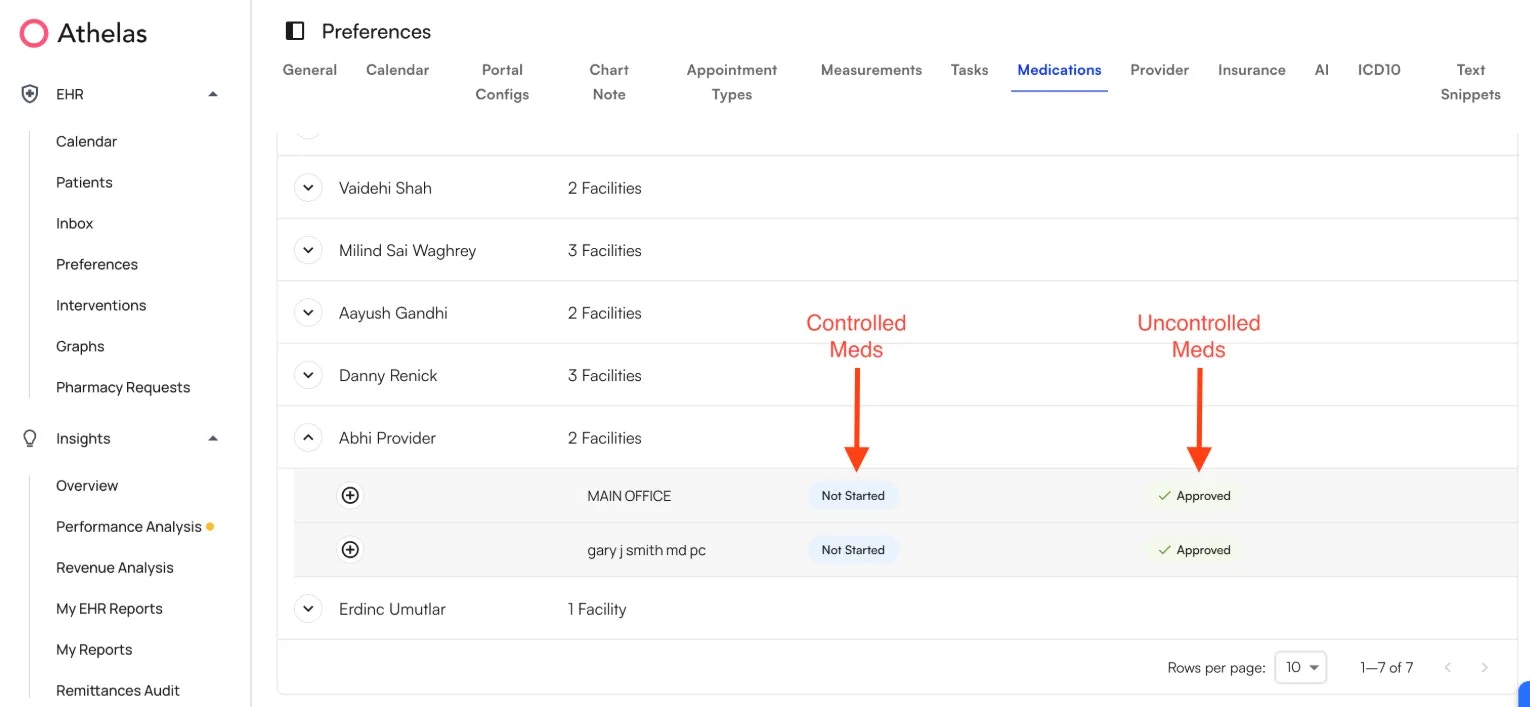
* Go to Preferences Tab → **Medications**
* **Nominate Provider** (Note: Only an admin/provider from the site can initiate this process; self-nomination is not permitted)
* Select Provider + Facility Combo → Nominate
* The provider + facility combo will appear in the table in dropdown. The **Approved** check under the Uncontrolled Substances column indicates the provider can now prescribe uncontrolled meds via Air.
 ### Registration for Controlled Meds
DEA registrations are state-specific and linked to both the provider’s state license and their practice location. We currently get DEA numbers from [ID.me](http://ID.me).
If a provider has multiple DEA numbers, we need a list of *all* of them to be able to validate against what we get from [ID.me](http://ID.me). Please notify Athelas Support Team in advance if this applies.
* Navigate to Preferences → Medications
* Click on Provider → + Icon → \*\*Begin Approval. \*\*Another user (anyone not the provider being nominated) with Admin level access from the site needs to Begin Approval
* Ask the **Provider** to go to Bell Icon → Medications → Register
* The provider will have to sign in with existing [ID.me](http://ID.me) account, or create a new account.
* A popup window will appear asking provider to complete the registration steps
* Once the Provider is set up with the [ID.me](http://ID.me) verification, navigate to Preferences → Medications. Then click on your facility and the + icon → **Approve**. The provider can approve this themselves, but they must do so separately for each facility they’ve been nominated for.
### Register to respond to Pharmacy Requests
Navigate to Preference → Medications → + icon → Register for pharmacy requests
### Registration for Controlled Meds
DEA registrations are state-specific and linked to both the provider’s state license and their practice location. We currently get DEA numbers from [ID.me](http://ID.me).
If a provider has multiple DEA numbers, we need a list of *all* of them to be able to validate against what we get from [ID.me](http://ID.me). Please notify Athelas Support Team in advance if this applies.
* Navigate to Preferences → Medications
* Click on Provider → + Icon → \*\*Begin Approval. \*\*Another user (anyone not the provider being nominated) with Admin level access from the site needs to Begin Approval
* Ask the **Provider** to go to Bell Icon → Medications → Register
* The provider will have to sign in with existing [ID.me](http://ID.me) account, or create a new account.
* A popup window will appear asking provider to complete the registration steps
* Once the Provider is set up with the [ID.me](http://ID.me) verification, navigate to Preferences → Medications. Then click on your facility and the + icon → **Approve**. The provider can approve this themselves, but they must do so separately for each facility they’ve been nominated for.
### Register to respond to Pharmacy Requests
Navigate to Preference → Medications → + icon → Register for pharmacy requests