> ## Documentation Index
> Fetch the complete documentation index at: https://trainings.air.athelas.com/llms.txt
> Use this file to discover all available pages before exploring further.
# Prescriber Agents
**Providers can designate staff members as prescriber agents, granting them the ability to:**
* Draft prescriptions (for controlled medications)
* Prescribe medications (for non-controlled medications)
Providers can assign prescriber agents by facility and set permissions for whether they can only create draft prescriptions or also prescribe medications.
### Pre-requisite for Provider to Nominate an Agent
**Note:** A pre-requisite to be able to assign a Prescriber Agent is:
* Provider should be assigned to the relevant facilities they want to prescribe for (update within **Preferences Tab > Provider Section > Edit Provider Details**)
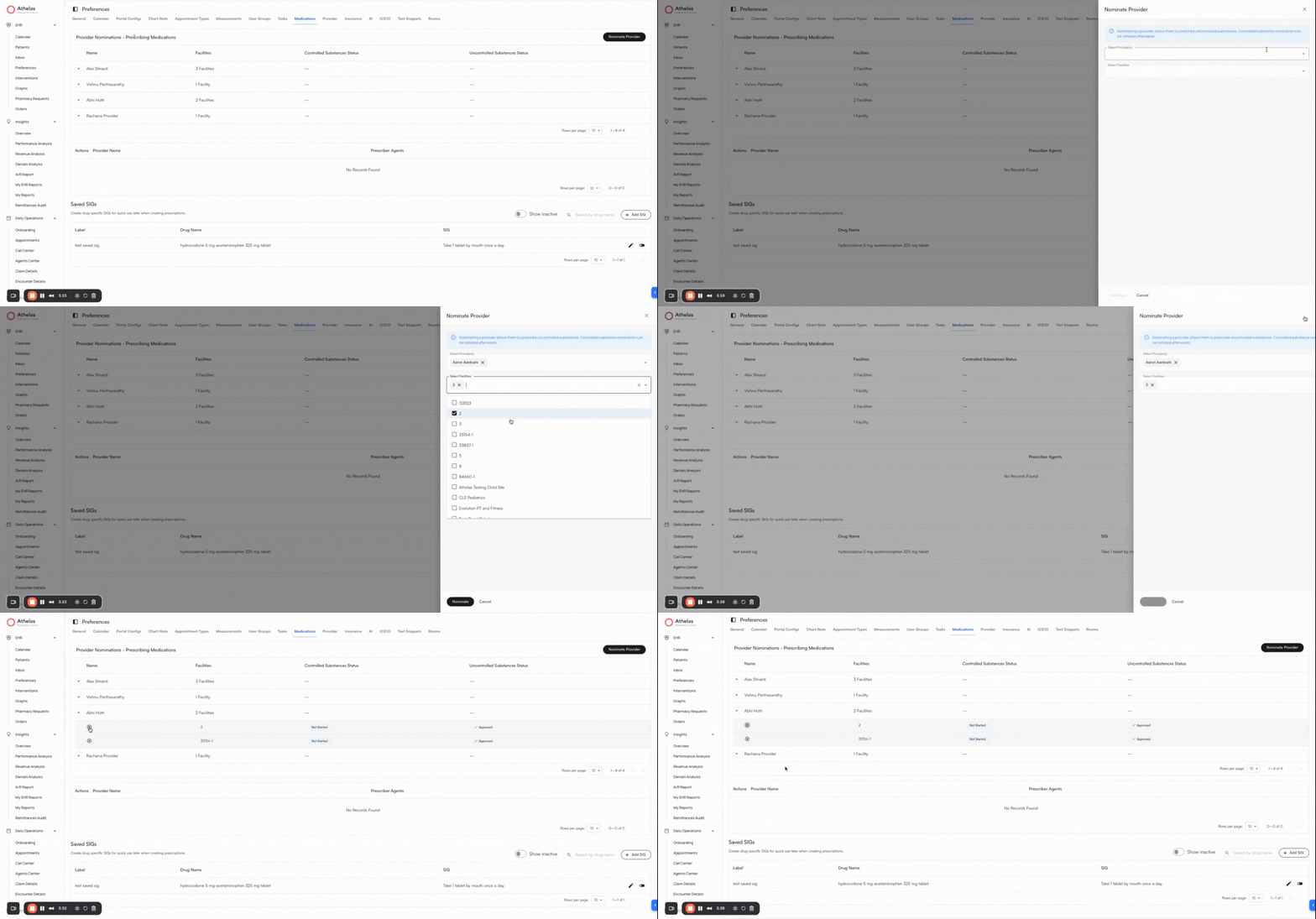 * Provider should be nominated to prescribe for the relevant facilities they want to prescribe for (update within **Preferences Tab > Medications Section > Nominate Provider**)
 ### Add Prescriber Agents to a Provider
* Go to the **Preferences Tab > Medications > Prescriber Agents**
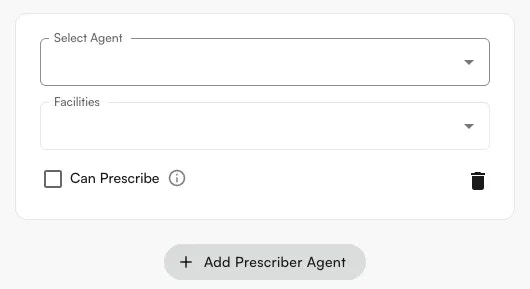
* Click **+Add Prescriber Agent**.
* You will see yourself listed as the provider by default. This cannot be changed, since prescriber agents must be set up by the provider or admin.
* Select one or more agents, then add the facilities where you want them to create draft medications.
* **Can prescribe** → allows the prescriber agent to prescribe **uncontrolled substances** directly. If **Can prescribe** is checked, the agent can still create drafts, but will also have the option to prescribe.
* Click **Submit** when done. This creates the prescriber agent for the selected site and facilities.
### Prescribe Medications as a Prescriber Agent
* Go to the **Patient's Profile > Medications** tab.
* Click **Create Medication Order**.
* When selecting an appointment, the prescriber agent will only see appointments for facilities where they are authorized as a prescriber agent.
* On the medication form, the prescriber agent can choose:
* **Prescribe as agent**
* **Save draft** (required if they are ineligible to prescribe for that facility or if the medication is controlled).
* Medications saved as drafts will appear with a **Draft** status.
* Once submitted:
* Draft medications will appear in the **Medications table**.
* A confirmation toast will display details of the medications created.
* A **task is automatically created for the provider**, who must review and sign off on the medications.
**Note:** Prescriber agents can edit draft medications, but they **cannot prescribe** medications once saved as a draft.
### Add Prescriber Agents to a Provider
* Go to the **Preferences Tab > Medications > Prescriber Agents**
* Click **+Add Prescriber Agent**.
* You will see yourself listed as the provider by default. This cannot be changed, since prescriber agents must be set up by the provider or admin.
* Select one or more agents, then add the facilities where you want them to create draft medications.
* **Can prescribe** → allows the prescriber agent to prescribe **uncontrolled substances** directly. If **Can prescribe** is checked, the agent can still create drafts, but will also have the option to prescribe.
* Click **Submit** when done. This creates the prescriber agent for the selected site and facilities.
### Prescribe Medications as a Prescriber Agent
* Go to the **Patient's Profile > Medications** tab.
* Click **Create Medication Order**.
* When selecting an appointment, the prescriber agent will only see appointments for facilities where they are authorized as a prescriber agent.
* On the medication form, the prescriber agent can choose:
* **Prescribe as agent**
* **Save draft** (required if they are ineligible to prescribe for that facility or if the medication is controlled).
* Medications saved as drafts will appear with a **Draft** status.
* Once submitted:
* Draft medications will appear in the **Medications table**.
* A confirmation toast will display details of the medications created.
* A **task is automatically created for the provider**, who must review and sign off on the medications.
**Note:** Prescriber agents can edit draft medications, but they **cannot prescribe** medications once saved as a draft.
### Review Prescriptions by Prescriber Agents
### Key Points to Remember
* **MAs or Providers can also be assigned as prescriber agents for other providers.** For example, a midlevel can be a prescriber agent for another provider and will be drafting/prescribing under their name.
* **Any prescriber agent has the ability to directly prescribe non-controlled medications** on behalf of another provider. This can be disabled in **Preferences > Medications > Prescriber Agents** to only allow drafting.
* **A prescriber agent can only draft (cannot prescribe) controlled medications** on behalf of another provider. The provider will have to verify with ID.me and approve the medication order.
* **Controlled medications will only appear for providers who are permitted to prescribe them.**
### FAQ
No. Prescriber agents can only **draft** controlled medications on behalf of a provider. The provider must verify their identity via **ID.me** and approve the order before it is sent.
Navigate to **Preferences > Medications > Prescriber Agents** and uncheck the **Can prescribe** option for that agent. This limits them to creating drafts only.
Yes. MAs and providers (including midlevels) can be assigned as prescriber agents for other providers. Drafts and prescriptions will appear under the supervising provider's name.
The draft appears in the **Medications** table with a **Draft** status, and a task is automatically created and assigned to the supervising provider to review and sign off.