> ## Documentation Index
> Fetch the complete documentation index at: https://trainings.air.athelas.com/llms.txt
> Use this file to discover all available pages before exploring further.
# Deferring a Claim
### At a Glance
Sometimes a claim has work to be done — but not right now. Maybe you're waiting on a callback from a payer, an appeal in litigation, or a coding update from a provider. **Deferring** lets you set a claim aside so it drops out of your worklist until it's actionable again, without losing track of it.
Deferring solves three everyday problems:
* Clearing claims out of your view when there's nothing you can do at the moment.
* Capturing *why* and *how often* claims get set aside, so your team can spot patterns.
* Making it clear when you can (or can't) expect an update from your EHR.
Deferrals work only on the new Claims Page. They aren't compatible with the legacy denials or rejections worklists.
## What Happens When You Defer a Claim
Deferring **hides** a claim from views that filter for `Claim is not deferred` — most importantly the **My Claims** and **Workable Claims** views, which exclude deferred claims automatically.
When the expiration date arrives, one of two things happens:
* If the work queue has **changed** in the meantime (because new data moved the claim forward), no further work is needed — the deferral did its job.
* If the work queue is **unchanged**, the claim reappears in your worklist so you can pick it back up.
Deferring **does not change the work queue** — it only sets the claim aside in its current queue. The date, reason, and duration of every deferral are recorded in the [Activity Feed](/insights_biller/claim_details/working_a_claim).
## How to Defer a Claim
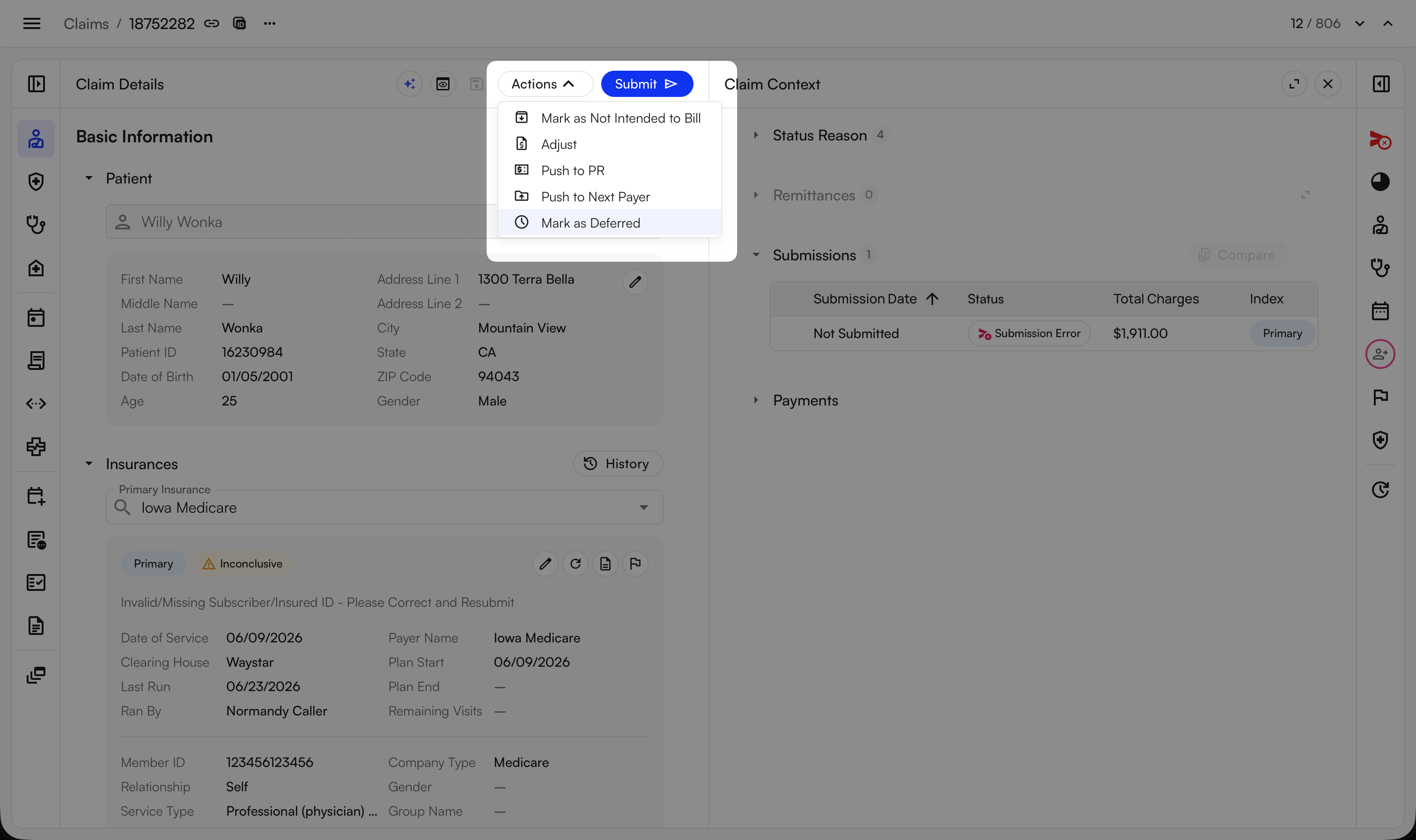
You can defer a claim from the **Actions** dropdown while viewing it.
 In the popup, provide a **Reason** and an **Expiration Date** (quick options like "1 month" are available). Both are required.
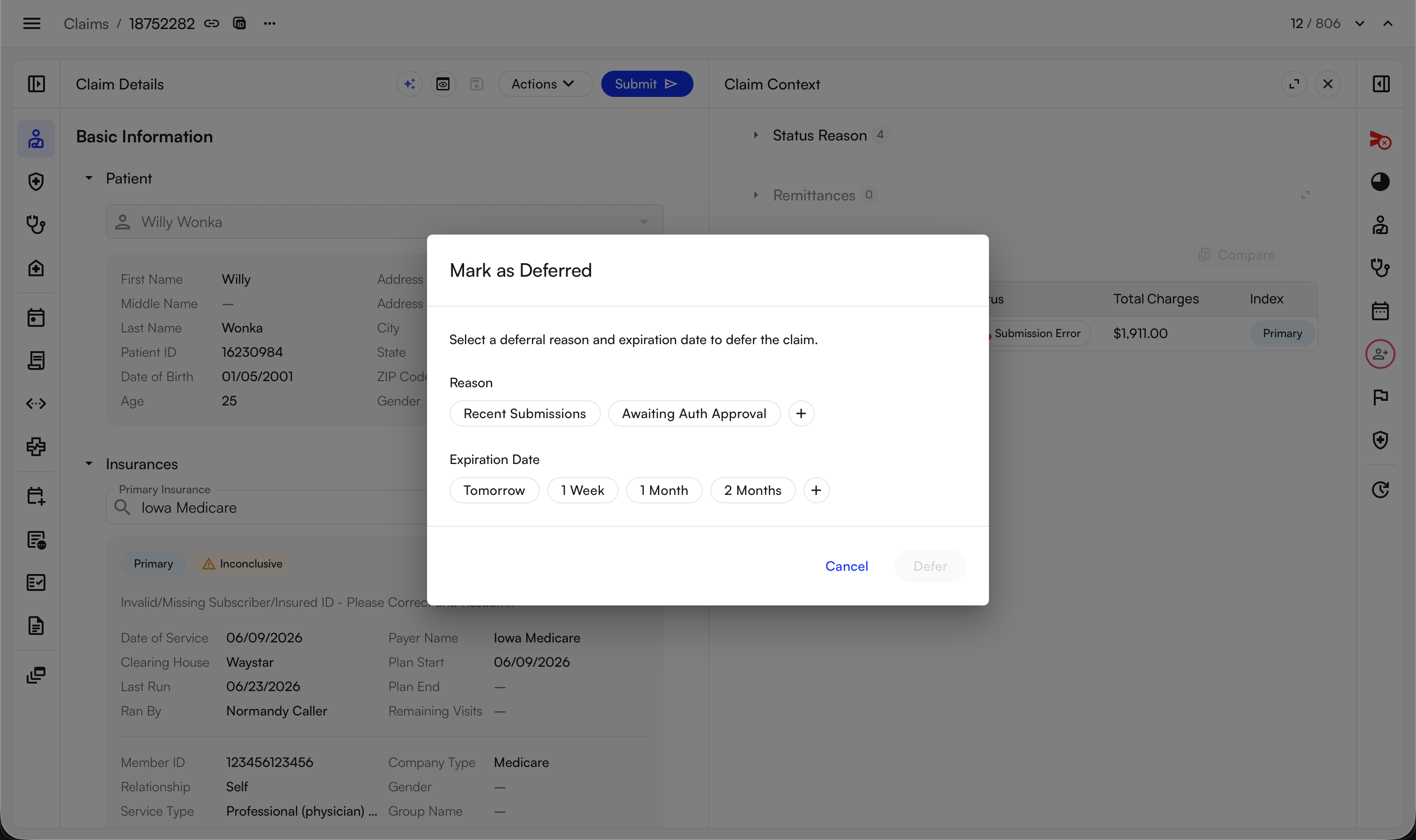 Once you save, the claim disappears from your workable views until it expires or its work queue changes.
✨**Smart Tip:** To check whether a claim is currently deferred, open its **Actions** menu — the options shown tell you its deferral state.
## Deferring in Bulk
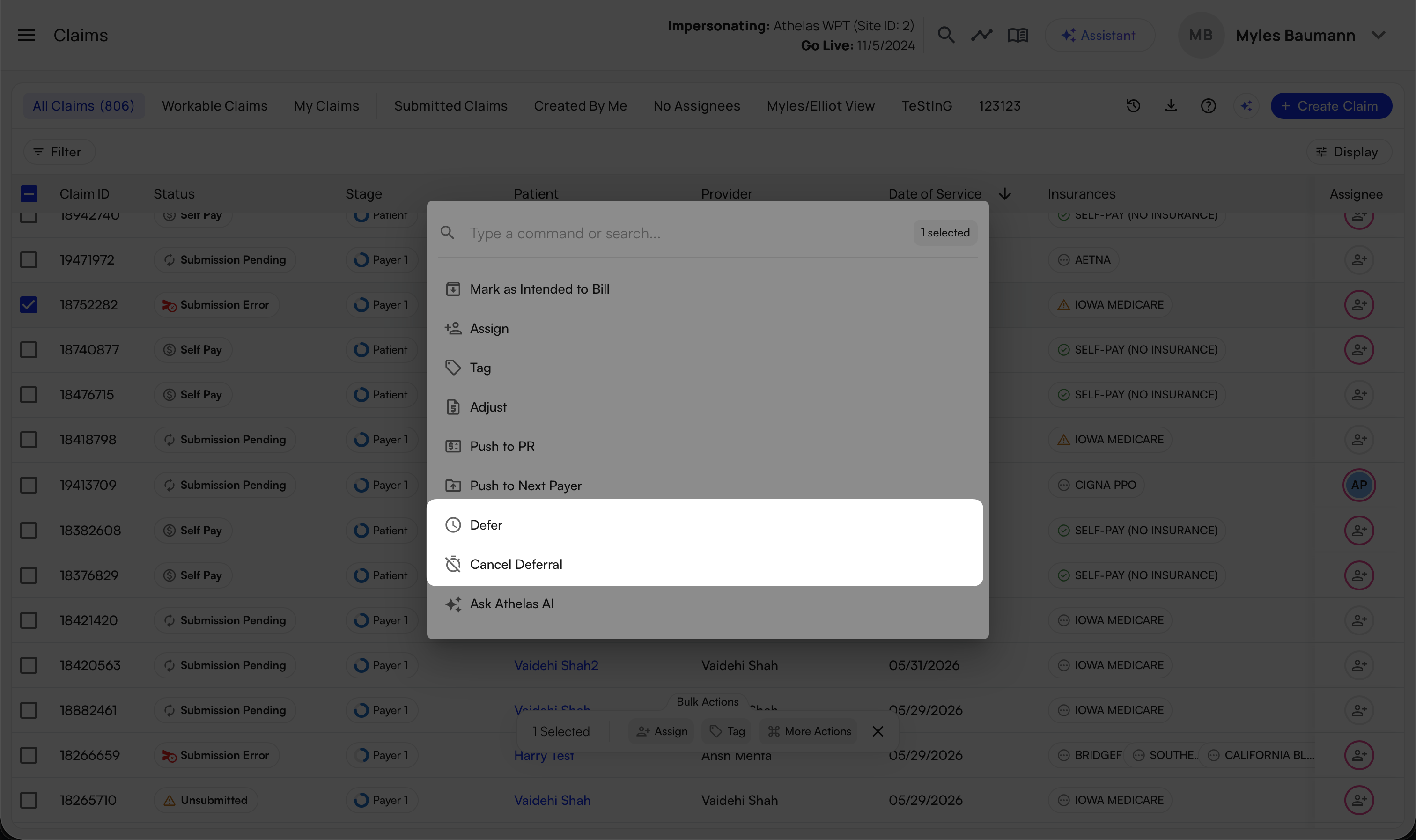
You can defer — and cancel deferrals — for many claims at once. Select the claims, then choose **Defer** (or **Cancel Deferral**) from the bulk actions.
Once you save, the claim disappears from your workable views until it expires or its work queue changes.
✨**Smart Tip:** To check whether a claim is currently deferred, open its **Actions** menu — the options shown tell you its deferral state.
## Deferring in Bulk
You can defer — and cancel deferrals — for many claims at once. Select the claims, then choose **Defer** (or **Cancel Deferral**) from the bulk actions.
 One thing to know:
* If you defer a claim that's **already deferred**, the expiration date **resets** to the new date — it does not add on to the existing deferral.
## Canceling or Extending a Deferral
Once a claim is deferred, you can **cancel** the deferral at any time, the same way you deferred it.
One thing to know:
* If you defer a claim that's **already deferred**, the expiration date **resets** to the new date — it does not add on to the existing deferral.
## Canceling or Extending a Deferral
Once a claim is deferred, you can **cancel** the deferral at any time, the same way you deferred it.
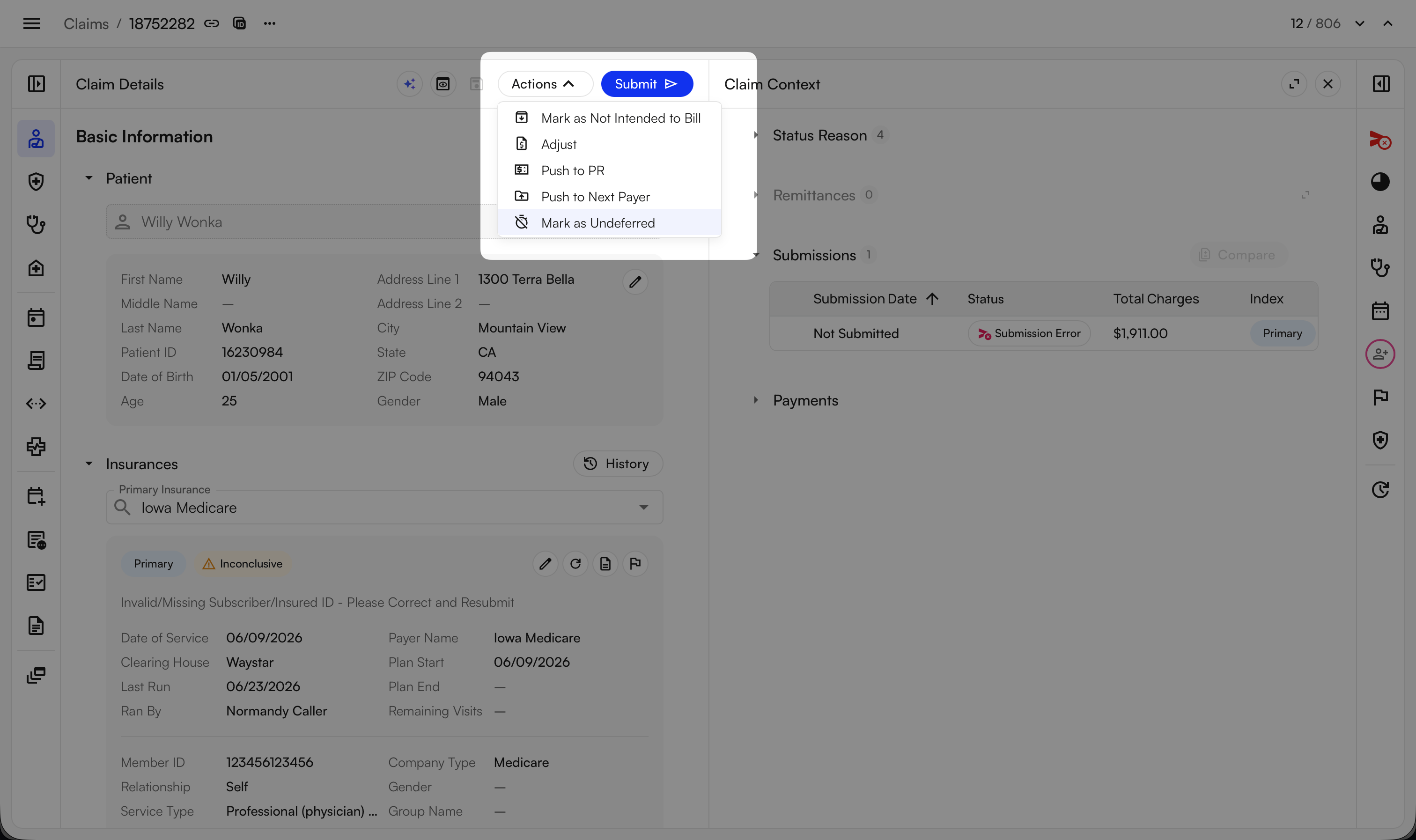 To **extend** a deferral, re-defer the claim with a new expiration date. Re-deferring without first canceling is supported through the bulk action.
## Creating Deferral Reasons
To add a new reason, click the **+** button in the reason list and type it in.
To **extend** a deferral, re-defer the claim with a new expiration date. Re-deferring without first canceling is supported through the bulk action.
## Creating Deferral Reasons
To add a new reason, click the **+** button in the reason list and type it in.
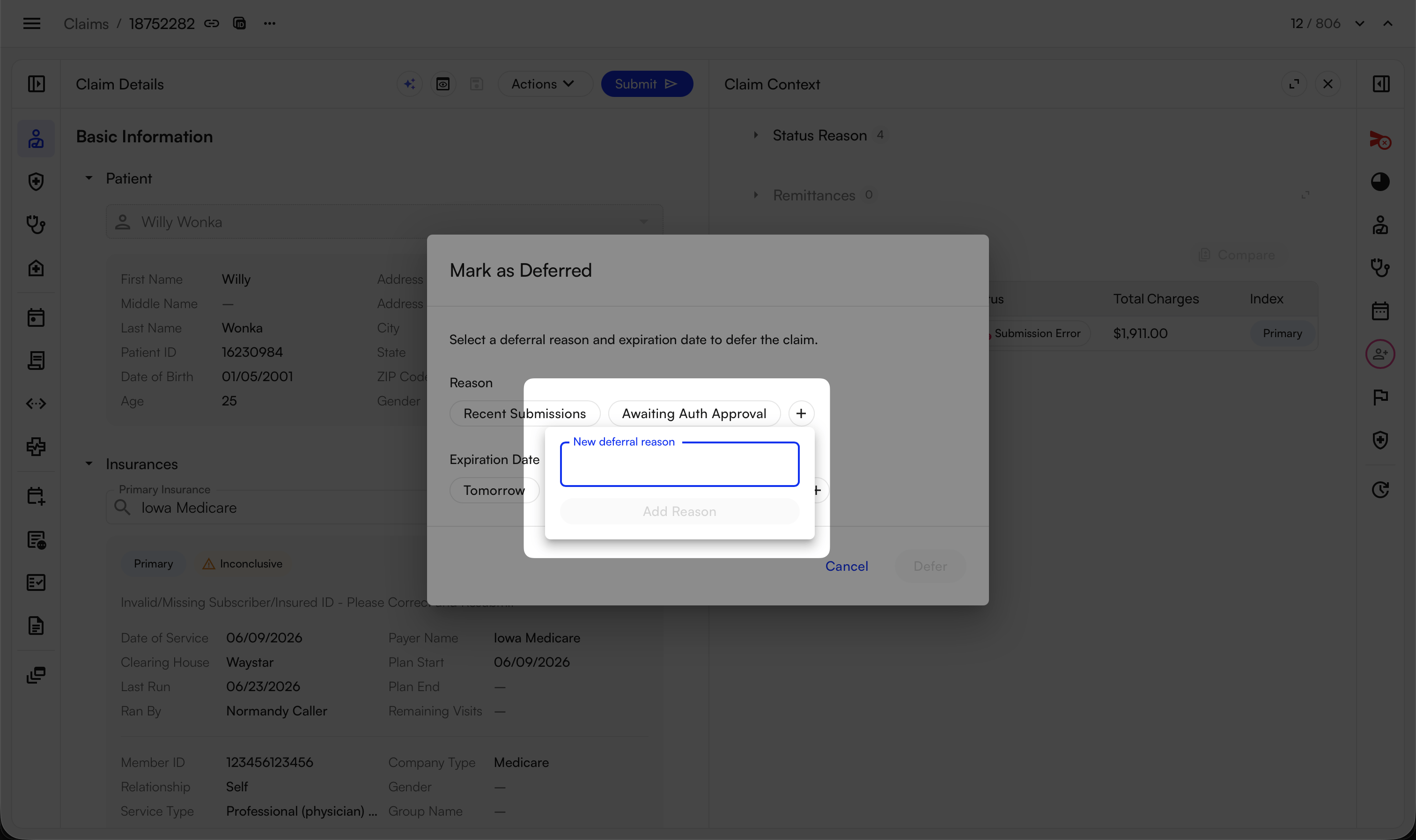 Deferral reasons are **site-specific** — once anyone at your site creates a reason, everyone at that site sees it as an option. Reasons can't be deleted once created (the same behavior as claim tags), so agree on a shared set of reasons before you go wide.
## Automatic Behavior
Deferrals take care of a few things on their own:
* **Auto-clear** — a deferral clears automatically when it **expires** or when the claim's **work queue changes**. Both events are logged in the Activity Feed.
* **Pauses patient responsibility** — while a claim is deferred, [patient responsibility (PR)](/insights_front_desk/patient_responsibility/patient_responsibility_page) generation is paused, so you won't send PR to a patient while you're still waiting on the claim.
## The "Updated in EHR" Reason (Billing-Only Sites)
Sites that use Insights for billing only (not the Air EHR) get a built-in reason: **Updated in EHR**. When you choose it, the expiration date is set automatically to the date of the next scheduled EHR sync for that claim.
Deferral reasons are **site-specific** — once anyone at your site creates a reason, everyone at that site sees it as an option. Reasons can't be deleted once created (the same behavior as claim tags), so agree on a shared set of reasons before you go wide.
## Automatic Behavior
Deferrals take care of a few things on their own:
* **Auto-clear** — a deferral clears automatically when it **expires** or when the claim's **work queue changes**. Both events are logged in the Activity Feed.
* **Pauses patient responsibility** — while a claim is deferred, [patient responsibility (PR)](/insights_front_desk/patient_responsibility/patient_responsibility_page) generation is paused, so you won't send PR to a patient while you're still waiting on the claim.
## The "Updated in EHR" Reason (Billing-Only Sites)
Sites that use Insights for billing only (not the Air EHR) get a built-in reason: **Updated in EHR**. When you choose it, the expiration date is set automatically to the date of the next scheduled EHR sync for that claim.
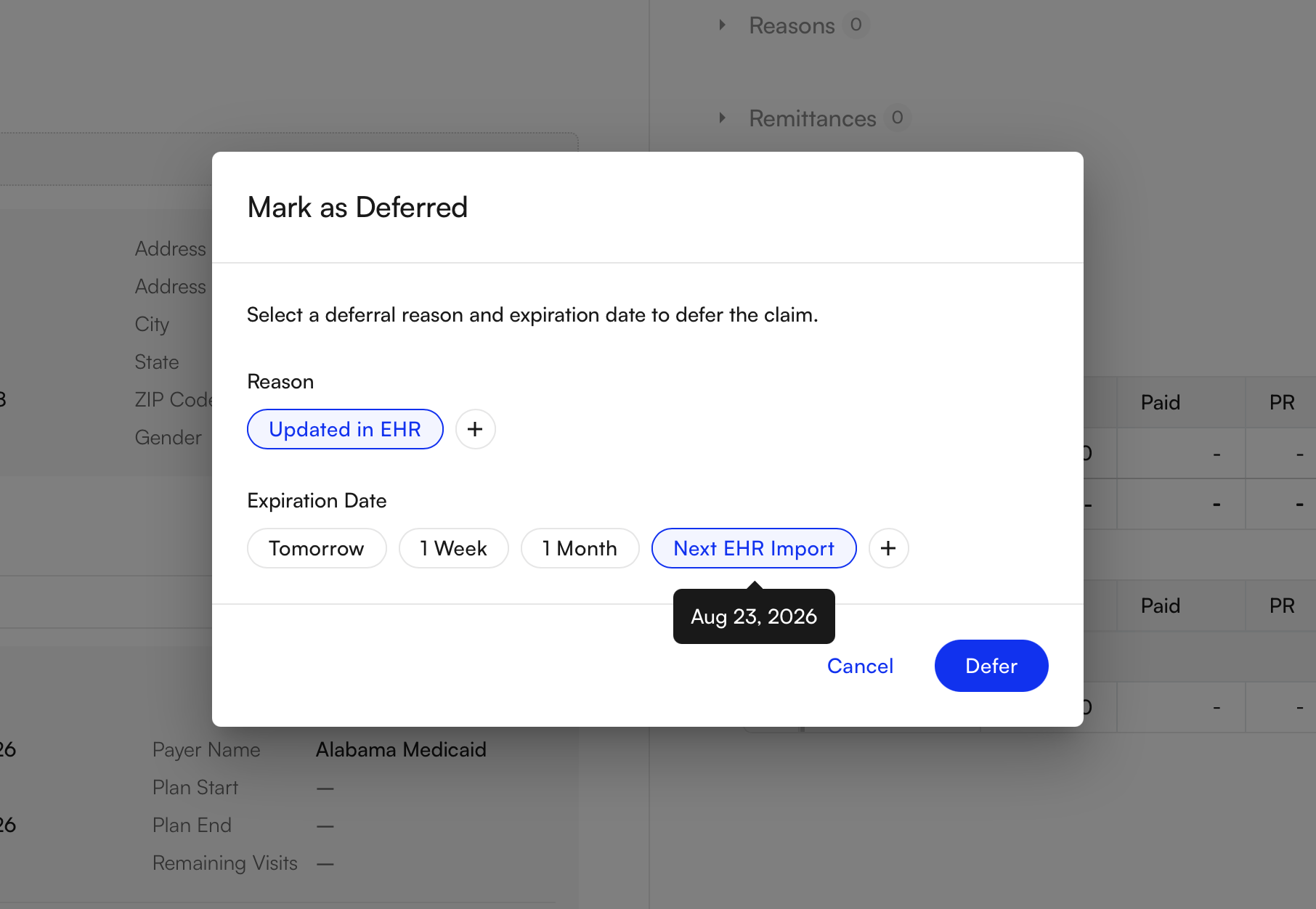 * Used in bulk, each claim is set to its own next sync date.
* If a claim has **no future sync scheduled** (for example, a claim older than 120 days), this reason is disabled — a guardrail so you can't wait on an update that will never arrive.
### FAQ
No. Deferring only sets the claim aside in its current status and hides it from your workable views. When the deferral expires — if the status hasn't advanced on its own — the claim reappears exactly where it was.
Every deferral is recorded in the claim's **Activity Feed** with who deferred it, the reason, and the duration. To check a claim's current deferral state, open its **Actions** menu.
The expiration date **resets** to the new date you choose — it doesn't extend the original deferral. This applies whether you re-defer a single claim or a batch.
It only appears for billing-only sites (those not on the Air EHR). Even then, it's disabled for a claim that has no future EHR sync scheduled — for example, a claim older than 120 days — so you don't defer a claim that would never receive an update.
No — PR generation is paused for the duration of the deferral. This prevents a patient statement from going out while you're still working the claim with the payer. PR resumes once the deferral clears.
* Used in bulk, each claim is set to its own next sync date.
* If a claim has **no future sync scheduled** (for example, a claim older than 120 days), this reason is disabled — a guardrail so you can't wait on an update that will never arrive.
### FAQ
No. Deferring only sets the claim aside in its current status and hides it from your workable views. When the deferral expires — if the status hasn't advanced on its own — the claim reappears exactly where it was.
Every deferral is recorded in the claim's **Activity Feed** with who deferred it, the reason, and the duration. To check a claim's current deferral state, open its **Actions** menu.
The expiration date **resets** to the new date you choose — it doesn't extend the original deferral. This applies whether you re-defer a single claim or a batch.
It only appears for billing-only sites (those not on the Air EHR). Even then, it's disabled for a claim that has no future EHR sync scheduled — for example, a claim older than 120 days — so you don't defer a claim that would never receive an update.
No — PR generation is paused for the duration of the deferral. This prevents a patient statement from going out while you're still working the claim with the payer. PR resumes once the deferral clears.