> ## Documentation Index
> Fetch the complete documentation index at: https://trainings.air.athelas.com/llms.txt
> Use this file to discover all available pages before exploring further.
# How to Download CMS-1500 Forms
### At a Glance
This guide details how to download CMS-1500 forms, individually and in bulk.
**What is a CMS-1500 (or HFCA-1500) Form?**
The Healthcare Financing Administration (HCFA)-1500 claim form, also known as **Centers for Medicare & Medicaid Services (CMS)-1500**, enables medical physicians to submit health insurance claims for reimbursement from various government insurance plans including Medicare, Medicaid and Tricare. When a physician has a private practice but performs services at an institutional facility such as a hospital or outpatient facility, the CMS-1500 form would be used to bill for their services.
For more information, visit \[[cms.gov](http://cms.gov/)]\([https://www.cms.gov/medicare/billing/electronicbillingeditrans/1500](https://www.cms.gov/medicare/billing/electronicbillingeditrans/1500)).
In Insights, we refer to these as CMS-1500 forms.
### Here’s How to Do It
* **Download an Individual CMS-1500 Form**From the [Claim Details page](https://insights.athelas.com/v3/claim_level_view), open the target claim.
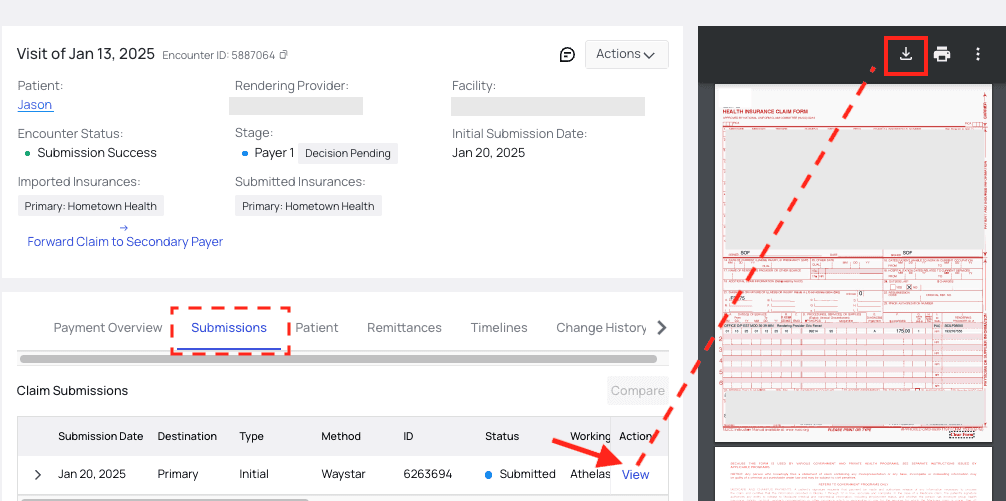
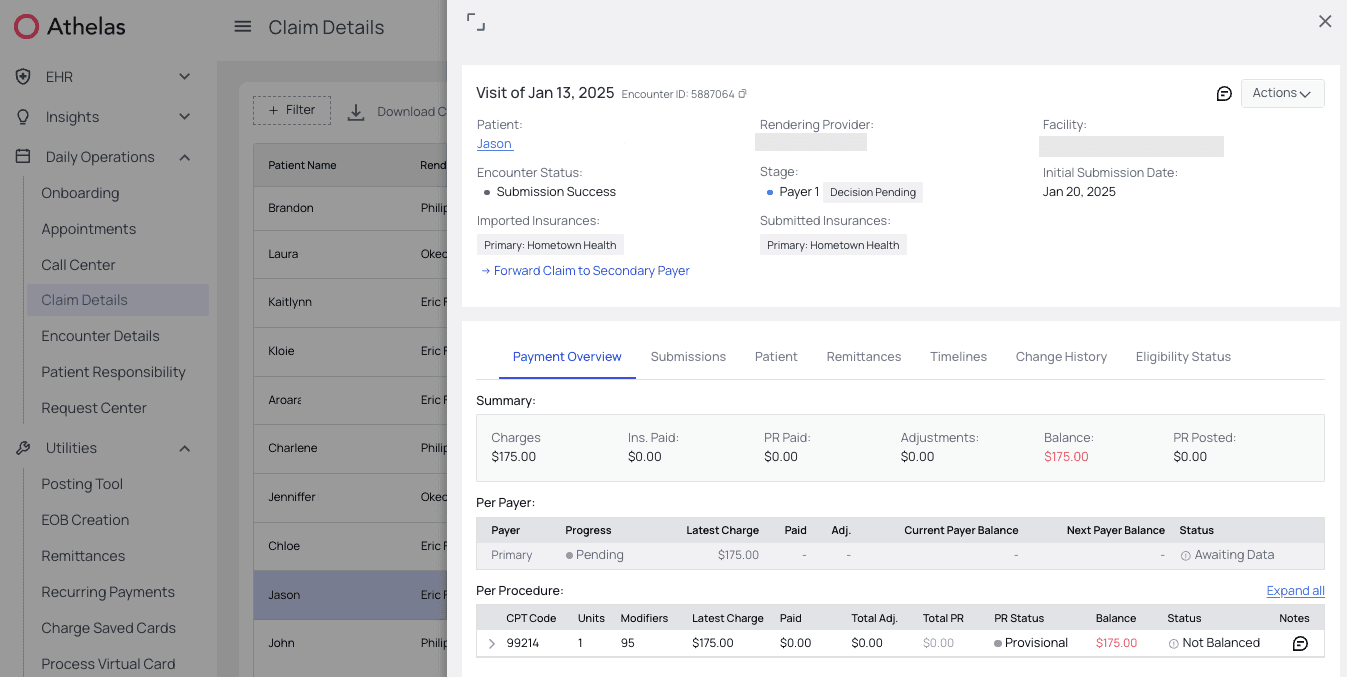 Open the Submissions tab. Find the submission in question and click `View`, under the ‘Action’ column.You will then see a preview of the CMS-1500 form. Note that it may take 10-15 seconds to load.You then have the option to Download or Print the document with the icon buttons at the top of the new preview page.
 Done!
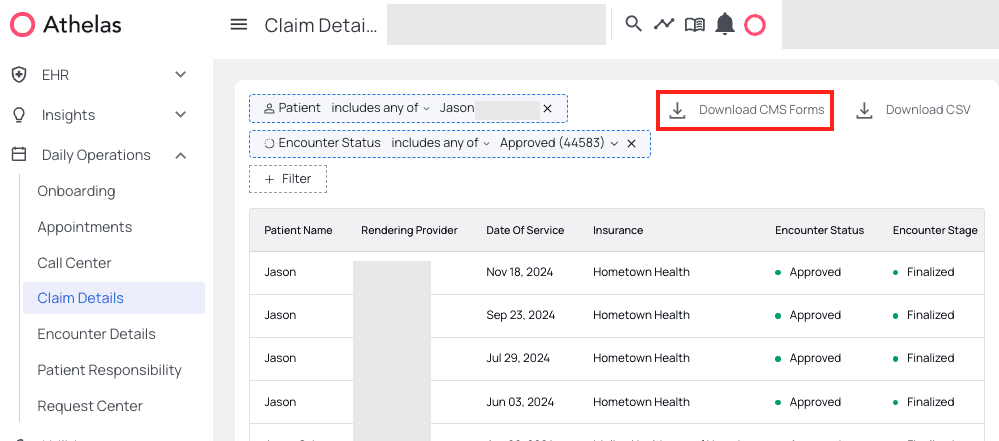
* **Download CMS-1500 Forms in Bulk**There is a `Download CMS Forms` button next to the filters at the top of the [Claim Details page](https://insights.athelas.com/v3/claim_level_view). We recommend using the filters to narrow your search, otherwise the download will probably take a very long time or fail.
In this example, we’ll download CMS-1500 forms for this particular patient, but only for claims with an Encounter Status of ‘Approved.’
Done!
* **Download CMS-1500 Forms in Bulk**There is a `Download CMS Forms` button next to the filters at the top of the [Claim Details page](https://insights.athelas.com/v3/claim_level_view). We recommend using the filters to narrow your search, otherwise the download will probably take a very long time or fail.
In this example, we’ll download CMS-1500 forms for this particular patient, but only for claims with an Encounter Status of ‘Approved.’
 Note that these downloads may be large and take a few minutes.
#### Coding
**Features Supported**
* A coding team is dedicated to ensuring accurate and compliant coding for electronic and paper claims.
* We have coding quality reviews to ensure clean claims and reduce downstream denials
* We provide coding review and support for coding related denied Claims
* We provide recommendations and updates on coding guidelines and best practices
* We code all encounters within 24-48 business hour SLA
**Features In Development**
* Automated E/M coding using AI
**Features Not Supported**
* Write-backs into the sites EHR
* Coding prior auth support for large- scale workflows.
* Specialities: PT
Note that these downloads may be large and take a few minutes.
#### Coding
**Features Supported**
* A coding team is dedicated to ensuring accurate and compliant coding for electronic and paper claims.
* We have coding quality reviews to ensure clean claims and reduce downstream denials
* We provide coding review and support for coding related denied Claims
* We provide recommendations and updates on coding guidelines and best practices
* We code all encounters within 24-48 business hour SLA
**Features In Development**
* Automated E/M coding using AI
**Features Not Supported**
* Write-backs into the sites EHR
* Coding prior auth support for large- scale workflows.
* Specialities: PT