> ## Documentation Index
> Fetch the complete documentation index at: https://trainings.air.athelas.com/llms.txt
> Use this file to discover all available pages before exploring further.
# PR Timeline
### At a Glance
The **PR Timeline** chronologically displays every event related to PR and Payments for a particular Date of Service (DoS). It **functions as a snapshot of PR for a given DoS, at any point in time.** You can view when the appointment took place, when claims were submitted, all the way through to when balances were updated and payment was fully applied.
## 🕰️ Finding the Timeline
From the [Patient Responsibility](https://insights.athelas.com/v2/patient-responsibility) page, navigate to the Patient View tab and **choose a patient.**
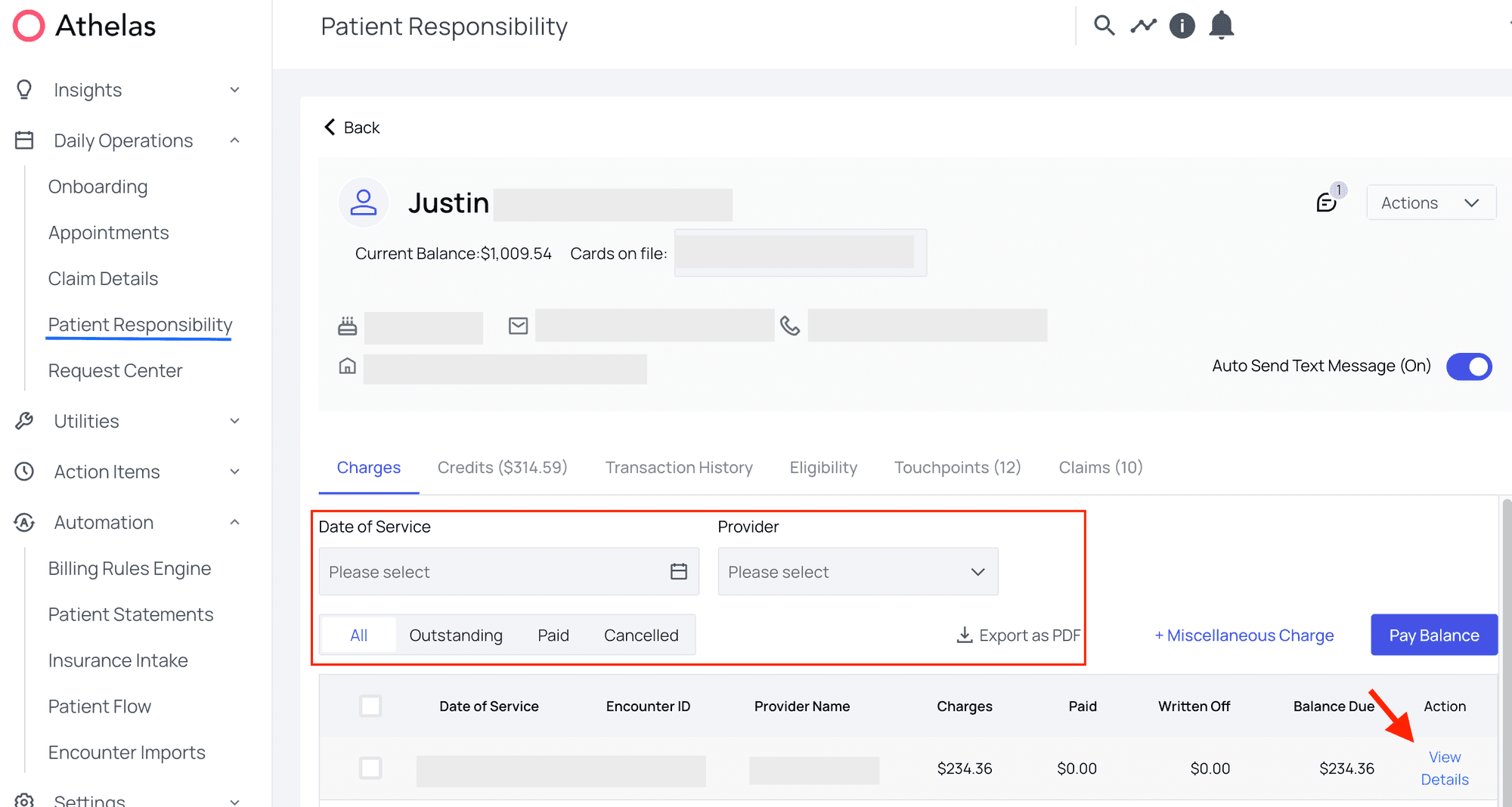
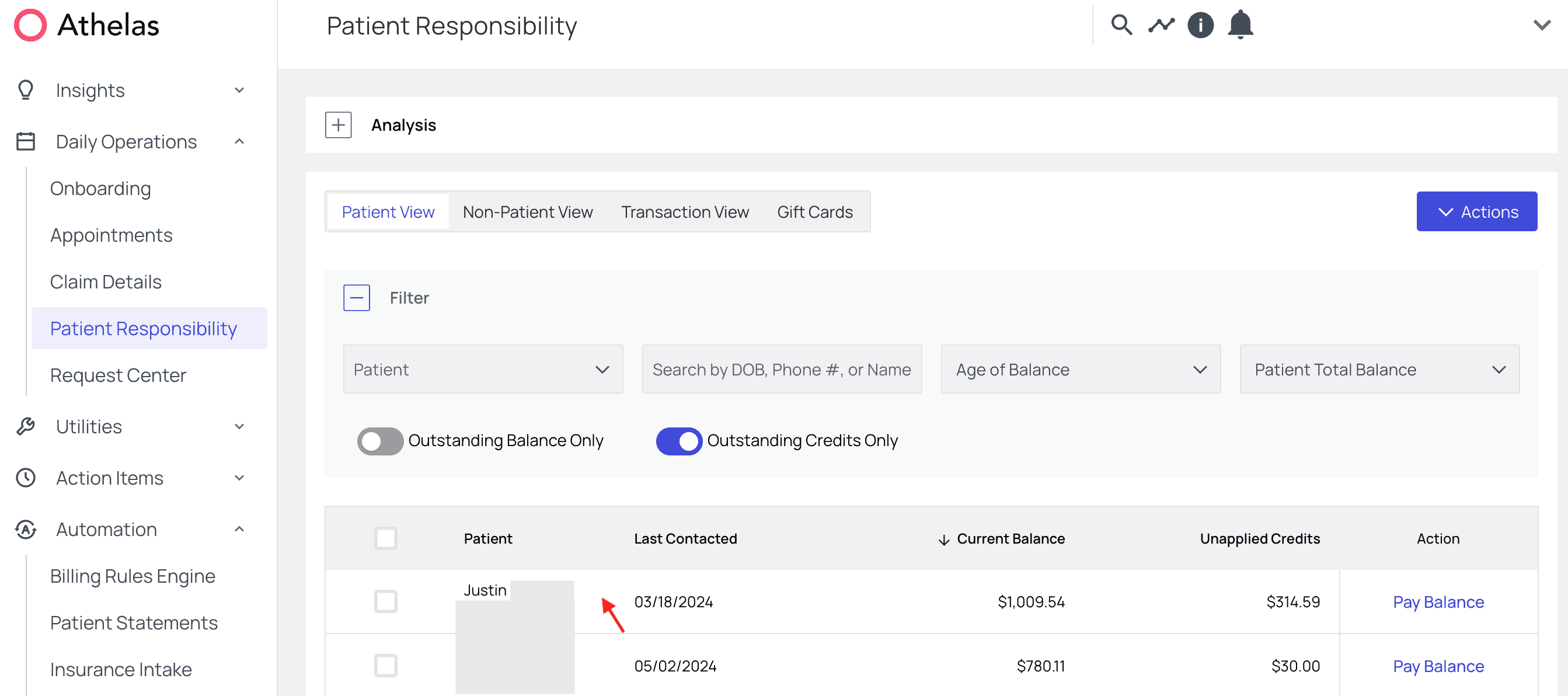 By default you’ll land on the **Charges tab.** From there, select a date of service from the list and click ‘**View Details**.’
* You can also filter by Date of Service, Provider, or PR status (Outstanding, Paid, Cancelled).
By default you’ll land on the **Charges tab.** From there, select a date of service from the list and click ‘**View Details**.’
* You can also filter by Date of Service, Provider, or PR status (Outstanding, Paid, Cancelled).
 From there, find the **Timeline tab** partway down the page, and the timeline will appear!
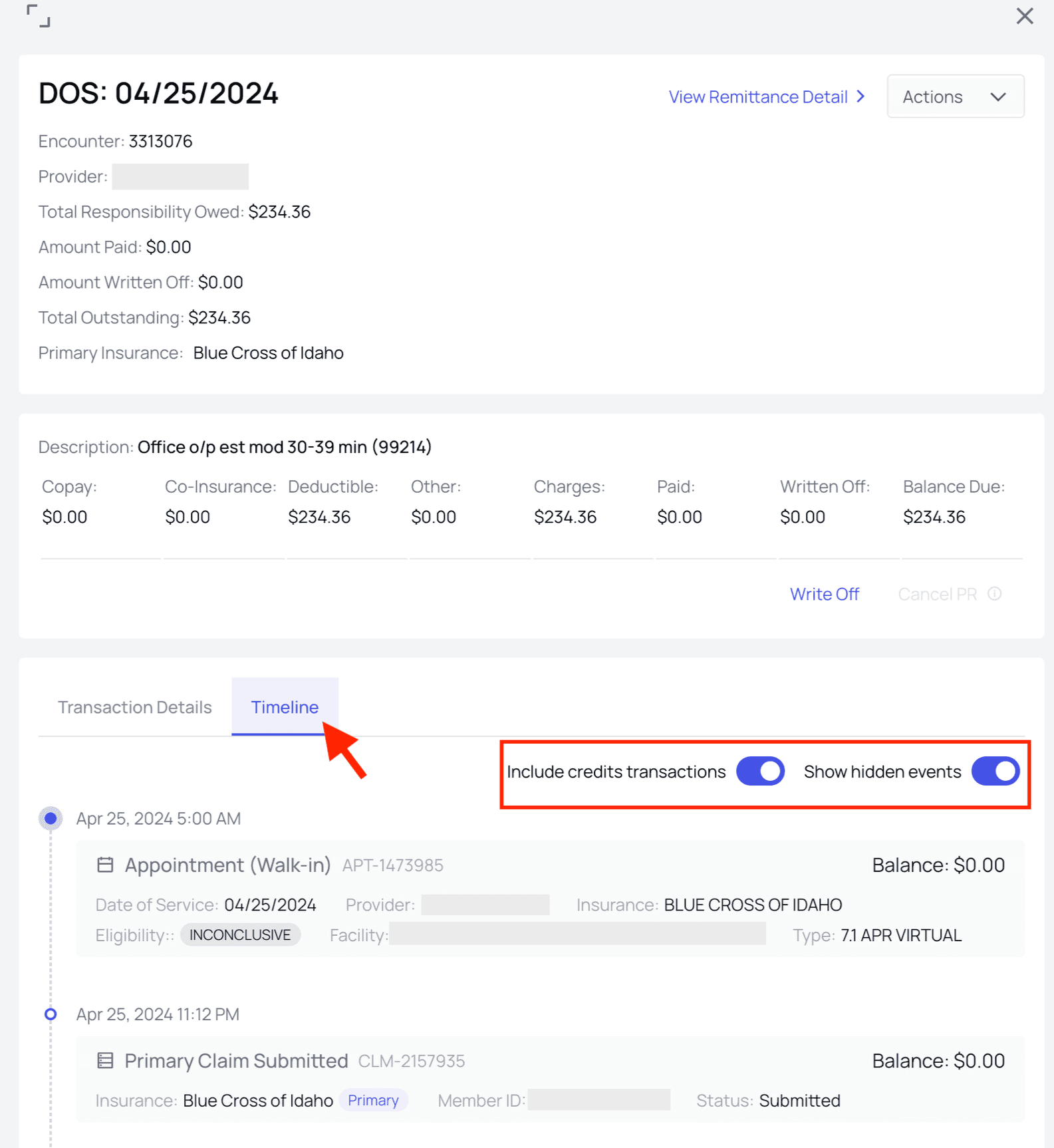 **Configuration:** There are toggles for showing or hiding **credits transactions** as well as other **hidden events**. Some Events are hidden due to their relatively inconsequential nature. For example, if a partial refund is required, then a full refund may be issued and then credits will be used to make up the difference. This event will exist, but it will be hidden from the PR Timeline to make the data more intuitive and readable.
## Parts of the PR Timeline
### Cards
The PR timeline is broken down into cards, each of which represents an event in the PR journey.
**Configuration:** There are toggles for showing or hiding **credits transactions** as well as other **hidden events**. Some Events are hidden due to their relatively inconsequential nature. For example, if a partial refund is required, then a full refund may be issued and then credits will be used to make up the difference. This event will exist, but it will be hidden from the PR Timeline to make the data more intuitive and readable.
## Parts of the PR Timeline
### Cards
The PR timeline is broken down into cards, each of which represents an event in the PR journey.
 ### Date and Time
Each card begins with the date and time that the event occurred.
### Date and Time
Each card begins with the date and time that the event occurred.
 ### Card Type
Next, what type of event the card represents is shown. For example a Payment, or Remittances Received, or Updated Balance for the patient’s account.
### Card Type
Next, what type of event the card represents is shown. For example a Payment, or Remittances Received, or Updated Balance for the patient’s account.
 ### Amount
Usually there is a primary dollar amount for the card. For example: a payment would lust the amount paid, and a remittance would list the total PR due.
### Amount
Usually there is a primary dollar amount for the card. For example: a payment would lust the amount paid, and a remittance would list the total PR due.
 ### Balance (and Change to Balance)
In the upper right of each card you’ll find a running balance for the patient — if you ever need to know how much a patient owes at this precise moment in the process, you’ll find it listed here.
* We also include a card showing the change to the balance since the last card.
* For example if the previous card ended with a balance of \$10, and the new card had a balance of \$10, we would list a change of +\$40.
### Balance (and Change to Balance)
In the upper right of each card you’ll find a running balance for the patient — if you ever need to know how much a patient owes at this precise moment in the process, you’ll find it listed here.
* We also include a card showing the change to the balance since the last card.
* For example if the previous card ended with a balance of \$10, and the new card had a balance of \$10, we would list a change of +\$40.
 ### Additional Details
And because here are sometimes more details than are useful to show immediately, most cards have an expandable section at the bottom with additional contextual details.
### Additional Details
And because here are sometimes more details than are useful to show immediately, most cards have an expandable section at the bottom with additional contextual details.
 Every card type has slightly different details, so keep your eyes open as you explore the timeline.
## Example of PR Timeline
*A PR Timeline may contain anywhere from a single Appointment card to nearly every possible PR factor in the book. Below is an example with a fairly standard number of events included in it.*
**Let’s walk through an example:** Below we can see that `Patient X` had a walk-in **appointment on Jan 11th,** and that their **insurance** **eligibility** came back as ‘Active.’
Every card type has slightly different details, so keep your eyes open as you explore the timeline.
## Example of PR Timeline
*A PR Timeline may contain anywhere from a single Appointment card to nearly every possible PR factor in the book. Below is an example with a fairly standard number of events included in it.*
**Let’s walk through an example:** Below we can see that `Patient X` had a walk-in **appointment on Jan 11th,** and that their **insurance** **eligibility** came back as ‘Active.’
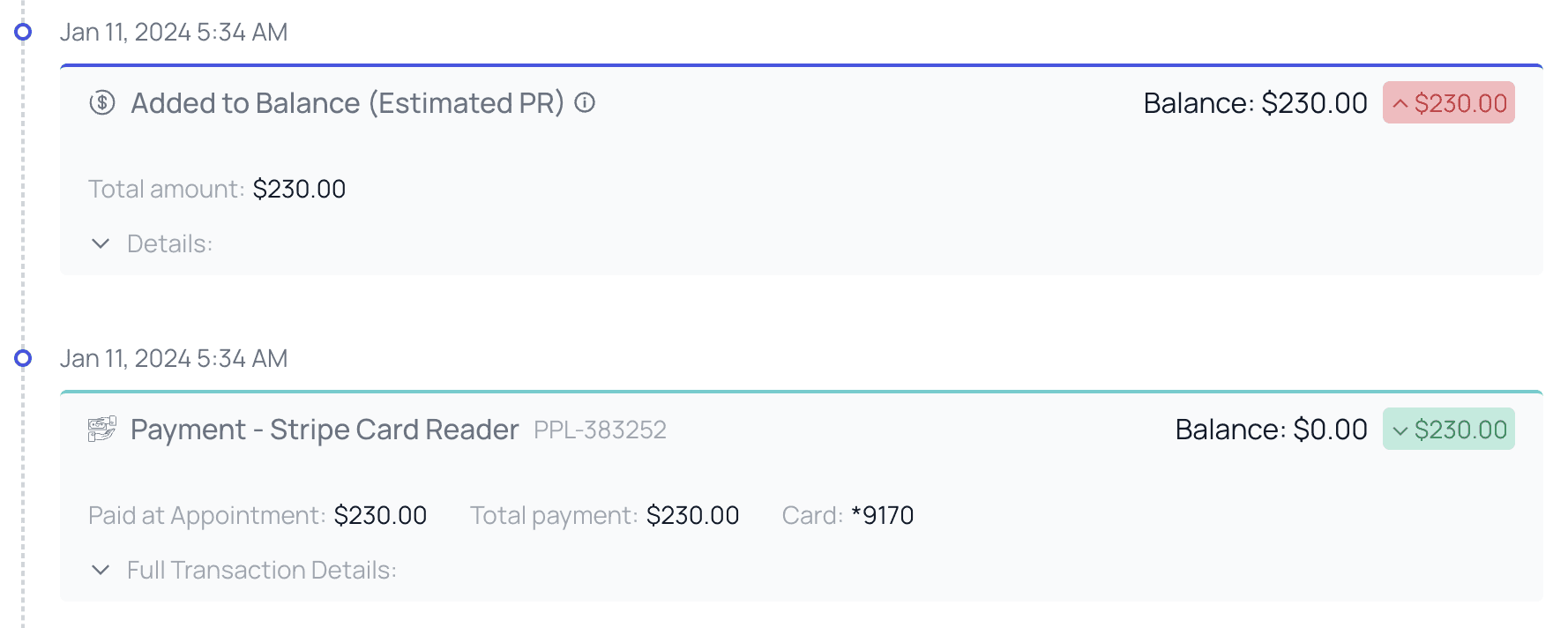
 Also on Jan 11th, we see that the front desk staff collected a payment of **\$230** at time of service. Then a corresponding \$230 of ‘Estimated’ patient responsibility was automatically added to the patient’s account, as a placeholder until we hear back from the payer.
* You can see the patient’s balance momentarily increase to \$230 and then zero out again as the placeholder PR balances the payment.
Also on Jan 11th, we see that the front desk staff collected a payment of **\$230** at time of service. Then a corresponding \$230 of ‘Estimated’ patient responsibility was automatically added to the patient’s account, as a placeholder until we hear back from the payer.
* You can see the patient’s balance momentarily increase to \$230 and then zero out again as the placeholder PR balances the payment.
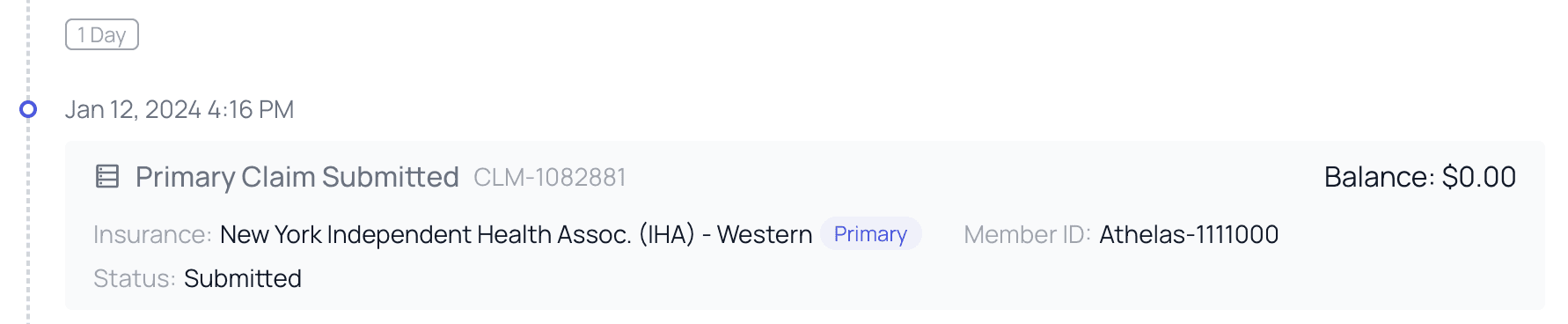
 The next day (Jan 12th) Athelas submitted the claim to the payer…
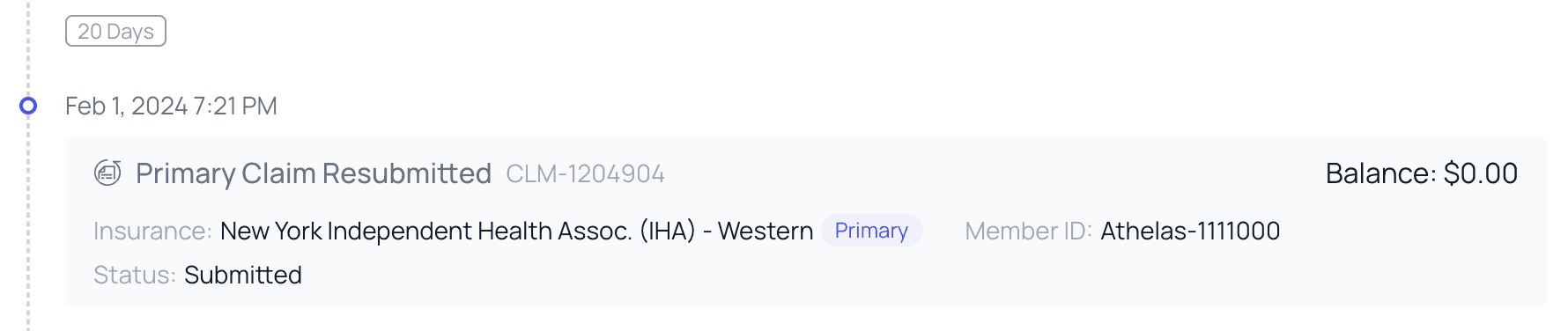
 But then a surprise: on Feb 1st — 20 days after initial claim submission —an update is needed and the claim is resubmitted.
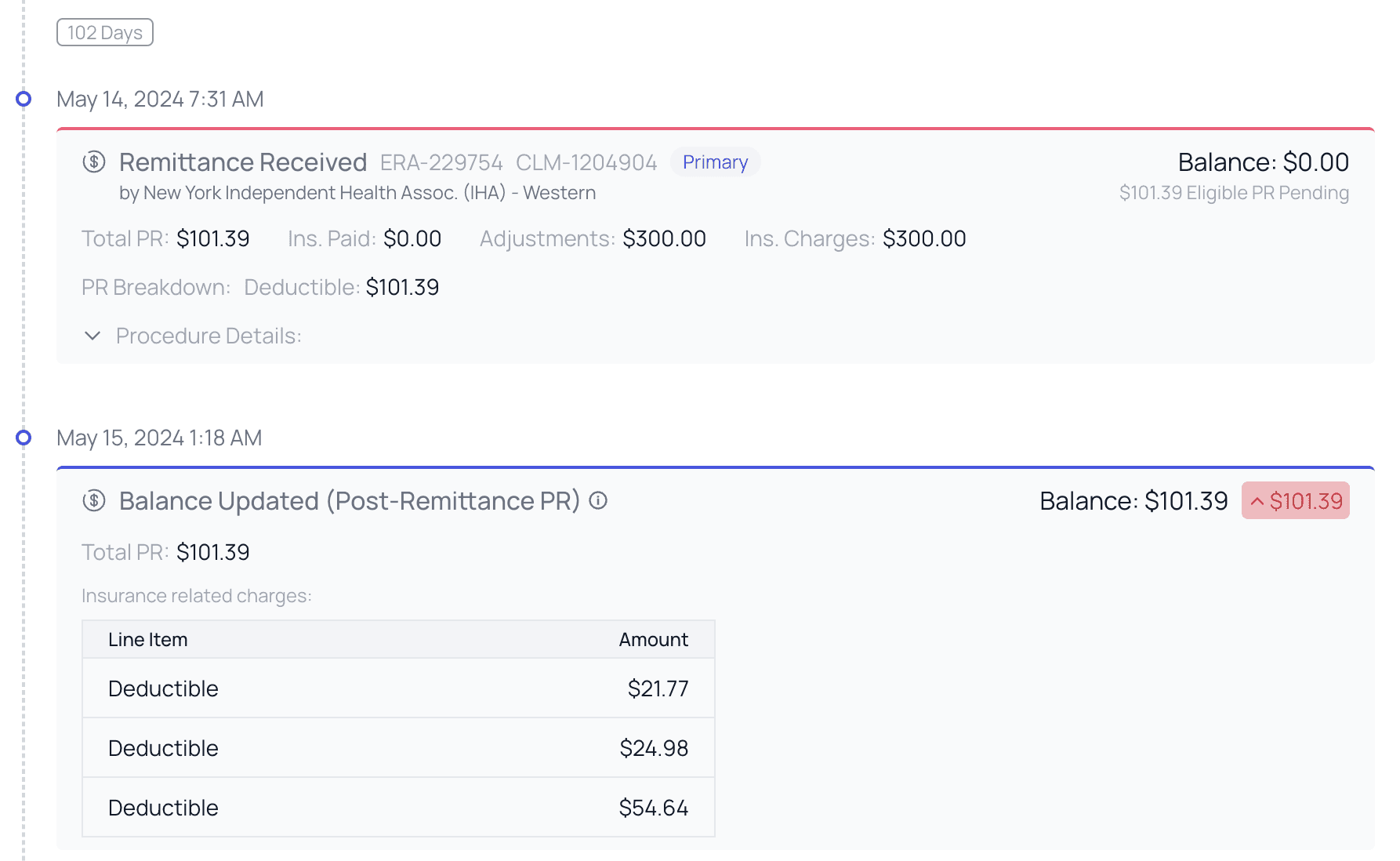
 Possibly due to the correction we sent, this claim took an especially long time to process. However on May 14th after 102 days, a **remittance was retrieved**. The remittance specified a total PR of only \$101.39, half of what was originally collected.
* After the remittance is received, you can see the patient’s PR **balance updating** to the corrected amount. The patient now has a surplus of \$101.39.
* You can also see that the PR is now ‘Post-Remittance PR’ rather than estimated.
Possibly due to the correction we sent, this claim took an especially long time to process. However on May 14th after 102 days, a **remittance was retrieved**. The remittance specified a total PR of only \$101.39, half of what was originally collected.
* After the remittance is received, you can see the patient’s PR **balance updating** to the corrected amount. The patient now has a surplus of \$101.39.
* You can also see that the PR is now ‘Post-Remittance PR’ rather than estimated.
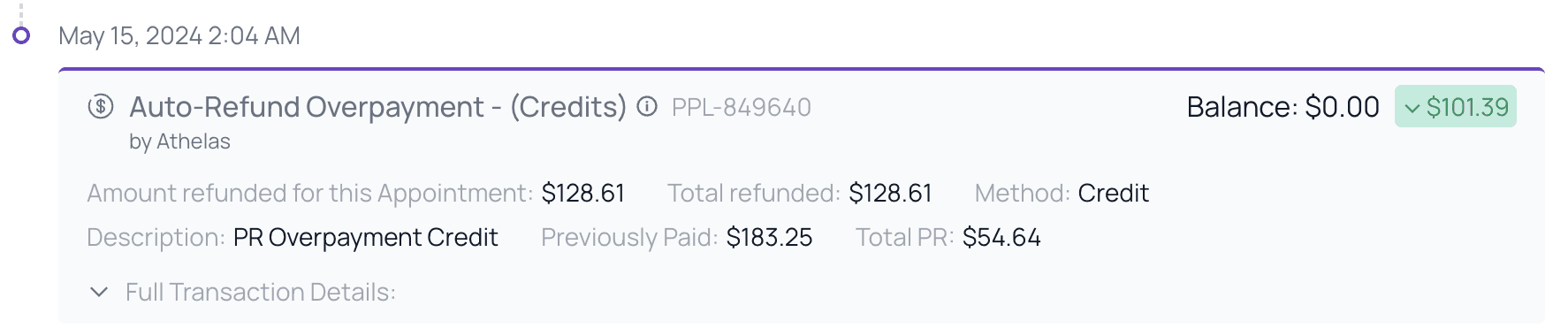
 Of course now we know that the patient has paid too much! Luckily, overnight the Athelas PR Systems detect the overpayment and automatically enact an Auto-Refund.
Credit is added to the patient’s account for \$101.39, reducing the balance to zero.
Of course now we know that the patient has paid too much! Luckily, overnight the Athelas PR Systems detect the overpayment and automatically enact an Auto-Refund.
Credit is added to the patient’s account for \$101.39, reducing the balance to zero.
 And there you have it! The timeline walked us through precisely why the patient’s balance is what it is today, step by step.
This was a more streamlined example, but when claims have resubmissions, partial payments, refunds, and manually edited PR, it can get more complex.
## Here are a few other cards you can expect to see:
**PR Cancellation** When a claim has already received a remittance and it is resubmitted, the existing PR attached to the claim will be cancelled while we await a new decision from the payer. (Any payments on the Appointment will be turned into credit, and locked to the date of service).
And there you have it! The timeline walked us through precisely why the patient’s balance is what it is today, step by step.
This was a more streamlined example, but when claims have resubmissions, partial payments, refunds, and manually edited PR, it can get more complex.
## Here are a few other cards you can expect to see:
**PR Cancellation** When a claim has already received a remittance and it is resubmitted, the existing PR attached to the claim will be cancelled while we await a new decision from the payer. (Any payments on the Appointment will be turned into credit, and locked to the date of service).
 **Credits Applied (Automatic)** When a patient has credits available, those credits may automatically be applied to new balances as those balances are added to the patient’s account.
 **Patient Statement Sent** When statements are delivered, you’ll see that in the timeline as well.
 **Insurance Updated**
If additional insurance (or changes to insurance) apply to a claim you’ll see them appear at the time the change is made. This is especially important for resubmissions.
**Insurance Updated**
If additional insurance (or changes to insurance) apply to a claim you’ll see them appear at the time the change is made. This is especially important for resubmissions.
 **Write Offs**
Whenever PR is written off, that will be indicated in the timeline.
**Write Offs**
Whenever PR is written off, that will be indicated in the timeline.
 And that’s just the beginning. As Athelas continues to determine more datapoints that will be helpful in explaining PR we’ll add new cards for increased explainability.
Whenever you have **questions about a patient’s PR, the PR Timeline can be your best resource,** so use it often!
**Features Supported**
View PR timeline that shows the user every step that led to the generation of PR
And that’s just the beginning. As Athelas continues to determine more datapoints that will be helpful in explaining PR we’ll add new cards for increased explainability.
Whenever you have **questions about a patient’s PR, the PR Timeline can be your best resource,** so use it often!
**Features Supported**
View PR timeline that shows the user every step that led to the generation of PR