> ## Documentation Index
> Fetch the complete documentation index at: https://trainings.air.athelas.com/llms.txt
> Use this file to discover all available pages before exploring further.
# Patient Subscriptions
#### At a Glance
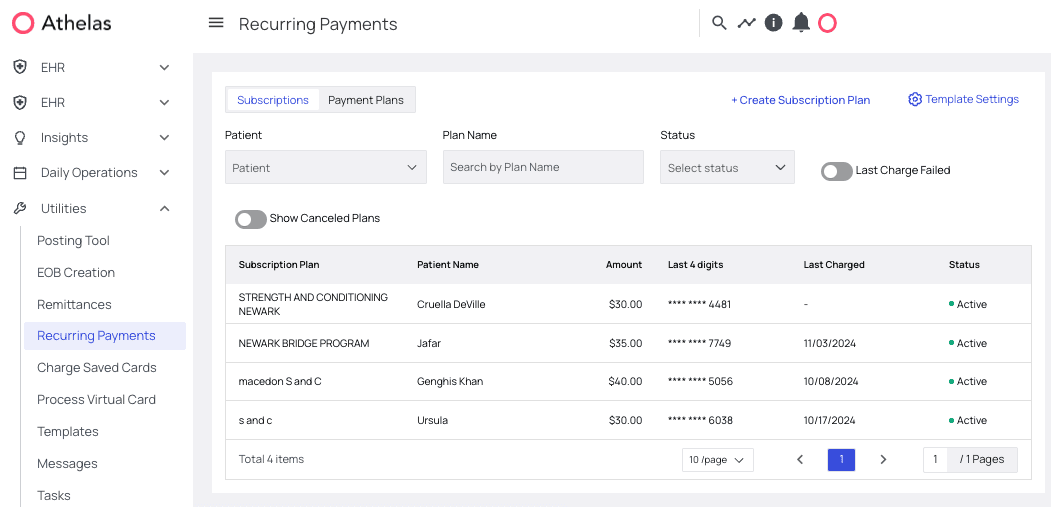
Some of the most reliable sources of revenue for many practices are *subscriptions*. Whether you’re charging for ongoing treatment plans, nutritional supplements, or anything in between, subscriptions can increase predictability in your practice’s income. The only challenge is that charging for subscriptions *can be a real hassle*.
That’s why Athelas built our [Patient Subscriptions](https://insights.athelas.com/v2/recurring-payments) system. From this interface you can:
* **Create templates** — these are the subscription programs you’ll enroll your patients in.
* **Enroll patients** — putting them on one of your subscription plans so they’ll be automatically charged at a frequency of your choosing.
* **Troubleshoot failed payments** — when card details fail, they’ll be added to a list of subscriptions to address so your team can get payments back on track.
 #### Best Practices
**1.** If you have a particular subscription you use over and over again, **start by adding a template** for it. This will save your staff a lot of time and increase accuracy. Patients can always get customized plans if necessary.
**2.** Although most practices run subscriptions on a monthly basis, you also have the option automatically charge on a **weekly** or even **daily** basis.
**3.** We recommend **checking for failing payments on a weekly basis** to make sure no patients have quietly stopped paying for the services they’re receiving.
#### Feature Walkthrough
#### 1. Create / Manage Templates
If you’re going to be using the same subscription plan over and over, start by creating a template:
From the [Recurring Payments](https://insights.athelas.com/v2/recurring-payments) page, go into the Subscriptions tab and click Template Settings.
#### Best Practices
**1.** If you have a particular subscription you use over and over again, **start by adding a template** for it. This will save your staff a lot of time and increase accuracy. Patients can always get customized plans if necessary.
**2.** Although most practices run subscriptions on a monthly basis, you also have the option automatically charge on a **weekly** or even **daily** basis.
**3.** We recommend **checking for failing payments on a weekly basis** to make sure no patients have quietly stopped paying for the services they’re receiving.
#### Feature Walkthrough
#### 1. Create / Manage Templates
If you’re going to be using the same subscription plan over and over, start by creating a template:
From the [Recurring Payments](https://insights.athelas.com/v2/recurring-payments) page, go into the Subscriptions tab and click Template Settings.
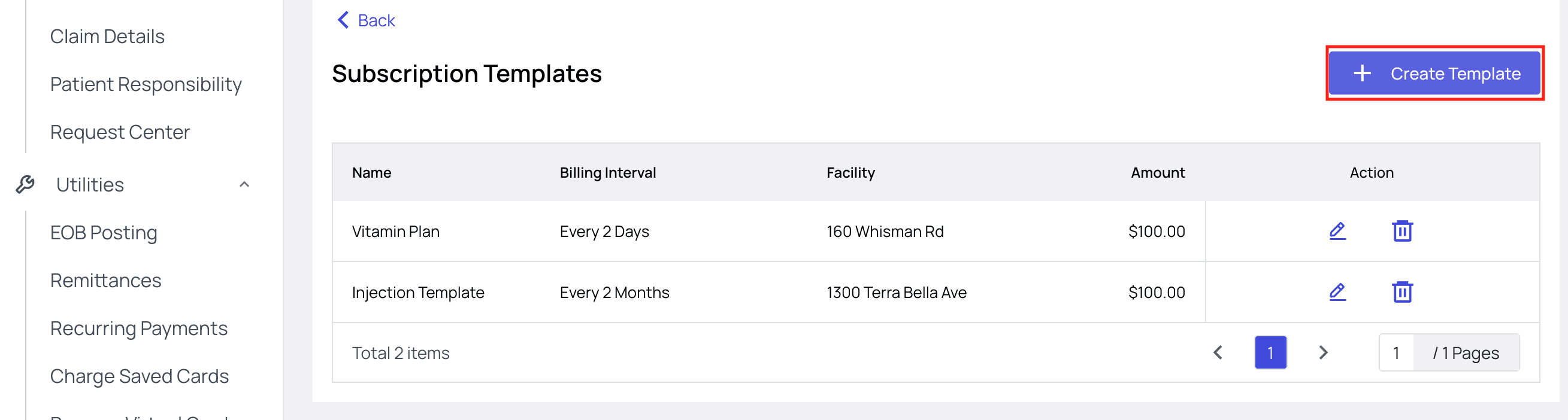
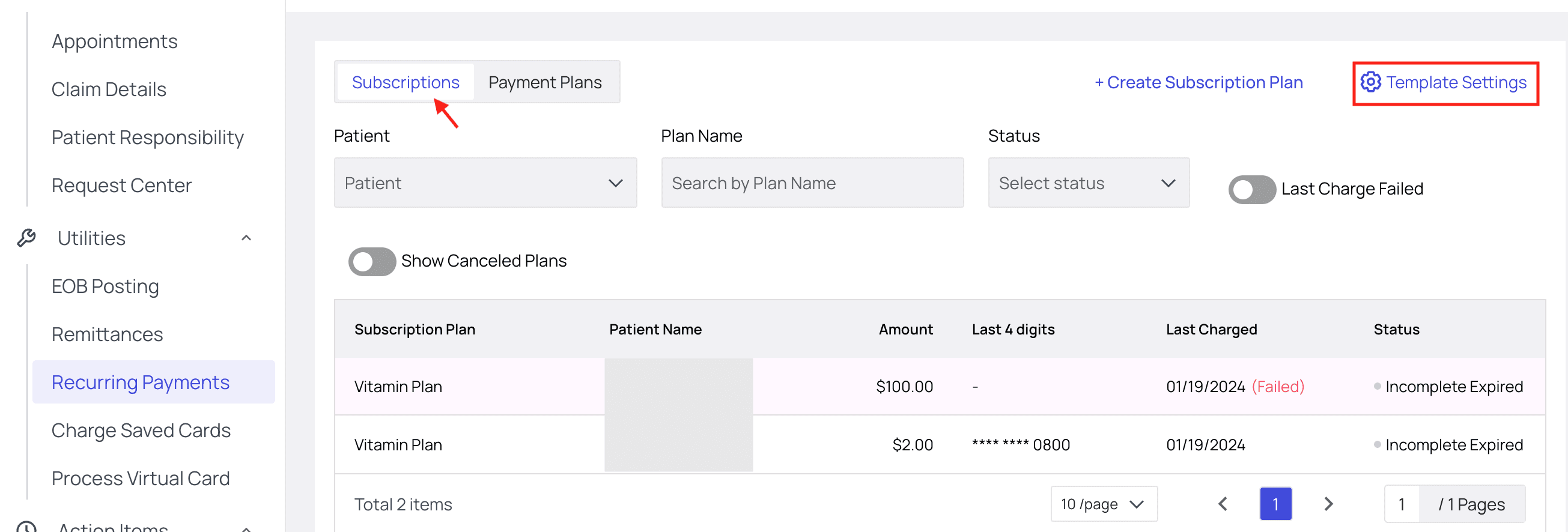 Here you’ll see a list of your existing plans. To create a new plan click ‘Create Template’.
 Fill in all required information.
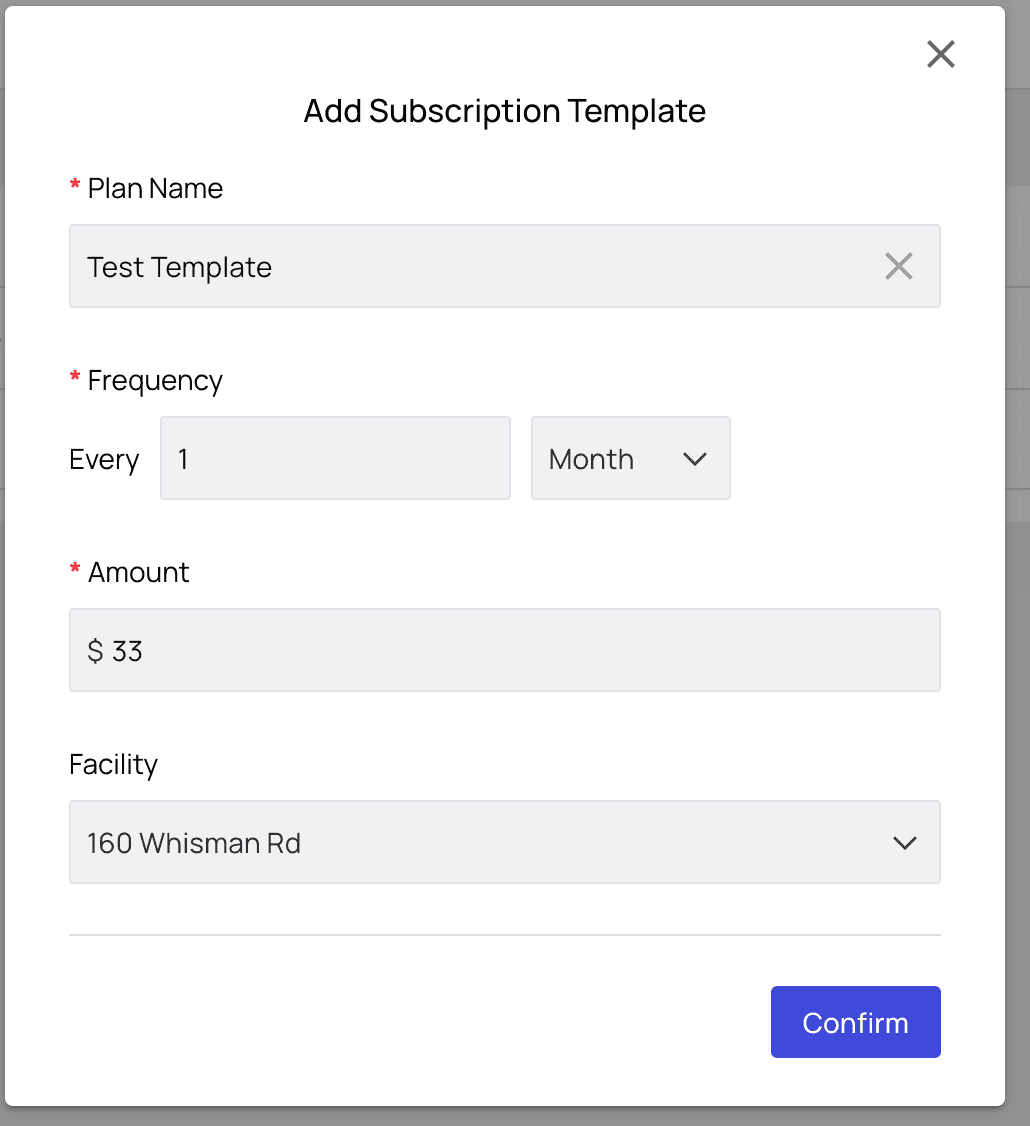 Click Confirm and the plan will be added to your list! From here you can also edit or delete your template.
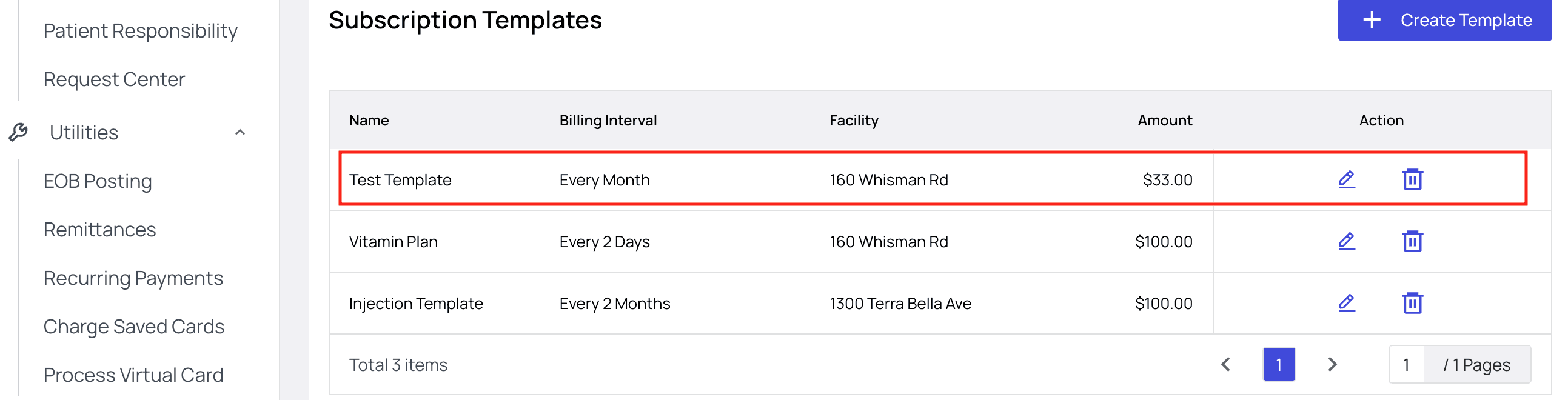 Back on the Recurring Payments page, you can click Create Subscription Plan and the template will now appear as an option when you’re enrolling patients in a subscription.
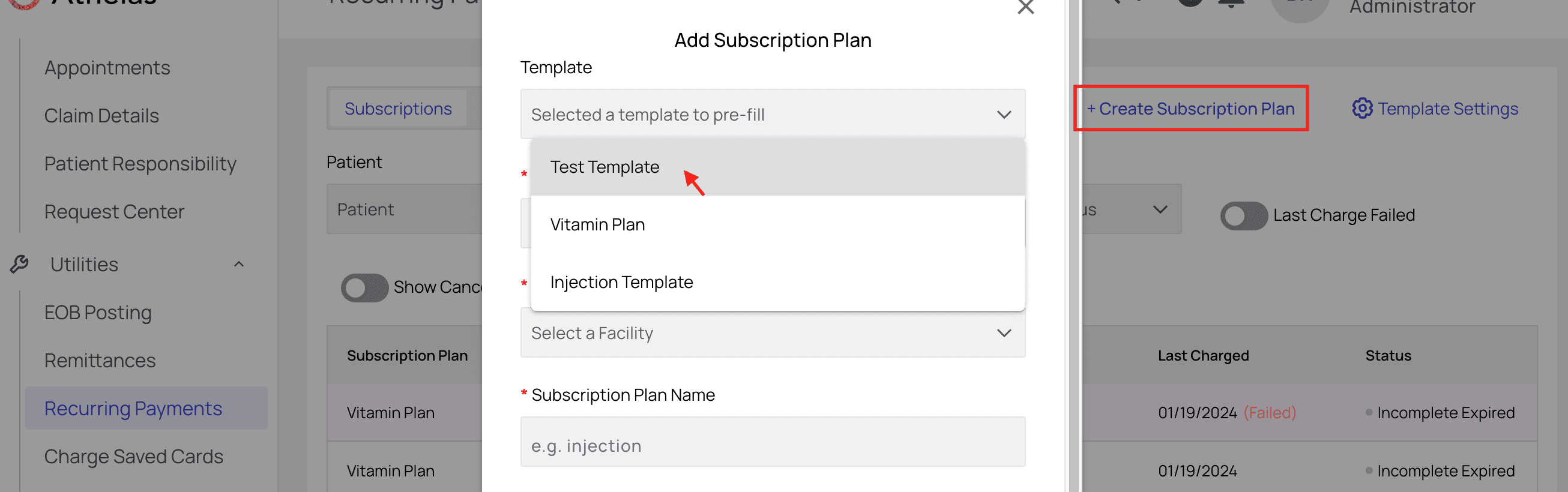 **Important Note:** Once you enroll a patient in a subscription plan using a template, editing the template will not make changes to those patients’ active subscriptions.
This has two major benefits:
* It allows all patient subscriptions to be 100% customizable. You can start with a template and then make changes at the patient level without affecting the template.
* It means you can occasionally increase your subscription fee for new patients without automatically hiking rates for previous patients. Old patients will continue to be billed at their established rate.
#### 2. Enroll Patients in Subscriptions
From the [Recurring Payments](https://insights.athelas.com/v2/recurring-payments) page, click Create Subscription Plan.
**Important Note:** Once you enroll a patient in a subscription plan using a template, editing the template will not make changes to those patients’ active subscriptions.
This has two major benefits:
* It allows all patient subscriptions to be 100% customizable. You can start with a template and then make changes at the patient level without affecting the template.
* It means you can occasionally increase your subscription fee for new patients without automatically hiking rates for previous patients. Old patients will continue to be billed at their established rate.
#### 2. Enroll Patients in Subscriptions
From the [Recurring Payments](https://insights.athelas.com/v2/recurring-payments) page, click Create Subscription Plan.
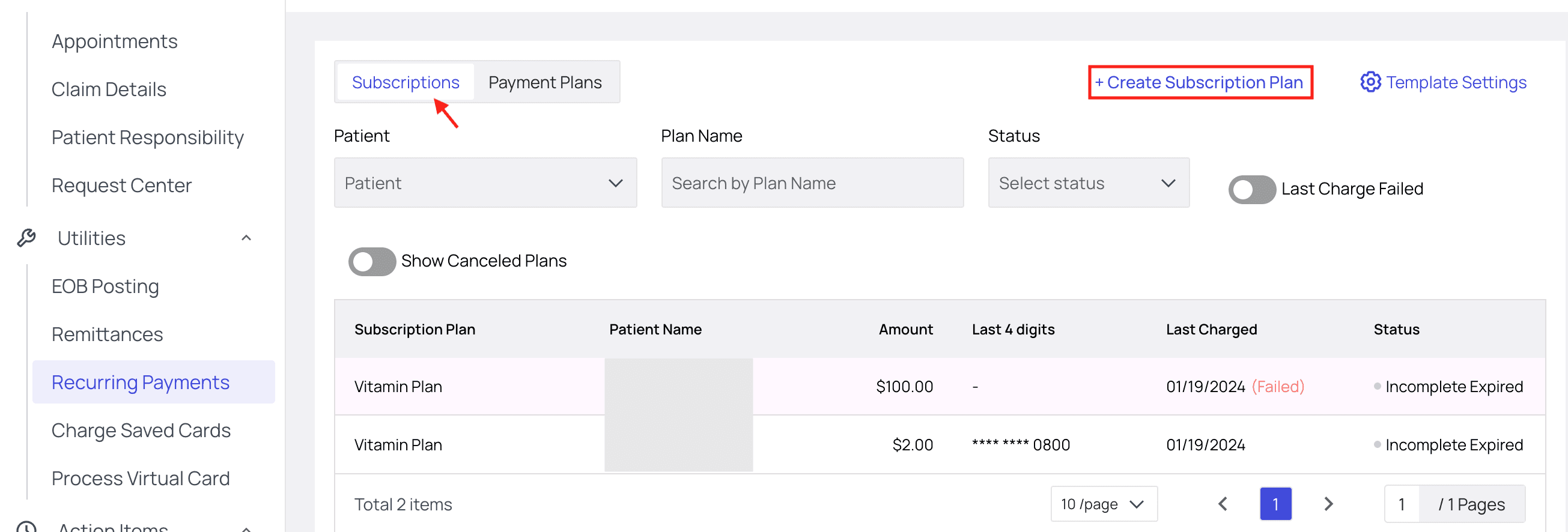 Fill in the required information, and choose your new template if you like.
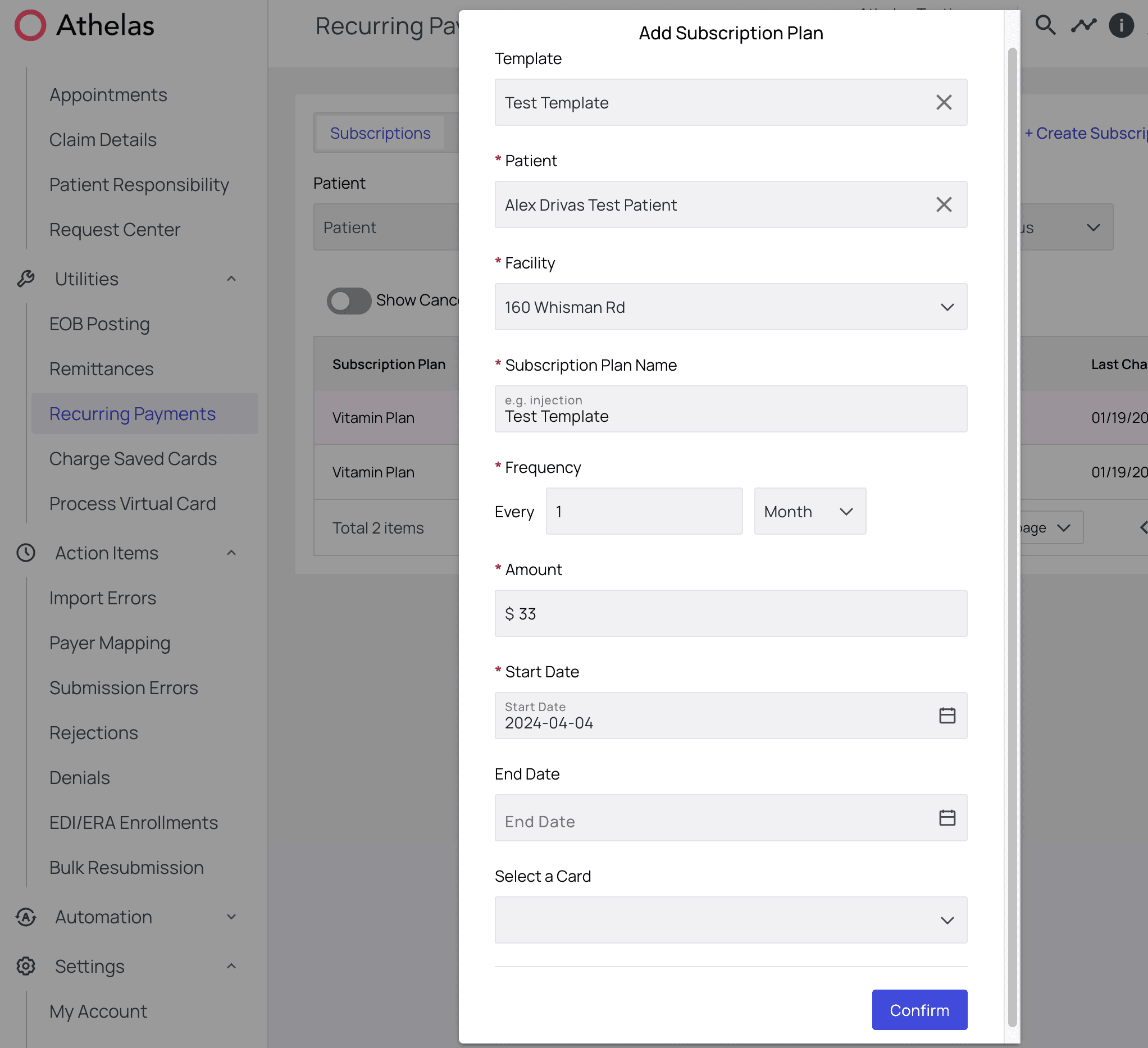 Click Confirm and you’re all set! The patient will be charged for the first time on the date you selected.
#### 3. Edit, Cancel, or Pause Subscriptions
From time to time you’ll want to make modifications to your existing subscriptions, and you can do this with ease in the subscription detail view.
First, click the subscription you want to modify.
Click Confirm and you’re all set! The patient will be charged for the first time on the date you selected.
#### 3. Edit, Cancel, or Pause Subscriptions
From time to time you’ll want to make modifications to your existing subscriptions, and you can do this with ease in the subscription detail view.
First, click the subscription you want to modify.
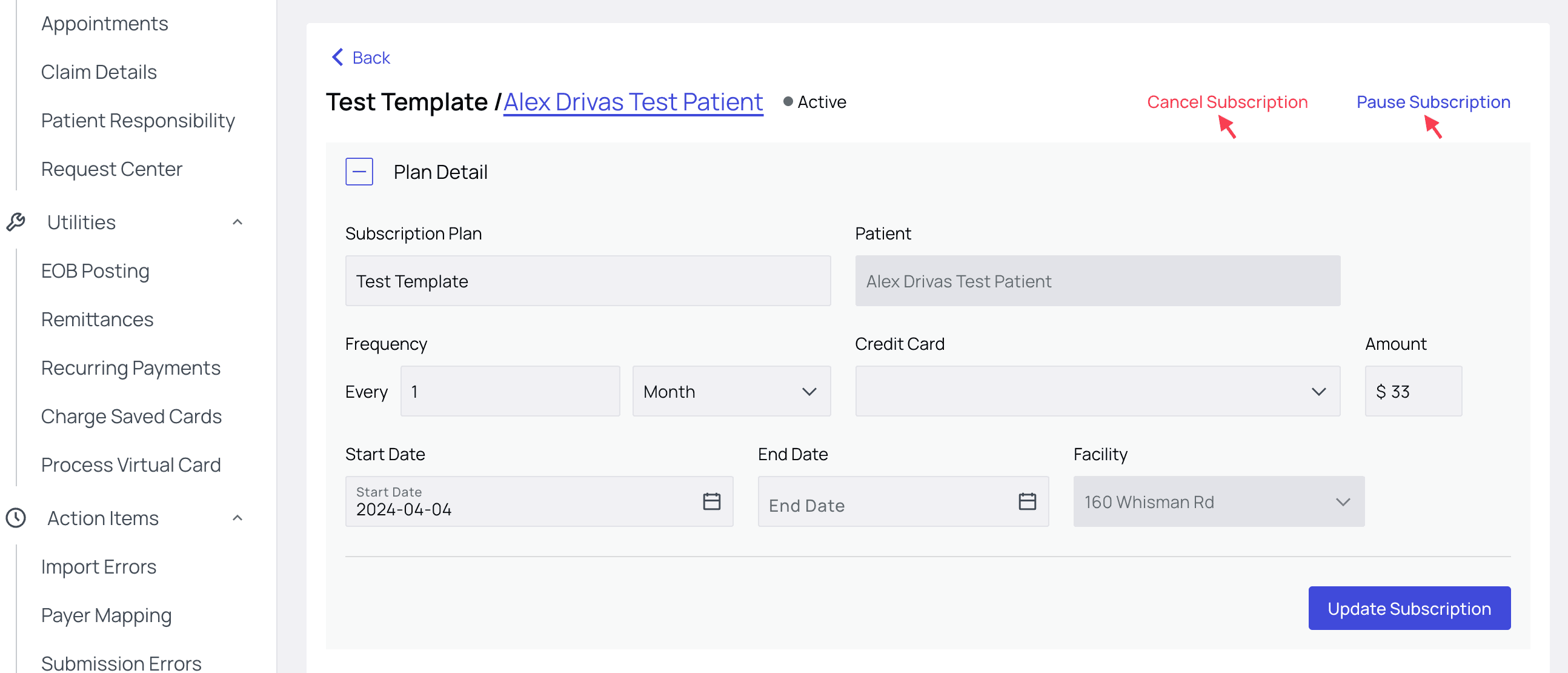
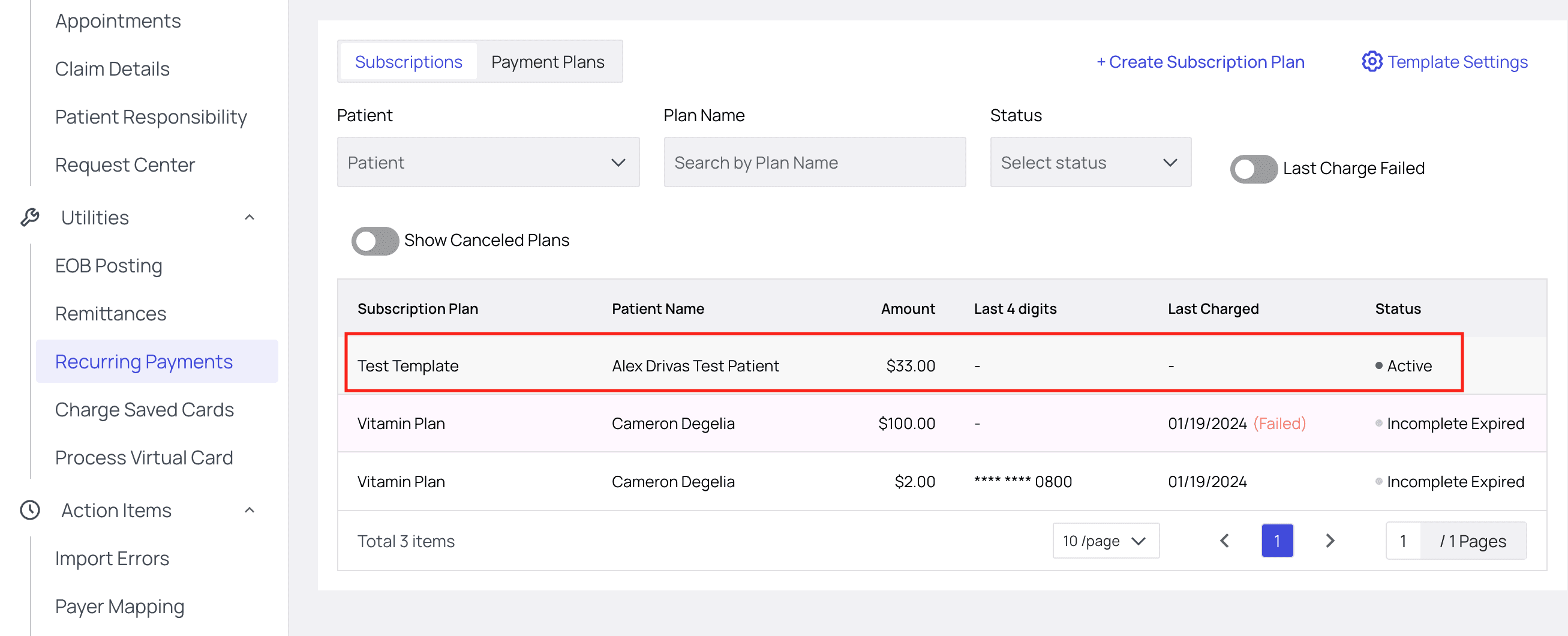 From here, you can adjust any of the parameters of your subscription. You can also **Pause** or **Cancel** the subscription.
 #### 4. Past and Future Charges
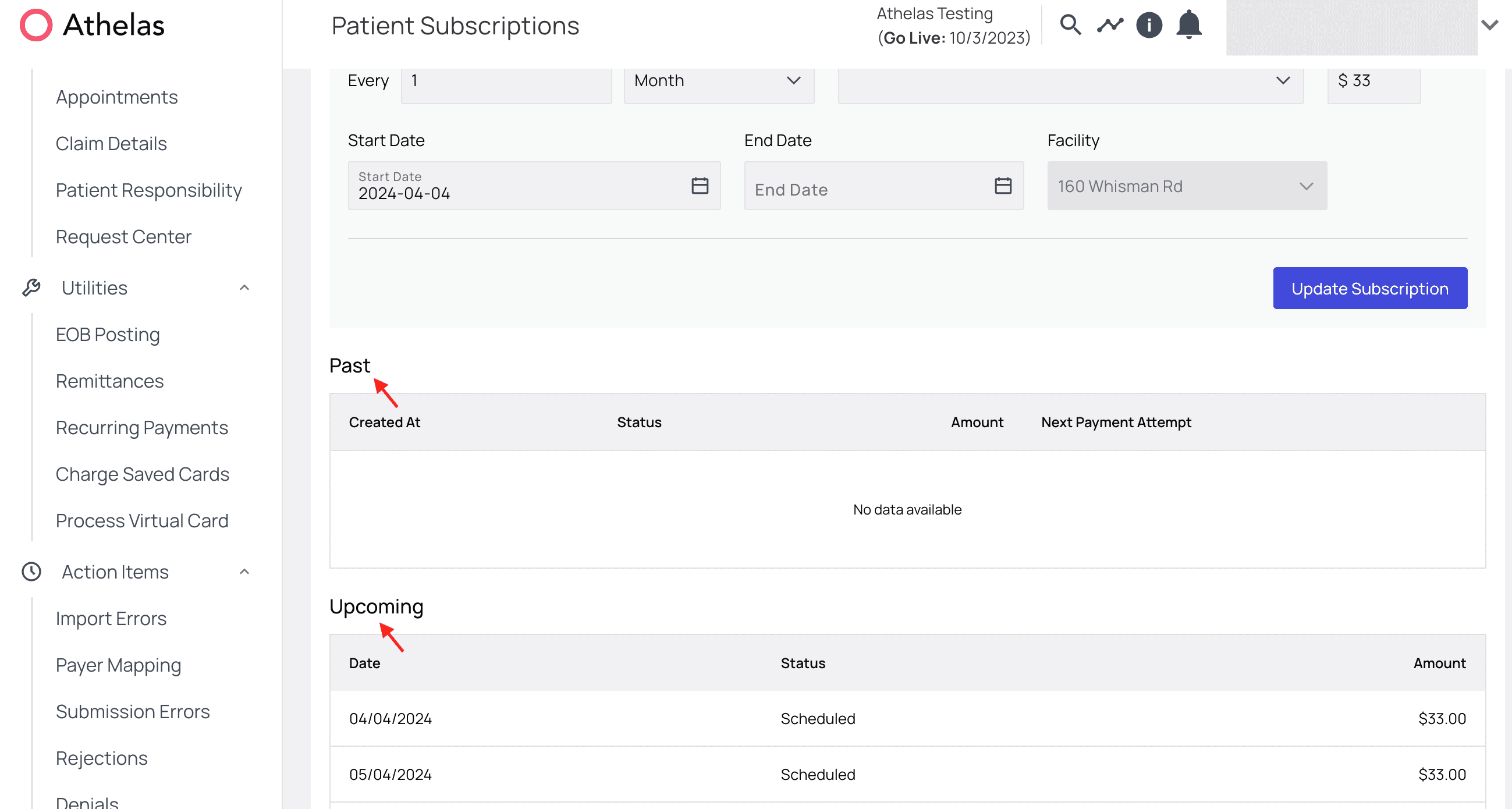
Towards the bottom of the subscription details view you can see a log of all past payments and anticipated future payments, complete with payment amount and payment status.
If you ever have a patient with a failing payment, this is where you’ll want to take a look to gather more information about what’s going on and take action.
#### 4. Past and Future Charges
Towards the bottom of the subscription details view you can see a log of all past payments and anticipated future payments, complete with payment amount and payment status.
If you ever have a patient with a failing payment, this is where you’ll want to take a look to gather more information about what’s going on and take action.
 #### Toggle Filters
You can click the Last Charge Failed toggle to filter your list to show all plans for which that is the case. These plans will be highlighted red.
#### Toggle Filters
You can click the Last Charge Failed toggle to filter your list to show all plans for which that is the case. These plans will be highlighted red.
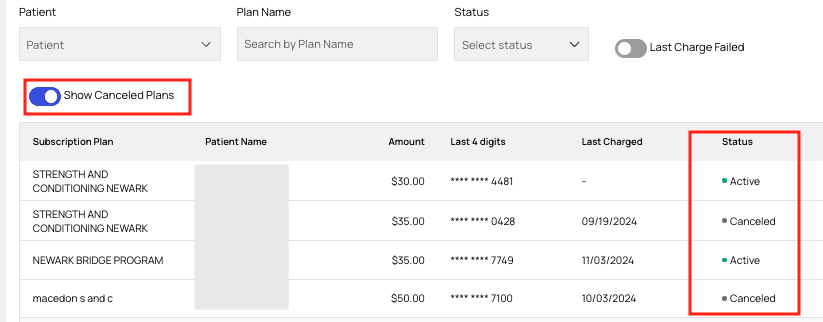
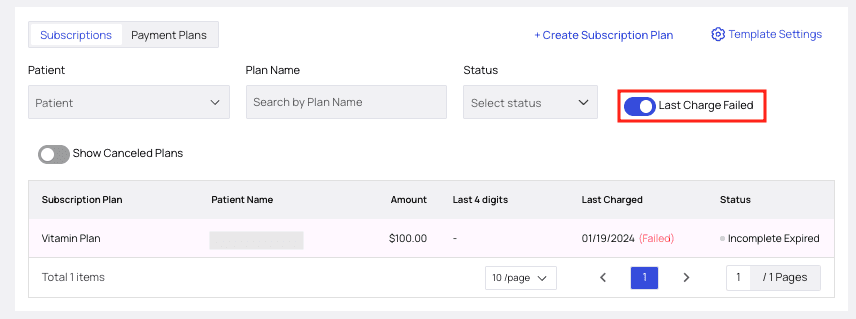 If you’d like the list to also Show Canceled Plans, there’s a toggle for that as well.
 #### Status Definitions
Each subscription plan will have a status displayed under the ‘Status’ column.
* **Active**Currently enabled, all payments to date processed as expected.
* **Canceled**Manually canceled by a staff member, not reversible. A new subscription will need to be made if the patient would like to continue.
* **Expired**The most recent payment failed, and then failed again in the following 24 hours. Time to update payment information. Often seen in conjunction with ‘Past Due’ status.
* **Incomplete**The first payment attempt failed. A second attempt will run within 24 hours. If it fails again, the status will update to ‘Expired.’
* **Past Due**The scheduled payment failed and now the balance is outstanding. Often seen in conjunction with ‘Expired’ status.
* **Scheduled**Upcoming payment
#### In Conclusion
Subscriptions can be a powerful and predictable source of revenue for a practice. The Subscriptions tool is designed to simplify their management.
If your practice already provides subscriptions, Athelas is here to simplify the process.
If subscriptions are new for your practice, you now have the tools to experiment with how they could passively increase your organization’s revenue.
#### Status Definitions
Each subscription plan will have a status displayed under the ‘Status’ column.
* **Active**Currently enabled, all payments to date processed as expected.
* **Canceled**Manually canceled by a staff member, not reversible. A new subscription will need to be made if the patient would like to continue.
* **Expired**The most recent payment failed, and then failed again in the following 24 hours. Time to update payment information. Often seen in conjunction with ‘Past Due’ status.
* **Incomplete**The first payment attempt failed. A second attempt will run within 24 hours. If it fails again, the status will update to ‘Expired.’
* **Past Due**The scheduled payment failed and now the balance is outstanding. Often seen in conjunction with ‘Expired’ status.
* **Scheduled**Upcoming payment
#### In Conclusion
Subscriptions can be a powerful and predictable source of revenue for a practice. The Subscriptions tool is designed to simplify their management.
If your practice already provides subscriptions, Athelas is here to simplify the process.
If subscriptions are new for your practice, you now have the tools to experiment with how they could passively increase your organization’s revenue.