> ## Documentation Index
> Fetch the complete documentation index at: https://trainings.air.athelas.com/llms.txt
> Use this file to discover all available pages before exploring further.
# Getting Started With Your RCM Assistant
## What is Athelas AI?
An intelligent **RCM assistant** designed to streamline your daily **billing and administrative workflows**.
Now available to everyone on [**insights.athelas.com**](https://insights.athelas.com/), Athelas AI helps your team navigate operations with speed, precision, and ease.
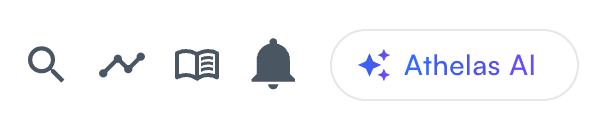 Athelas AI is embedded throughout your **Insights dashboard**, accessible anytime from the **top-right corner**.
It’s ready to assist wherever you are — with entry points across multiple Insights pages.
Athelas AI is embedded throughout your **Insights dashboard**, accessible anytime from the **top-right corner**.
It’s ready to assist wherever you are — with entry points across multiple Insights pages.


 #### How to Get Started
* **Access** — Open Athelas AI in the top-right corner of Insights.
* **Check Features** — Ask “What can you do?” to view current functions.
* **Analyze** — Ask questions about claims, balances, and more to get instant insights.
* **Take Action** — The assistant can both provide information and execute tasks.
* **Get Support** — Create support tickets directly through the assistant when needed.
* **Share Messages** — Share, copy, or download responses instantly.
* **Give Feedback** — Use the thumbs up/down to help us improve responses.
## User Guidelines
* **Always confirm actions** when prompted — Athelas AI never performs financial actions without explicit approval.
* **Refresh your page** after updates to see recent changes.
* **Ask clear, specific questions**, and follow up naturally.
* **Include dates or date ranges** when relevant.
* **Use action verbs:** “Show,” “Explain,” “Update,” “Process.”
* **Professional use only:** Athelas AI is built for **RCM operations** — not general inquiries.
## Pro Tips for Maximum Efficiency
##### Be Specific
**Good:** “Show me patient John Smith’s appointments for October 2024.”
**Avoid:** “Show me some appointments.”
##### Use Exact Information
* “Find patient \[name], DOB 03/15/1985.”
* “Refund \$75.50 for date of service 11/09/2025.”
##### Combine Related Tasks
* “Find patient Sarah Wilson and show me her balance breakdown and recent appointments.”
* “Get encounter \[ID] details and show me submission options.”
##### Ask for Explanations
* “Why is encounter \[ID] currently denied?”
* “Explain the charge breakdown for this patient.”
* “What’s the next step for this claim?”
## Common Workflow Examples
##### Daily Balance Review
* “Show all patients with balances over \$200.”
* “For patient \[name], show complete charge breakdown.”
* “What payment options are available for this balance?”
##### Claim Follow-Up
* “Find all encounters from last week with pending claims.”
* “Show details for encounter \[ID] including submission status.”
* “Why did patient \[ID] start getting denied this month?”
##### Patient Account Resolution
* “Patient \[name] called about their bill — show their account details.”
* “Analyze all charges and payments for recent visits.”
* “Write off \$50 balance due to financial hardship.”
##### Insurance Verification
* “Find patient \[name] and show insurance information.”
* “Update primary insurance to \[new name].”
* “Resubmit recent claims with updated insurance.”
## Questions or Issues
If you have questions or encounter issues:
* Ask Athelas AI directly for help
* Create a support ticket through the assistant
* Contact your billing team leads
**Athelas AI** is built to make every day faster, smarter, and simpler —
enhancing your **revenue cycle efficiency** and **patient experience**.
#### How to Get Started
* **Access** — Open Athelas AI in the top-right corner of Insights.
* **Check Features** — Ask “What can you do?” to view current functions.
* **Analyze** — Ask questions about claims, balances, and more to get instant insights.
* **Take Action** — The assistant can both provide information and execute tasks.
* **Get Support** — Create support tickets directly through the assistant when needed.
* **Share Messages** — Share, copy, or download responses instantly.
* **Give Feedback** — Use the thumbs up/down to help us improve responses.
## User Guidelines
* **Always confirm actions** when prompted — Athelas AI never performs financial actions without explicit approval.
* **Refresh your page** after updates to see recent changes.
* **Ask clear, specific questions**, and follow up naturally.
* **Include dates or date ranges** when relevant.
* **Use action verbs:** “Show,” “Explain,” “Update,” “Process.”
* **Professional use only:** Athelas AI is built for **RCM operations** — not general inquiries.
## Pro Tips for Maximum Efficiency
##### Be Specific
**Good:** “Show me patient John Smith’s appointments for October 2024.”
**Avoid:** “Show me some appointments.”
##### Use Exact Information
* “Find patient \[name], DOB 03/15/1985.”
* “Refund \$75.50 for date of service 11/09/2025.”
##### Combine Related Tasks
* “Find patient Sarah Wilson and show me her balance breakdown and recent appointments.”
* “Get encounter \[ID] details and show me submission options.”
##### Ask for Explanations
* “Why is encounter \[ID] currently denied?”
* “Explain the charge breakdown for this patient.”
* “What’s the next step for this claim?”
## Common Workflow Examples
##### Daily Balance Review
* “Show all patients with balances over \$200.”
* “For patient \[name], show complete charge breakdown.”
* “What payment options are available for this balance?”
##### Claim Follow-Up
* “Find all encounters from last week with pending claims.”
* “Show details for encounter \[ID] including submission status.”
* “Why did patient \[ID] start getting denied this month?”
##### Patient Account Resolution
* “Patient \[name] called about their bill — show their account details.”
* “Analyze all charges and payments for recent visits.”
* “Write off \$50 balance due to financial hardship.”
##### Insurance Verification
* “Find patient \[name] and show insurance information.”
* “Update primary insurance to \[new name].”
* “Resubmit recent claims with updated insurance.”
## Questions or Issues
If you have questions or encounter issues:
* Ask Athelas AI directly for help
* Create a support ticket through the assistant
* Contact your billing team leads
**Athelas AI** is built to make every day faster, smarter, and simpler —
enhancing your **revenue cycle efficiency** and **patient experience**.