
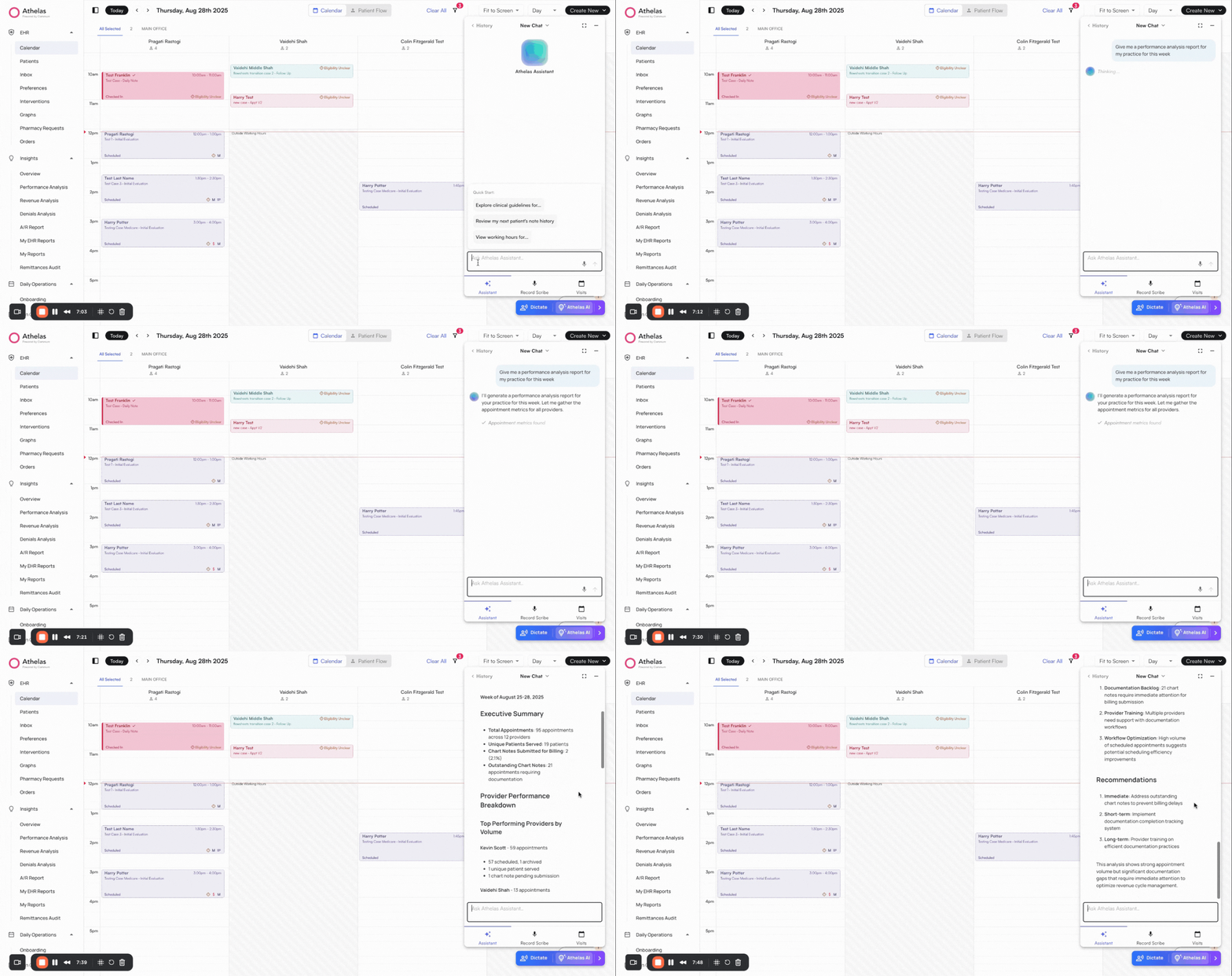
Ask Athelas AI for quick statistics
✨Smart Tip: Use Athelas AI to generate quick reports and surface key statistics instantly. You can also use Voice Mode.
Review detailed reports
Access a full overview of KPIs in Insights → Performance Analysis on the left navigation bar.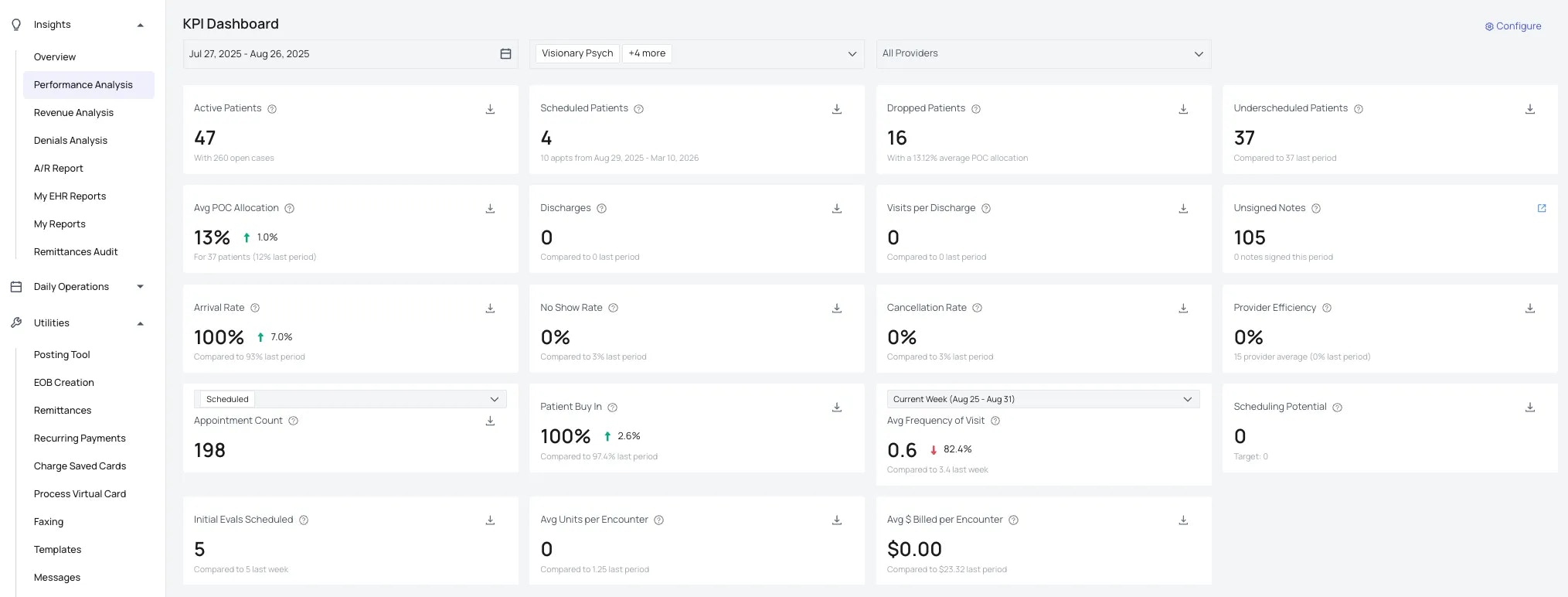
- Definitions: Hover over the info icon on any card to see a definition of the metric.
- Filters: Apply filters by Date Range, Facility, and Provider. Most cards, tables, and downloads respect these filters
- Exceptions include Active, Scheduled, and Dropped Patients (which are based on case status rather than date).
- Appointment Total cards include their own dropdown filters, allowing you to quickly view appointment metrics by status.
- Trends: Each card highlights current values with a “last period” comparison to indicate positive or negative changes. “Last Period” refers to the previous interval equal to the selected date range (e.g., if you select 7 days, “last period” means 8–14 days ago).
- Export: Each card includes a download option for CSV export. Reports include detailed fields such as appointment IDs and patient contact information to enable effective follow-up.
Understanding KPI Calculations
Active Patients (Patients with Open Cases)
Active Patients (Patients with Open Cases)
How it’s calculated:
- Counts distinct patients who have at least one non-archived case
- A case is considered “open” when is_archived = FALSE
- The query joins Appointments → Patient → AppointmentsCase
- Filters by site, provider, and facility if specified
- Groups patients by week
- Averages the patient counts across the 4-week period
Scheduled Patients
Scheduled Patients
How it’s calculated:
- Identifies patients with open cases who have at least one future scheduled appointment
- Only counts appointments with status ‘SCHEDULED’ or ‘CONFIRMED’
- Uses a CTE (Common Table Expression) to find the next appointment date for each patient
- Appointment must be in the future (after current timestamp in site timezone)
- Patient count
- Next appointment date for each patient
Dropped Patients
Dropped Patients
How it’s calculated:
- Identifies patients with open cases but NO future scheduled appointments
- Joins with latest evaluation chart note to pull Plan of Care (POC) information
- Calculates scheduling ratio based on POC parameters
- Patient count
- Last completed appointment date for context
- Average POC allocation percentage as secondary statistic
Underscheduled Patients
Underscheduled Patients
How it’s calculated:
- Counts patients with scheduling ratio < 1.0 (not fully scheduled according to POC)
- Scheduling ratio = (completed + upcoming appointments) / total POC visits
- Uses the latest evaluation or recertification note for POC data
- Only counts appointments within the POC date range
- Calculated from frequency, duration, and visit count fields in the chart note
- Example: 3 visits/week × 4 weeks = 12 total POC visits
- Shows average scheduling ratio across all patients as tertiary statistic
Discharges
Discharges
How it’s calculated:
- Counts patients whose cases were archived (discharged) within the date range
- Uses appointment_case_records to find the exact discharge timestamp
- Adjusts timestamp to site timezone for accurate date filtering
- Only includes cases with discharge records (is_archived = TRUE)
- Compares current period vs previous period for trend analysis
- Previous period duration matches current period duration
Visits per Discharge
Visits per Discharge
How it’s calculated:
- Calculates the average number of visits before discharge per case
- Only counts visits from appointments with valid statuses (excludes cancelled, archived)
- Filters visits to those occurring within the specified date range
- Groups by provider to show per-provider breakdown
- Visits per Discharge = Total visits / Total discharges
- Overall average calculated across all providers and discharges
Unsigned Notes
Unsigned Notes
How it’s calculated:
- Counts currently unsigned chart notes (any date)
- Counts signed notes in the current period for context
- Excludes documentation-only notes
- Compares with previous period signed count
- Previous period duration matches current period duration
Arrival Rate, No Show Rate, and Cancellation Rate
Arrival Rate, No Show Rate, and Cancellation Rate
How they’re calculated:
- Arrival Rate: % of past appointments that were completed/checked-in/confirmed/ongoing
- No Show Rate: % of past appointments marked as no-show
- Cancellation Rate: % of past appointments cancelled
- Only includes past appointments (excludes future scheduled and archived)
- All three rates sum to 100% of past appointments
- Compares current period vs previous period for trends
- Each rate = (Count of appointments with specific status / Total past appointments) × 100
Patient Buy-In
Patient Buy-In
How it’s calculated:
- Measures patient engagement as the inverse of no-show rate
- Buy-in appointments: scheduled, confirmed, completed, checked-in, ongoing, cancelled
- Non-buy-in: no-shows only
- Excludes archived appointments
- Higher is better (indicates more patient engagement)
- Essentially shows what percentage of patients are engaged vs no-showing
- Compares current period vs previous period
Provider Efficiency
Provider Efficiency
How it’s calculated:
- Measures provider productivity against a benchmark (default: 80 appointments/week)
- Efficiency = (completed+checked-in+ongoing+confirmed appts / benchmark) × 100
- Benchmark is adjusted for the actual number of weekdays in the date range
- Only counts appointments with completion statuses
- Configurable benchmark per site via kpi_config table
- Default benchmark: 80 appointments per week per provider
- Shows per-provider breakdown with overall average
Appointment Count
Appointment Count
How it’s calculated:
- Counts total appointments matching filter criteria
- Filterable by appointment status (scheduled, confirmed, completed, etc.)
- Excludes archived appointments
- Supports weekly average calculation when requested
- Total appointments divided by number of weeks in date range
Average Appointment Count
Average Appointment Count
How it’s calculated:
- Calculates average weekly appointment count over the date range
- Uses same filters as Appointment Count (status, category)
- Formula: Total appointments / Number of weeks in date range
- Helps normalize comparison across different time periods
- Useful for understanding typical weekly volume
Average Frequency of Visit
Average Frequency of Visit
How it’s calculated:
- Measures average visits per patient per week
- Numerator: Total appointments in the selected week
- Denominator: 4-week rolling average of active patients
- Uses active patients (open cases) to normalize
- Helps understand patient visit cadence
- Shows how often active patients are being seen
- Compares with previous week
Initial Evaluations Scheduled
Initial Evaluations Scheduled
How it’s calculated:
- Counts appointments of type “Initial Evaluation”
- Excludes archived, cancelled, and no-show appointments
- Uses ehr_appointment_types to identify initial eval appointments
- Supports weekly average calculation
- Compares current period vs previous period
Average Initial Evals Scheduled
Average Initial Evals Scheduled
How it’s calculated:
- Calculates average weekly initial evaluation count
- Same filters and logic as Initial Evals Scheduled
- Formula: Total count / Number of weeks in date range
- Helps track new patient intake rate over time
- Normalizes comparison across different time periods
Average Units per Encounter
Average Units per Encounter
How it’s calculated:
- Calculates average number of billable units per encounter
- Uses service unit count from the latest submitted claim (not ghost claims)
- Falls back to procedure’s service_unit_count if no claim exists
- Only counts submitted claims (not pending or rejected)
- Prioritizes lowest destination claim (PRIMARY over SECONDARY)
- Groups by encounter to get total units
- Averages across all encounters
- Compares current period vs previous period
Average POC Allocation
Average POC Allocation
How it’s calculated:
- The average scheduling ratio across all patients with a valid Plan of Care
- Scheduling ratio = (completed + upcoming appointments) / total POC visits
- Uses the latest evaluation or recertification note for POC data
- Only includes patients with active cases and valid POC information
- Shows overall scheduling compliance across your practice
- Values closer to 1.0 indicate better adherence to treatment plans
Review the status of Active Patients
Access the Active Patient Breakdown in Insights → Performance Analysis on the left navigation bar.
- Definition: An Active patient is any patient with an open case during the defined data range. You can see the % of patients with 0, 1, 2 and 3+ scheduled visits in the future.
- Filters: Apply filters by Date Range, Facility, and Provider.
-
Export: You can download the top 4 cards for a CSV export. Reports include detailed fields from the table below including Patient name, Case, Provider, Insurance, # visits, Drop Offs, % Arrival, Last Appt., Appts Next week, Appts Following week and Notes.
FAQ
What does 'last period' mean in the trend comparisons?
What does 'last period' mean in the trend comparisons?
“Last period” refers to the previous interval equal to your selected date range. For example:
- If you select 7 days (today through 7 days ago), “last period” means 8-14 days ago
- If you select 30 days, “last period” means the previous 30 days before that
- If you select a custom range like January 1-15, “last period” means December 17-31 (the same number of days)
Why don't some cards respect the date range filter?
Why don't some cards respect the date range filter?
Some metrics are based on current case status rather than date ranges:
- Active Patients: Shows patients with currently open cases (not archived), regardless of date
- Scheduled Patients: Shows patients with future appointments, regardless of date
- Dropped Patients: Shows patients without future appointments, regardless of date
How is the scheduling ratio calculated for underscheduled patients?
How is the scheduling ratio calculated for underscheduled patients?
The scheduling ratio helps you understand if patients are scheduled according to their Plan of Care (POC):Formula:
- Scheduling Ratio = (Completed appointments + Upcoming appointments) / Total POC visits
- A patient’s POC prescribes 3 visits per week for 4 weeks = 12 total visits
- They’ve completed 5 visits and have 4 more scheduled = 9 total
- Scheduling ratio = 9 / 12 = 0.75 (or 75%)
What's the difference between Provider Efficiency and other appointment metrics?
What's the difference between Provider Efficiency and other appointment metrics?
Provider Efficiency measures productivity against a specific benchmark:
- Default benchmark: 80 completed appointments per week per provider (configurable by site)
- Calculation: (Completed + checked-in + ongoing + confirmed appointments / benchmark) × 100
- Adjustment: The benchmark is adjusted for the actual number of weekdays in your selected date range
- Appointment Count: Simply counts total appointments (filterable by status)
- Average Appointment Count: Weekly average across the date range
- Average Frequency of Visit: Visits per patient per week
How do I use these KPIs to improve my practice operations?
How do I use these KPIs to improve my practice operations?
Here are some practical ways to use these metrics:Reduce patient dropout:
- Monitor Dropped Patients and Underscheduled Patients to proactively reach out and schedule appointments
- Track Patient Buy-In to identify engagement trends
- Use Scheduling Ratio and Average POC Allocation to ensure patients meet their treatment plans
- Review Average Frequency of Visit to understand typical visit patterns
- Monitor Arrival Rate and No Show Rate to identify trends
- Follow up with patients who have low arrival rates
- Review Unsigned Notes daily to ensure timely chart completion
- Monitor Average Units per Encounter to track billing documentation
- Use Provider Efficiency to identify providers who may need support or are exceeding targets
- Compare Visits per Discharge across providers to understand treatment episode lengths