
View Chart Note Clinical Types within the chart note itself in the chart note header, which remains always visible on the chart note. To update the clinical note type of the chart note, click on the dropdown and select an alternative type from the available options.Documentation Index
Fetch the complete documentation index at: https://trainings.air.athelas.com/llms.txt
Use this file to discover all available pages before exploring further.
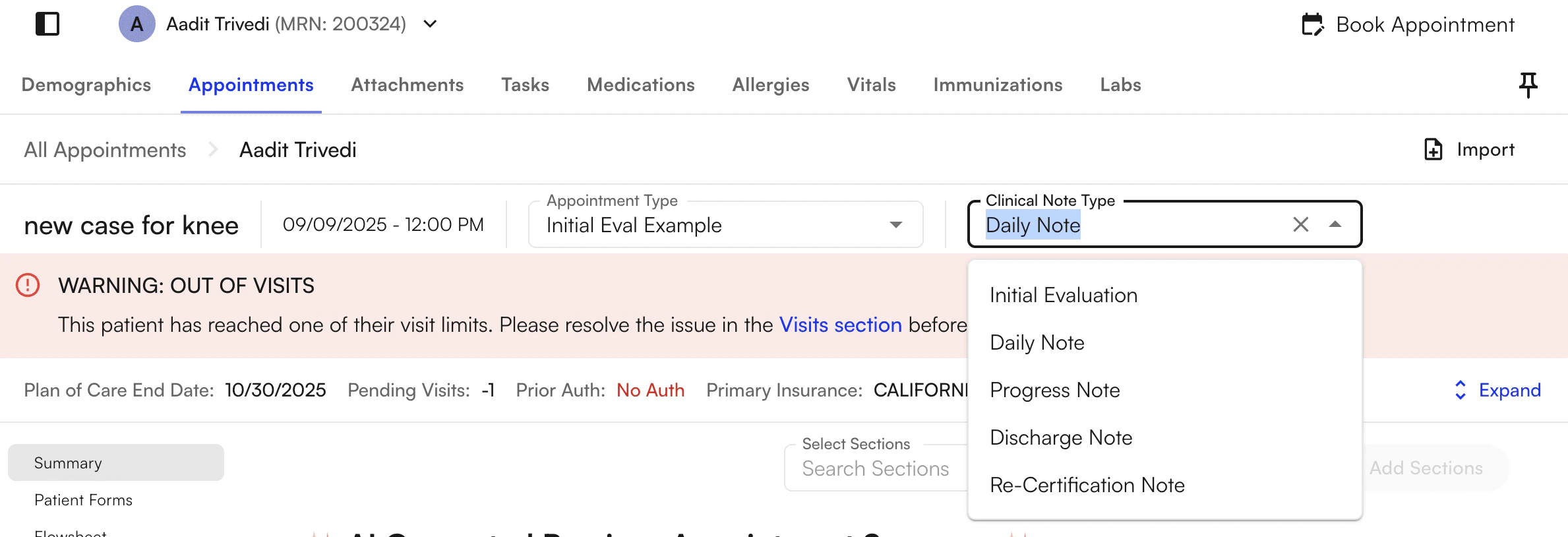
Clinical note types overview
There are six clinical note types in the system. Each type drives different downstream behavior — including how the system tracks progress notes, plan of care timing, visit counters, and case status.| Clinical note type | Purpose |
|---|---|
| Initial Evaluation | First comprehensive evaluation for the episode. Starts the plan of care. |
| Daily Note | Routine visit documentation between formal reassessments. |
| Progress Note | Periodic reassessment required at visit, day, or plan-of-care milestones. |
| Discharge Note | Documents end of the episode. Auto-discharges the case on submit. |
| Re-Certification Note | Re-certifies the plan of care (e.g., for Medicare). |
| Admin Progress Note | Administrative progress documentation with a separate conclude/download flow. |
Evaluative vs. non-evaluative notes
The system uses the “evaluative” classification to drive visit-limit, progress-note, and last-evaluative-note logic.- Evaluative note types (count for visit limits, progress note timing, and “last evaluative note” tracking):
- Initial Evaluation
- Re-Certification Note
- Progress Note
- Discharge Note
- Admin Progress Note
- Non-evaluative note type:
- Daily Note — the only type that is not treated as evaluative. It does not satisfy progress note requirements, reset visit/day counters, or count as the most recent evaluative note.
When to use each type
Initial Evaluation
The first comprehensive evaluation for the episode. Used at the start of a plan of care. The system treats it as the start of the evaluative chain — for example, progress note timing (every X visits/days since the last evaluative note) and plan of care tracking key off of it.Daily Note
Routine visit documentation. Use it for documenting visits when you’re not doing a formal progress note or re-certification. Daily Notes do not satisfy progress note requirements or reset visit/day counters.Progress Note
A periodic reassessment. The system requires a Progress Note when:- Visit limits are reached (e.g., every X visits)
- Day limits are reached (e.g., every X days)
- The plan of care end date is reached
Discharge Note
Documents the end of the episode. When you sign a Discharge Note, the case is automatically discharged (archived). After that, you can cancel or archive any future appointments tied to the case.Re-Certification Note
Re-certifies the plan of care — for example, for Medicare. The Re-Certification Note is treated as an evaluative note, so it resets progress note timing and visit counts in the same way as Initial Evaluation and Progress Note.Admin Progress Note
Administrative progress documentation. Handled differently from clinical notes:- The “Convert clinical type” action may not be available in some flows.
- It has a separate conclude action — concluding finalizes the note and makes it available for download from the patient’s attachments.
- Some lists hide archived appointments that are Admin Progress Notes.
Progress note required logic
The system shows Progress Note Required or Upcoming Progress Note alerts based on the following triggers:| Trigger | Example alert |
|---|---|
| Visit limit | ”A progress note is required every X visits, and this will be the Nth visit since the last evaluative note.” |
| Day limit | ”A progress note is required every X days, and it’s been X days since the last one.” |
| Plan of care end date | ”Plan of Care expired on [date]. A Progress Note is required before continuing documentation.” |
| Prior authorization | ”Only X unused visits remain until prior authorization limit is reached.” |
| Medicare therapy cap | ”Medicare therapy cap exceeded. Apply KX modifier and ensure documentation supports medical necessity.” |
FAQ
What's the difference between a Progress Note and a Re-Certification Note?
What's the difference between a Progress Note and a Re-Certification Note?
Both are evaluative notes that reset progress note timing and visit counts. Progress Note is the periodic reassessment required by visit/day limits or plan-of-care end date. Re-Certification Note is specifically for re-certifying the plan of care — for example, on Medicare cadence.
Why is the Daily Note not 'evaluative'?
Why is the Daily Note not 'evaluative'?
Daily Notes document routine visits without serving as a formal reassessment. Because they don’t count as the “last evaluative note,” they don’t satisfy Progress Note requirements or reset the visit/day counters used to determine when the next Progress Note is due.
What happens when I sign a Discharge Note?
What happens when I sign a Discharge Note?
Signing a Discharge Note automatically discharges (archives) the case. Any future appointments on that case can then be canceled or archived. If you signed a Discharge Note by mistake, restore the case from the patient’s profile.
Can I change the clinical type after I've started a note?
Can I change the clinical type after I've started a note?
Yes — click the clinical type in the chart note header and select a different type from the dropdown. If you’re converting to a Progress Note, you may see a prompt warning that template data could be overwritten when pulled from the last evaluative note.
Why do I see 'Progress Note Required' on a patient's chart?
Why do I see 'Progress Note Required' on a patient's chart?
The system tracks four triggers that can prompt a Progress Note: visit limit reached, day limit reached, plan of care end date, and prior authorization remaining visits. You’ll also see a separate alert if the Medicare therapy cap is exceeded, prompting a KX modifier and supporting documentation.